
Cash trades, the till and cashier orders
How to record a cash trade against your till in Nexto, when to write a cashier order instead, and how Execute turns that order into a voucher and a receipt.
Watch this video on: YouTube
Most of what happens at the counter does not need an account. A traveller walks in with Turkish Lira, wants US Dollars, pays, takes the money and leaves. Nothing is owed in either direction, and opening an account for that person would only add a name to a list nobody reads again.
In buying and selling currency we recorded a trade that landed on the customer's account and settled later. This episode covers the other two cases: the cash trade, where the money changes hands on the spot, and the cashier order, where no money has moved yet and you have only made an arrangement for tomorrow.
The difference between the three is one word — the counterparty — and getting it wrong is what leaves your till short at the end of the day.
What you will learn
- The one word that separates a cash trade from an ordinary trade
- How to record a cash trade against a specific till
- What the voucher of a cash trade looks like in the ledger
- When to write a cashier order instead of a trade, and why it posts nothing
- How Execute turns a pending order into a voucher and a receipt
- How to attach the bearer's signed receipt and ID photo to the order
- Why recording non-cash money as cash costs you an evening
Cash, account, or only an arrangement
The technical difference between the three modes is the counterparty.
In an ordinary trade the counterparty is the customer's account, so somebody's balance changes. In a cash trade the counterparty is your cash box, so no balance changes — the holdings of the box go up or down instead. And an order has no counterparty at all, because at that point there is no voucher yet.
Money moved right now: cash trade. It landed on an account and settles later: ordinary trade. You only agreed something for tomorrow: cashier order.
Recording a cash trade, step by step
Pick the cash box
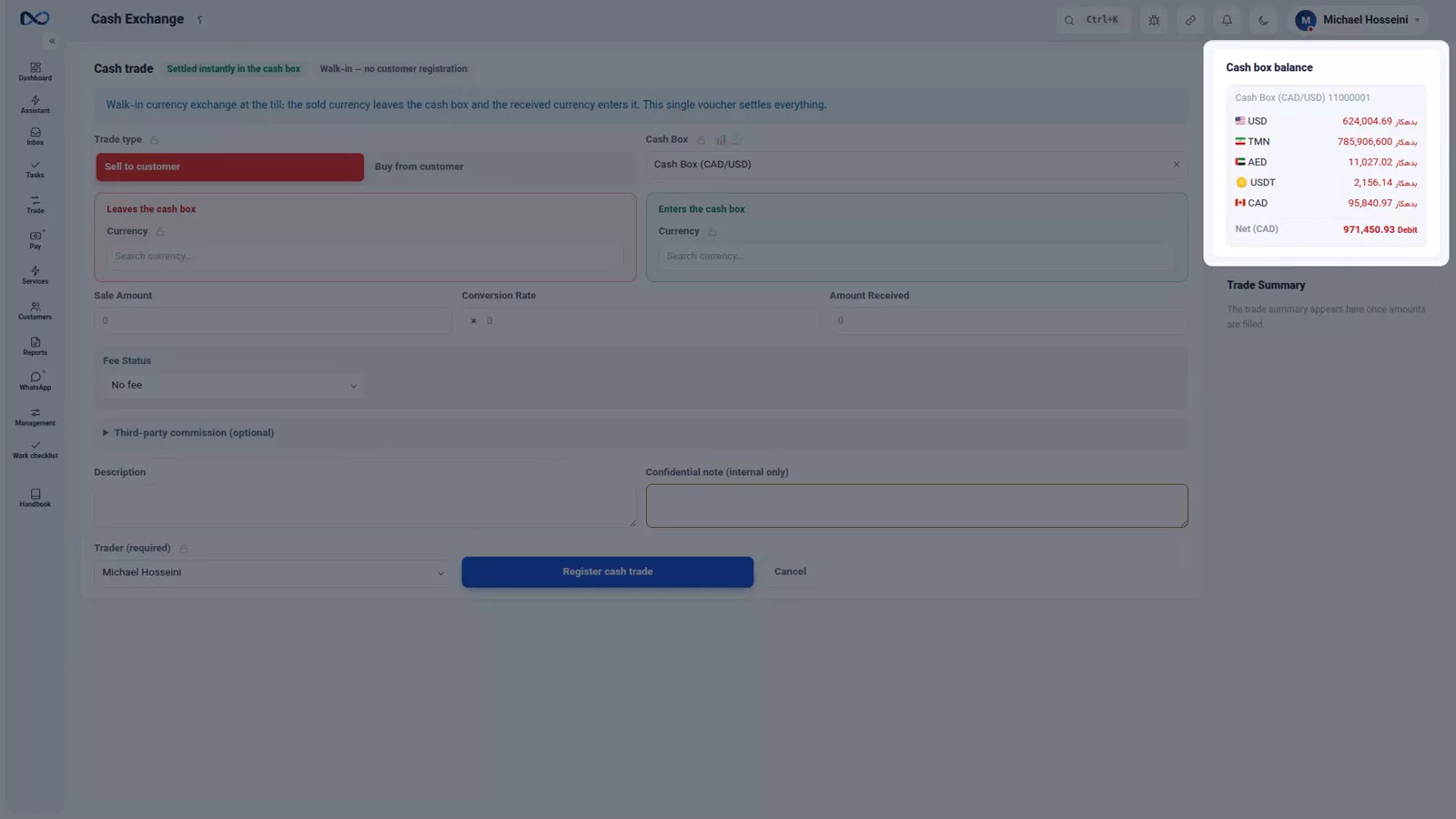
The cash form starts where the ordinary form starts with a customer: with the box. You choose which cash box the money comes out of and goes into. If you run several tills, each till has its own box and you pick it right here. The moment you pick, that box's holdings appear beside the form, so you can see what is actually in the drawer before you commit to anything.
Fill in what you sell and what you take
From there it is the same form you already know. Set the trade type — in this example, a sale to the customer. Choose the currency you hand over, US Dollar, and the currency you take, Turkish Lira, because the customer is a traveller carrying cash lira. Nothing here differs from an ordinary trade; only the counterparty changed.
Enter amount and rate
We sell 2,000 US Dollars at a rate of 48.9 Turkish Lira per Dollar, and we take the lira right now, at the till, in cash. Nexto computes the received amount: 97,800 Turkish Lira. Check that figure against the notes on the counter before you go further.
Check the summary, then record
The summary panel is the same one as in an ordinary trade, with the same edge vs board figure you should always read before recording anything. Fee and commission behave exactly as they do on the ordinary form. Write a description — "cash till sale" is enough — and fill in the trader, which is a required field. Then record the cash trade, and the voucher is created and its page opens.
Read the voucher
The voucher is where the difference becomes visible. Instead of the customer's account, you see the cash box: credited in US Dollar, debited in Turkish Lira. The money really left the box and really entered the box; no claim on anyone was recorded.

The cashier order
When you need one
Beside the till there is a second thing that is not a trade at all. A customer says their agent will come tomorrow and collect an amount, or leaves money with you to pay someone later. That is an arrangement the cashier has to carry out, not a trade — and until it is carried out, nothing should hit the ledger.
The box involved can be your own box or a colleague's box. You can, for example, tell a partner exchange in Dubai to hand an amount to a bearer.
Fill in the order
An order has two directions: the box receives, or the box pays. It also has a field you will not find in ordinary accounting software — the bearer's name, for when the person collecting is not the customer themselves, together with a photo of their ID. Whoever turns up tomorrow must be the person the customer named.
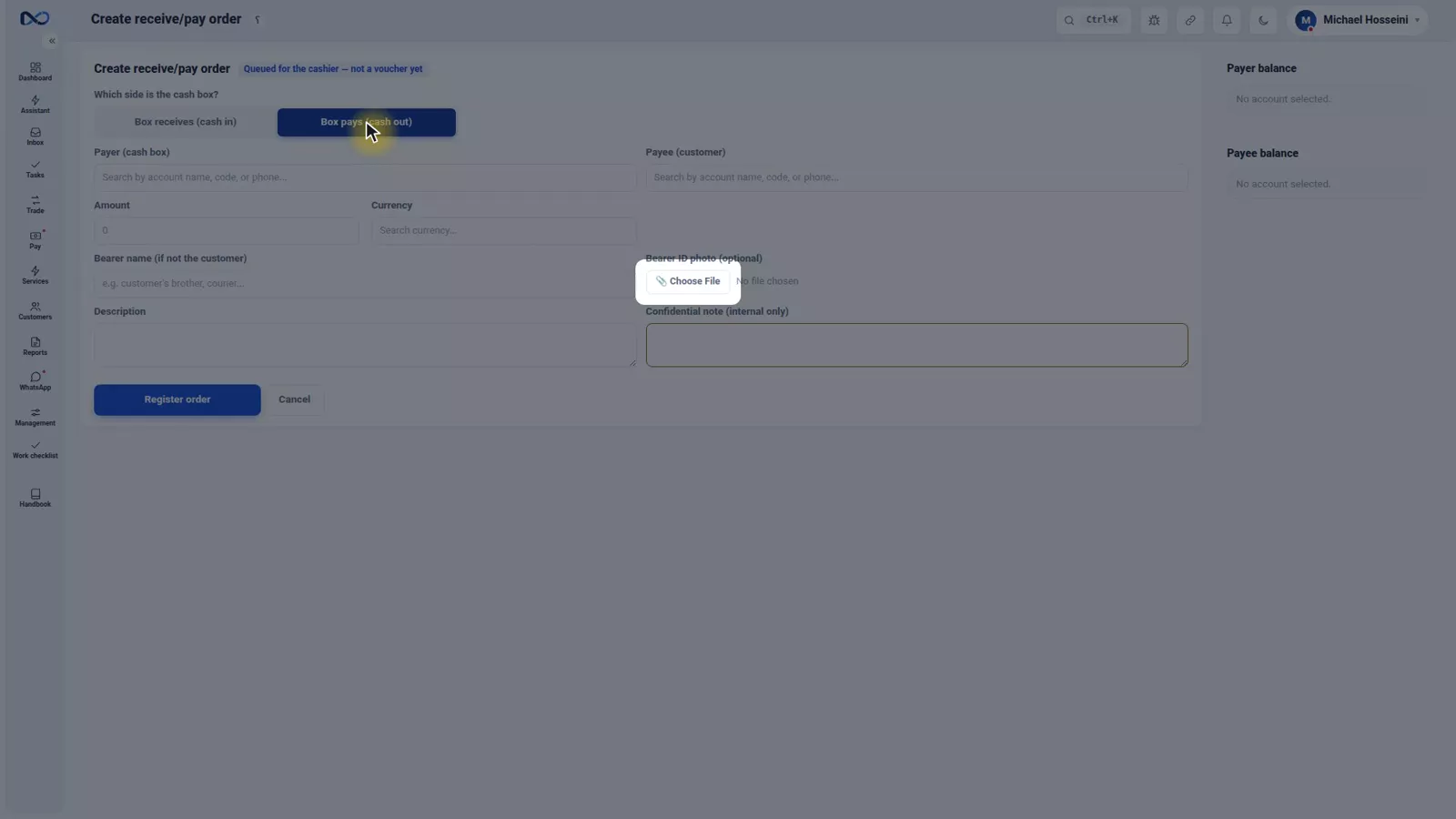
In the example, Persepolis Exchange says its agent, Reza Moghimi, will collect 10,000 US Dollars in cash tomorrow. The payer is the cash box, the payee is Persepolis Exchange, the amount is 10,000, the currency is US Dollar, and the bearer's name is Reza Moghimi. Register the order and nothing is posted — there is no voucher, only an arrangement sitting in the cashier's queue.
Execute it when the money actually moves
Every order carries one of three statuses: pending, done, or cancelled. As long as it is pending, no voucher exists. Tomorrow, when Reza Moghimi arrives and takes the money, the cashier presses Execute and confirms. At that moment the voucher is posted and a receipt is issued.
Print the receipt and attach the proof
Once the order moves to done, its voucher code sits next to it. From there you print the receipt. The bearer signs it, you place their ID card inside the receipt's frame and photograph the whole thing, and that image is uploaded right beside the order. A signed mark then stays with the order, so months later there is no argument about who collected what.
Do not record everything as cash
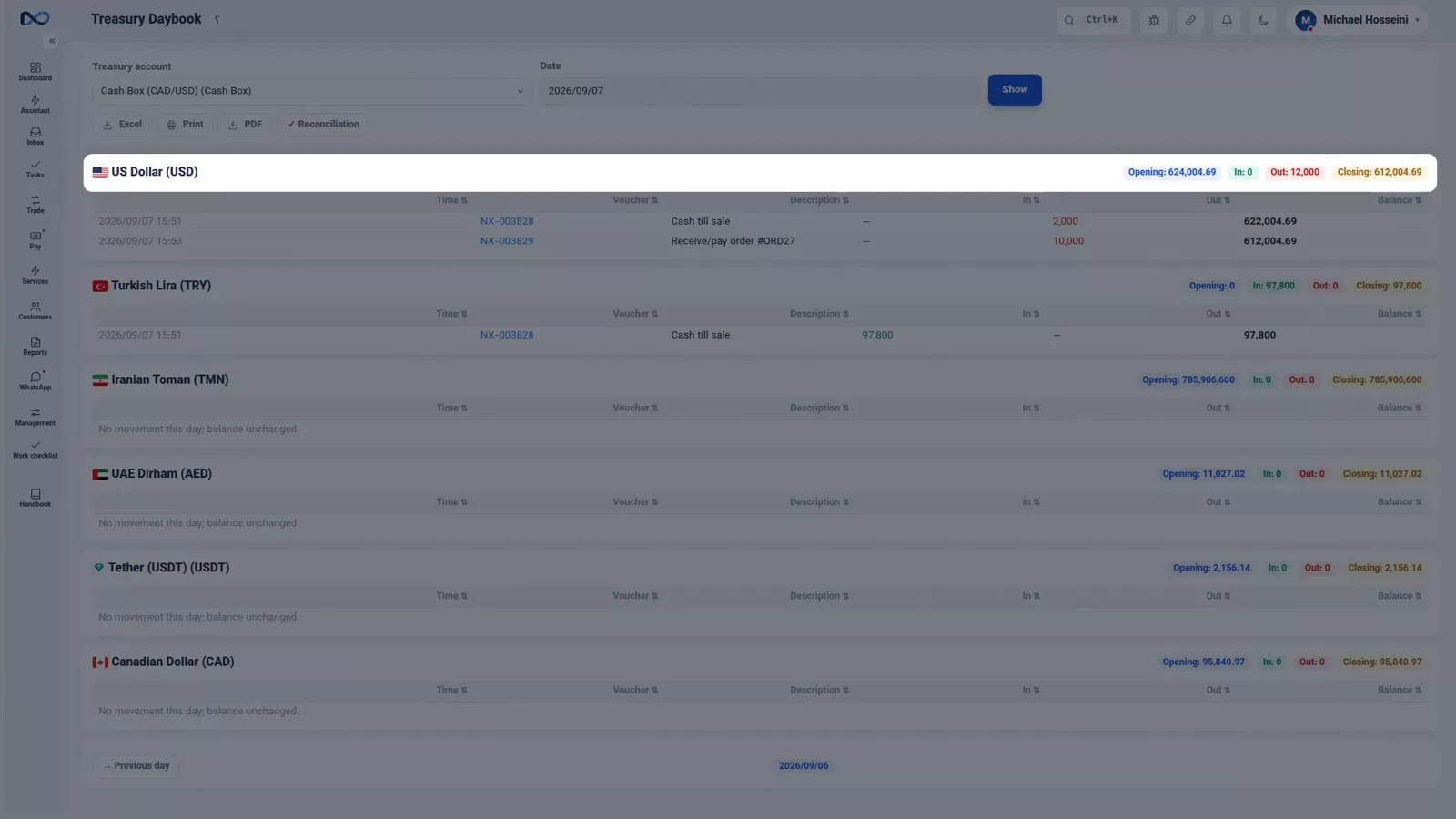
Cash is the fastest form in the software, and that is exactly the trap. If money did not actually move and you record it as cash, the box's holdings stop matching what is in the drawer, and at the end of the day you will be hunting a difference that only exists in the software.
The cash book is where that difference shows itself: opening, in, out and closing, for each currency.
Tips and warnings
- Pick the box that matches the physical till the money is in. One box per till is what makes end-of-day counting possible.
- Read the box holdings that appear beside the form before you record. If they already look wrong, fix that first.
- The trader field is required on the cash form. Fill it with the person who actually did the trade, not whoever happens to be logged in.
- An order is not a trade and posts nothing. If money has already moved, do not write an order — record the trade.
- Never let someone other than the named bearer collect. The bearer's name and ID photo exist so the cashier can refuse.
- Attach the photographed, signed receipt to the order the same day. An executed order without its proof is worth much less later.
Where to go next
The previous episode, buying and selling currency, covers the ordinary trade form, the voucher it creates, and what to do when a trade is booked wrong. Next comes where trade profit comes from, which explains why the edge-vs-board number in the summary panel is not your profit. When the money moves through a bank instead of the drawer, you are in transfers, receipts and payments; and if a customer leaves you a promise rather than money, see payment commitments and deposit requests.
FAQ
What is the difference between a cash trade and an ordinary trade in Nexto?
The counterparty. In an ordinary trade the counterparty is the customer's account, so their balance changes. In a cash trade the counterparty is your cash box, so the box's holdings go up or down and no balance is created.
Do I need to create a customer record for a walk-in cash customer?
No. A cash trade settles at the counter against the cash box, so no account is opened and no debt remains on either side.
What is a cashier order?
It is an arrangement, not a trade: a customer's agent will collect an amount tomorrow, or you will pay someone later out of a box. It sits in the cashier's queue with a pending status and posts no voucher until it is executed.
When does a cashier order create a voucher?
Only when the cashier presses Execute and confirms it, at the moment the money actually changes hands. That is when the voucher is posted and a receipt is issued, and the order moves to done.
Who is the bearer on an order?
The person collecting the money when it is not the customer themselves. You record their name and a photo of their ID on the order, and only that person may collect.
Why does my till not match at the end of the day?
The usual cause is recording a trade as cash when the money did not actually move. Compare the cash book — opening, in, out and closing per currency — against the drawer to find where the difference was introduced.
Full video transcript
This part is about the cash trade: a customer who pays, gets paid, and leaves at that very moment, without an account being opened for them or a debt remaining. In the previous part we recorded a trade that landed on the customer's account and settled later. Here the money changes hands on the spot. And we'll see a third mode too: no money has moved yet and you've only made an arrangement; that's called a cashier order. The technical difference is one word: the counterparty.
In an ordinary trade the counterparty is the customer's account; in a cash trade the counterparty is your cash box. So instead of someone's balance changing, the cash box holdings go up or down. And an order has no counterparty at all, because there's no voucher yet. The cash form. The first field, instead of the customer, is the cash box: which box the money comes out of and goes into. If you run several tills, each till has its own box and you pick it right here.
The moment you pick, the box's holdings appear beside the form. The rest is the same form as before: trade type, sell to the customer. The currency we hand over, dollars, and the one we take, this time lira, because the customer is a traveller with cash lira. Up to here nothing differs from an ordinary trade; only the counterparty changed. Amount and rate: we sell two thousand dollars, at forty-eight point nine lira per dollar, and we take the lira right now, right here at the till, in cash.
It has computed the received amount: ninety-seven thousand eight hundred lira. The summary panel is the same, with the same edge vs board you must see before any record. Fee and commission work just like an ordinary trade. We write the description: cash till sale. The trader, as before, is required and stays the same manager. And now, record cash trade, the voucher is created and its page opens. And in the voucher you see that same difference in the ledger: instead of the customer's account, the cash box in dollars is credited; and in lira, debited.
The money really left the box and entered the box, not that a claim was recorded. Now something you need beside the till: the order. A customer says my agent will come tomorrow and collect this amount, or leaves money for you to pay someone later. This isn't a trade yet; it's an arrangement the cashier has to carry out. And the box can be your own box or a colleague's box, for instance you tell a partner exchange in Dubai to hand this amount to a bearer.
An order has two directions: box receives, or box pays. And a field special to an exchange: the bearer's name if it isn't the customer themselves, with a photo of their ID. Whoever collects the money tomorrow must be the person the customer named. Let's record an order: Persepolis Exchange says its agent, Reza Moghimi, will collect ten thousand dollars in cash tomorrow. The payer is the cash box. The payee is Persepolis Exchange. Amount: ten thousand.
Currency: dollars. Bearer's name: Reza Moghimi. And register order, there's no voucher yet, only an arrangement now sitting in the cashier's queue. Every order has one of three statuses: pending, done, cancelled. As long as it's pending, no voucher has been posted. Tomorrow, when Reza Moghimi comes and takes the money, the cashier hits Execute and confirms: at that moment a voucher is posted and a receipt is issued. The order moved to done and its voucher code sits next to it.
From here you print the receipt; the bearer signs, you place their ID card in the receipt's frame and photograph the whole thing. That image is uploaded right beside the order, and a signed mark stays with it. And a tip: don't be tempted to record everything as cash because it's faster. If money didn't actually move and you record it as cash, the box holdings won't match reality and at day's end you'll be hunting the difference. The cash book is exactly where that difference shows itself: opening, in, out, closing, for each currency.
Money changed hands right now: cash. It landed on an account: an ordinary trade. You only made an arrangement: an order, and after execution, a signed receipt beside it. Next part we go to the question everyone answers wrong: how much did the trade really profit?
Try it yourself right now
A complete private demo with sample data — no installation, no credit card.
Create free demo