
Transfers, receipts and payments
How to record a transfer in Nexto: payer and payee, the fee, the tracking code, and why awaiting collection and a pending voucher are never the same tick.
Watch this video on: YouTube
A customer who owes you pays his money straight into the account of another customer that you owe. Nothing passes through your own account, no currency is converted, no rate is involved: the first customer's debt to you goes down, and your debt to the second one goes down too. That is a transfer — the simplest voucher in Nexto, and the one you will record most often.
Because it is simple, it is easy to be careless with, and two of its fields are where careless costs money: the tracking code, which stops the same deposit slip being posted twice, and a pair of ticks that mean opposite things. This episode walks the form field by field, then follows those ticks to the two pages where you chase them up. It follows on from where trade profit comes from, where money did change currency — here it does not.
What you will learn
- What a transfer is, and why it has no rate and no profit
- How to fill the payer and payee blocks, and what a side can be
- Where a fee belongs, and which fees are none of your business
- Why the tracking code is not optional
- The difference between awaiting collection and a pending voucher
- How to follow each of them up, in collection control and the pending vouchers list
The transfer form, field by field
Start with the amount and the currency
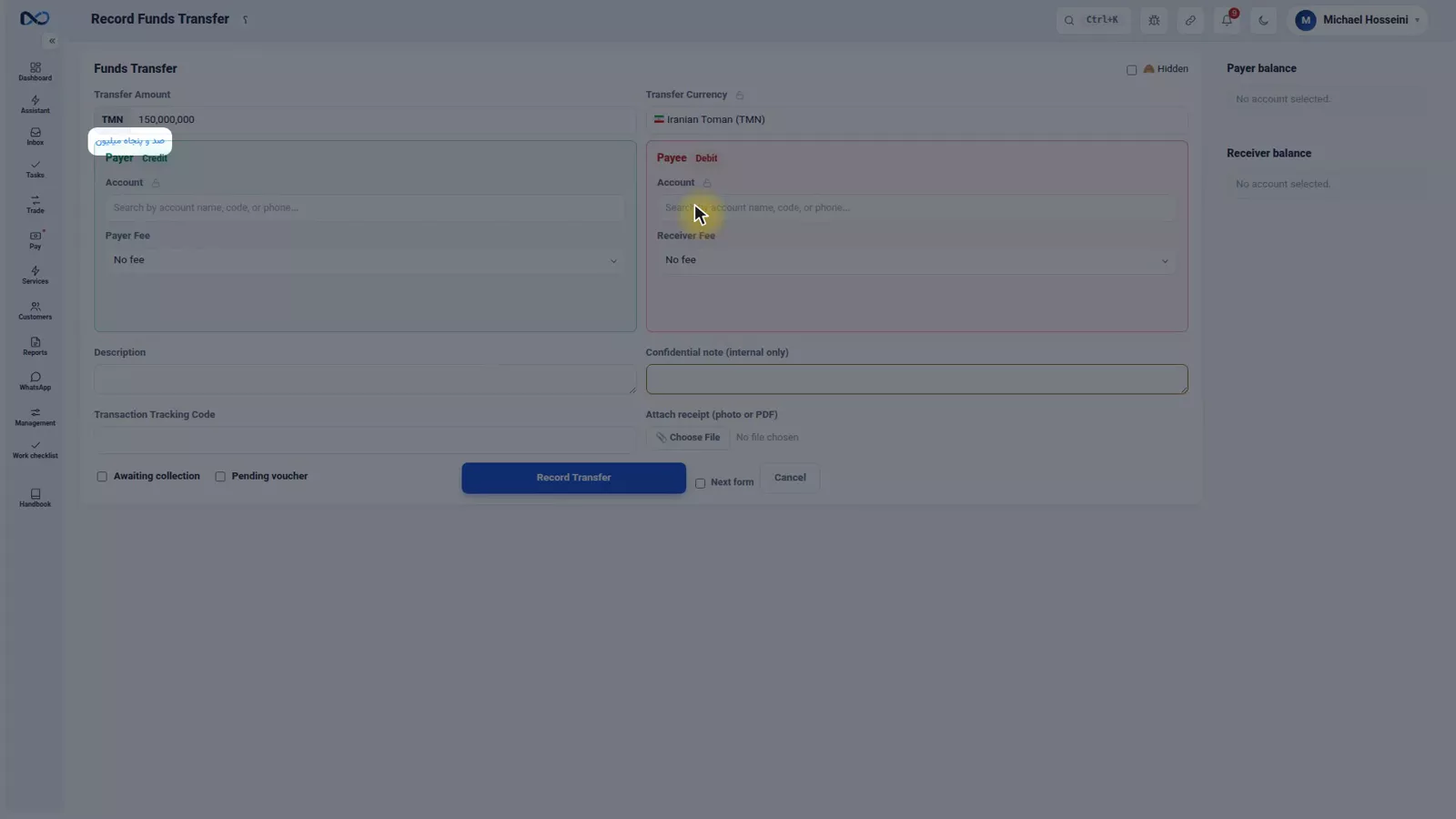
The first thing you fill in on the transfer form is the amount and its currency — in the example, 150,000,000 Iranian Toman. Underneath the box, Nexto spells the same figure out in words. Read that line before you go on; it is the cheapest way to catch a missing zero.
Pick the payer — the green block
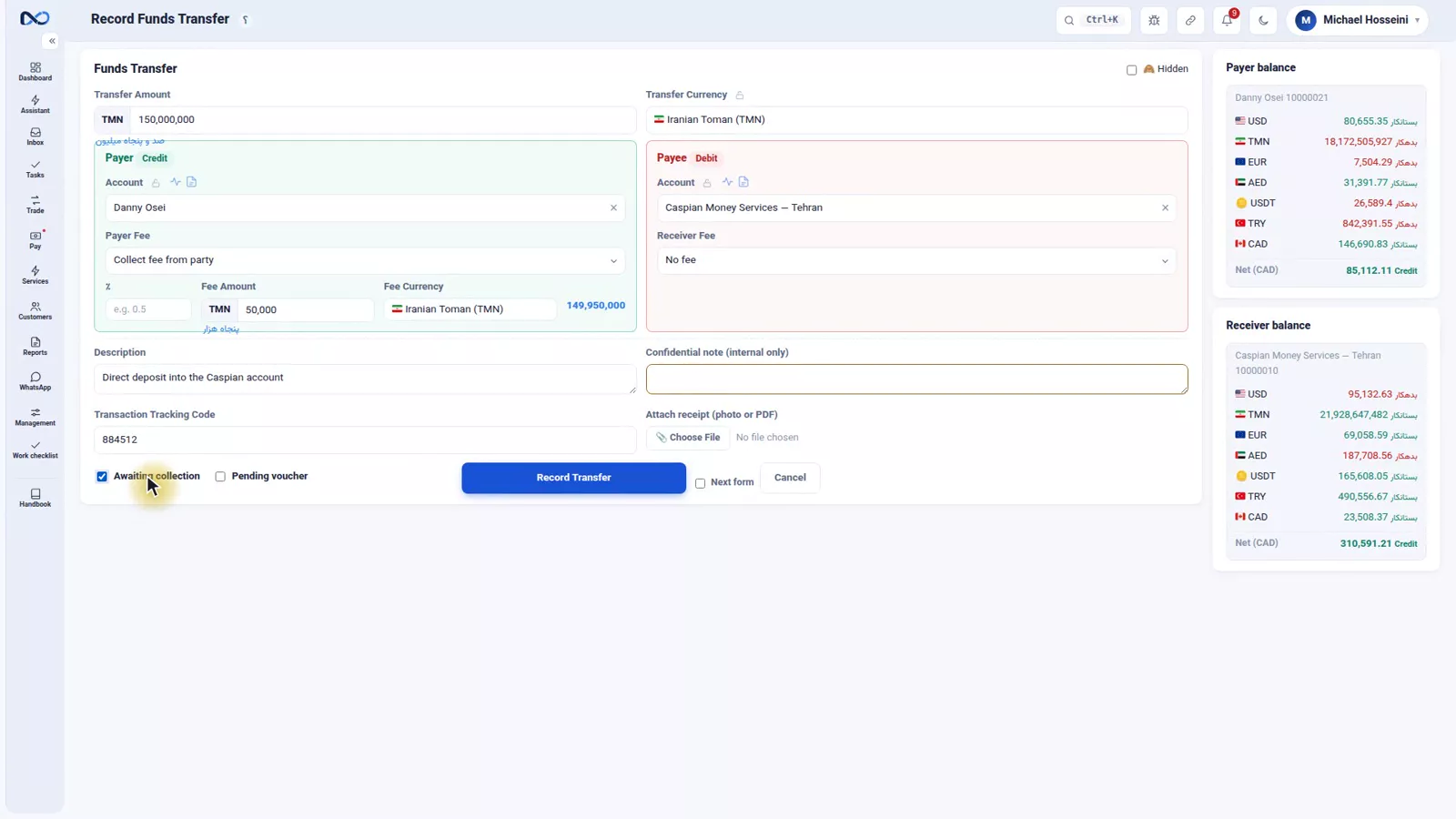
The payer is the account the money leaves. In the example that is Danny Osei, a customer who owes the office, so the transfer brings his debt down. A side does not have to be a customer: it can be a cash box or a bank account just as well.
The moment you pick an account, its balance appears beside the form. Look at it. If it is not what you expected, you are probably on the wrong account — much easier to notice now than after the voucher is posted.
Pick the payee — the red block
The payee is the account the money arrives in — in the example Caspian Money Services, a customer the office owes, so the payment reduces what the office owes them. Those two words, payer and payee, explain the whole form.
Two small things on every Nexto form
Beside each field there is a padlock that pins your value for the entries that follow: with ten transfers in a row in the same currency, you pin the currency once and never pick it again. And beside every account you choose, two shortcuts appear — that customer's statement and their stats — without leaving the form.
The fee
The fee here means one thing only: a fee between the office and the customer, with an amount and currency of its own — either you charge them for the transfer or you pay them one. What the customer paid their own bank is their business and does not belong on this form.
Because a transfer has two sides, the form has two fee slots: put the fee in the block of the customer you are settling it with. In the example the office charges Danny Osei 50,000 Toman, so it goes in his block.
Description, tracking code, attachment
Write a description, then fill in the tracking code — the number printed on the deposit slip — every single time. The duplicate-tracking-code guard works from exactly this field, and it is what stops the same slip being posted twice. Attach the photo of the slip here too, so evidence and voucher stay together.
The two ticks that must never be mixed up
Two ticks sit side by side at the bottom of the form and they do opposite things.
Awaiting collection posts the voucher right away and the balances update immediately. The tick is only for your own peace of mind: the transfer also joins the collection-control queue so you can verify later that the money really landed.
Pending voucher books nothing at all: no entry, no balance change. The transfer waits until the payment is carried out or the funds arrive; you approve it, and at that moment it becomes a voucher. That is the tick for a brand-new customer whose slip you are not yet sure about. In the example the customer is well known to the office, so awaiting collection is the right choice.
Record the transfer
Press Record Transfer and look at what comes out. The voucher has two lines — the payer credited, the payee debited — plus the fee line if you entered one. There is no third account in the middle, because nothing was converted.
Following the two ticks
Collection control
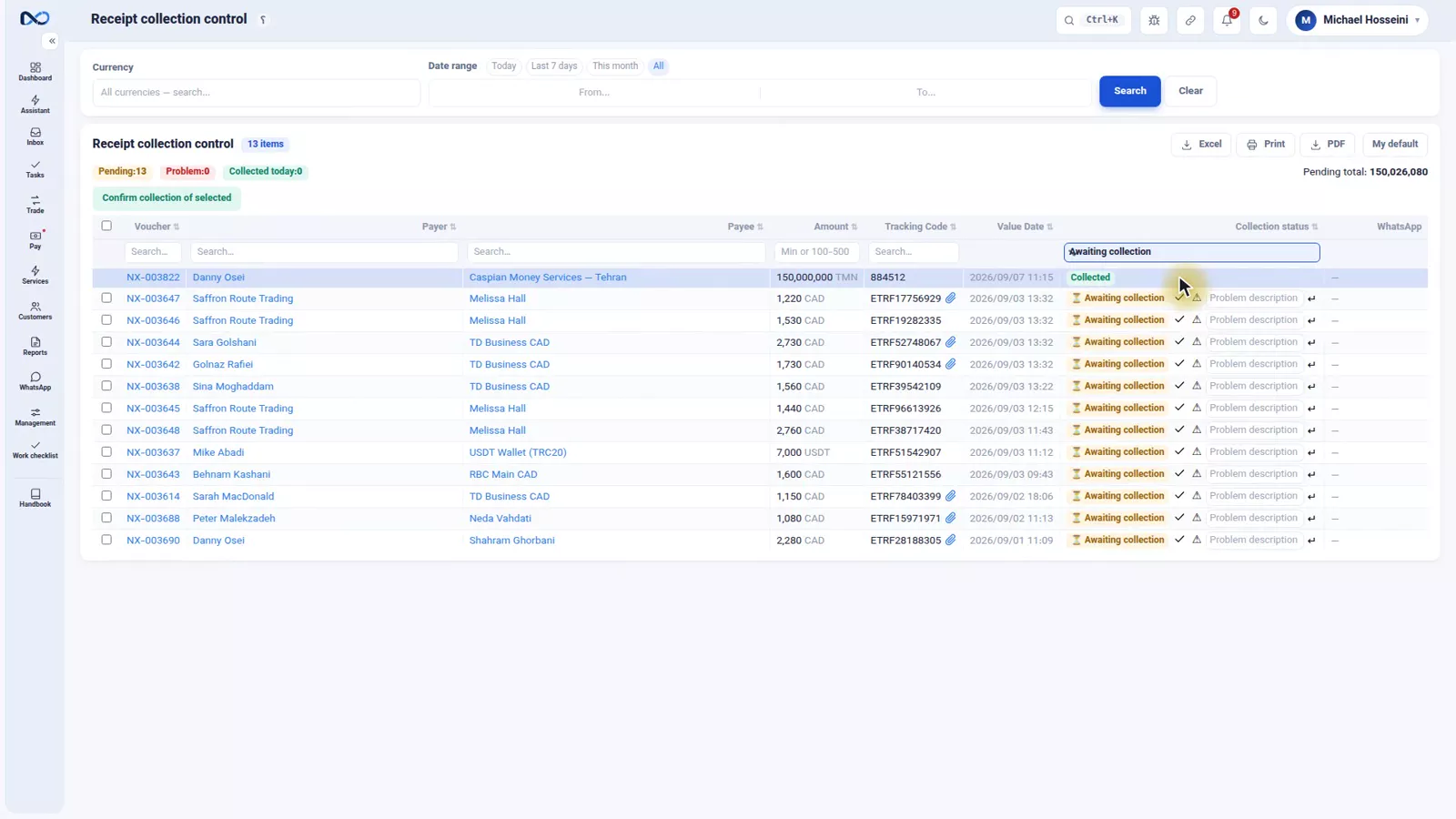
Every transfer posted with the awaiting-collection tick lands on the collection-control page: transfers whose voucher is already posted but where nobody has yet confirmed the money actually arrived.
When you have checked and the money is there, press confirm collection and the row leaves the queue. If it never arrived, press report problem — and you know that same day you have to go after the customer, rather than weeks later from a balance that will not reconcile.
The pending vouchers list
A pending voucher is followed up elsewhere: the pending vouchers list, where every suspended transfer waits for approval. Once the money lands you approve it, and at that instant it becomes a real voucher and the balances move.
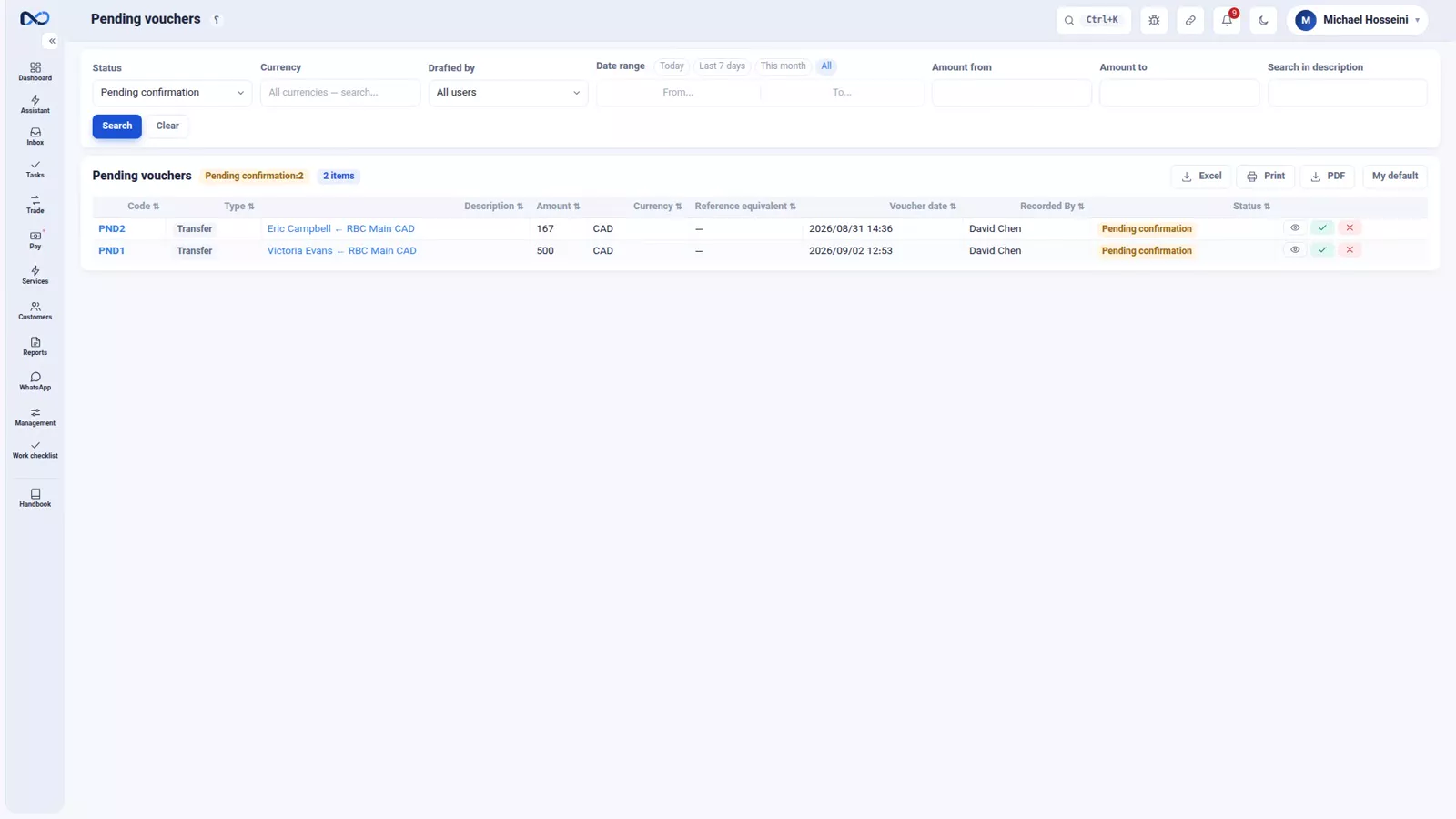
The rule for choosing is short. A known customer with a valid slip: awaiting collection. A new customer or a slip you doubt: pending voucher, approved only after the money arrives.
Tips and warnings
- A transfer never carries a rate and never produces profit. If money changes currency, it is a trade, not a transfer.
- The tracking code is what makes the duplicate guard work. Skip it and the guard is off for that document.
- Do not enter the customer's own bank charges as a fee. That field is for what the office and the customer agreed.
- Put the fee in the right block. A fee entered against the wrong side settles the wrong account.
- Awaiting collection means the money has already moved in your books. It is a reminder to check, not a hold.
- A pending voucher changes no balance until you approve it, so do not treat that list as finished work.
Where to go next
The previous episode, where trade profit comes from, covers the document that does carry a rate. Next comes payment commitments and deposit requests: what to record when the payment is not going to happen today. Cash boxes as a side of a transfer appear in cash trades and the till, and every transfer shows up again in the customer statement.
FAQ
What is a transfer in Nexto?
It is one currency moving from one account to another: a payer whose account the money leaves and a payee whose account it arrives in. No currency is exchanged and no rate is involved, so it never generates profit.
Can a transfer be between a customer and a bank?
Yes. Each side can be a customer, a cash box or a bank, so a transfer covers a receipt into your bank and a payment out of it as well as a settlement between two customers.
Where do I enter the transfer fee?
In the fee field of the block belonging to the customer you are settling with, since the form has one block per side. Only fees agreed between the office and the customer belong there, not what the customer paid their own bank.
Why does Nexto insist on the tracking code?
Because the duplicate-tracking-code guard reads that field. If the same deposit slip is entered a second time, Nexto catches it there; leaving the field empty removes that protection.
What is the difference between awaiting collection and a pending voucher?
Awaiting collection posts the voucher immediately and adds the transfer to the collection-control queue so you can verify the money arrived. A pending voucher posts nothing: it waits in the pending vouchers list and becomes a voucher only when you approve it.
Which tick should I use for a new customer?
A pending voucher. Nothing is booked until the funds arrive and you approve it, which is what you want when you cannot yet vouch for the slip. Awaiting collection is for a known customer with a valid slip.
Full video transcript
A customer who owes you pays his money directly into the account of another customer that you owe. For you that means the first one’s debt goes down, and your debt to the second one goes down too, without a single dollar passing through your own account. No currency is exchanged, no rate is involved; money simply moves. This is the simplest voucher in Nexto, and the one you will use most. And it has two sides: the payer, the account the money leaves; and the payee, the account the money arrives in.
Those two words explain the whole form. A side can be a customer, a cash box, or a bank. Amount and currency first. 150,000,000 Iranian Toman - and underneath it, the same figure spelled out in words, so that a zero never goes missing. The payer: the green block. Our customer who owes us, Danny Osei - the money leaves his account, which means his debt to us goes down. And the moment you pick him, his balance appears beside the form. The payee: the red block.
Caspian Money Services, a customer we owe - the money lands in their account, which means our debt to them goes down. And two small things that appear on every Nexto form, and we will mention them here. Beside each field there is a padlock - it keeps your value for the entries that follow; for example, if you have ten transfers in a row in the same currency, you pin the currency once and never pick it again. And beside every account you choose, two shortcuts appear: the customer statement and the customer stats - right there, without leaving the form.
The fee: it means we charge the customer a fee for this transfer, or we pay them one - an amount and a currency. This is an account between us and the customer; the fee the customer paid to their own bank is their own business and does not belong here. The form has two blocks because a transfer has two sides: put the fee in the block of the customer you are settling with. For instance, we charge Danny Osei 50,000 Toman. A description, and the tracking code: the number printed on the deposit slip.
Always fill it in - the duplicate-tracking-code guard works from exactly this field and stops the same slip being posted twice. And the attachment: put the photo of the slip right here. And now two ticks that sit side by side and must never be mixed up. Tick one, awaiting collection: the voucher is posted right away and the balances update; the tick is only for reassurance - this transfer stays in the collection-control queue so that later you can check the money really landed and nothing went wrong.
Tick two, a pending voucher: no entry is booked at all; the transfer waits until it is carried out or the funds arrive, then you approve it and at that very moment it becomes a voucher. Use that, for example, for a brand-new customer whose slip you are afraid might be forged. Here the customer is well known to us, so tick one is the right choice. We press Record Transfer. The voucher has two lines and that is all: the payer is credited, the payee is debited - plus the fee line.
There is no third account in the middle, because nothing was converted. And let us follow that tick: collection control. Every transfer posted with the awaiting-collection tick lands here. This page is the list of transfers whose voucher is posted but where you have not yet verified that the money really arrived. Once you have checked and the money is there, you hit confirm collection and it leaves the queue. If it never arrived, you hit report problem - and you know that same day that you have to go after the customer.
And where do you follow up a pending voucher? In the pending vouchers list: every suspended transfer waits there for approval; once the money lands, you approve it and at that instant it becomes a voucher. The rule for choosing is simple: a known customer with a valid slip - awaiting collection, just to be safe. A new customer or a doubtful slip - pending voucher, until the money really arrives. So there are two routes: known and valid - awaiting collection, followed up in collection control.
New or doubtful - pending voucher, approved after the money arrives. To sum up: a transfer means one currency moving from one account to another; a payer and a payee; a fee between us and the customer, in that customer’s block; the tracking code every time; awaiting collection for peace of mind, and a pending voucher for when you are not sure yet. Next episode: what happens when a payment is going to be made in the future.
Try it yourself right now
A complete private demo with sample data — no installation, no credit card.
Create free demo