
Payment commitments and deposit requests
How to record a payment commitment in Nexto, pay it off in parts until the balance is zero, and register a deposit request with the customer IBAN behind it.
Watch this video on: YouTube
A customer gives you an account number and wants his money sent to it. You agree the amount and that it goes out over the next few days — and then you have a problem that is not really accounting: until something is paid there is no voucher, and a promise nobody wrote down is a promise somebody will forget.
A payment commitment is where you write it down. It records who promised how much, to whom, out of which account. It is not a voucher, and it says so at the top of its own page. Then every time a real payment goes out you register a part, and each part is a genuine voucher that brings the balance down until it reaches zero.
The other half of the story is the deposit request: the destination. This episode covers both. It follows on from transfers, receipts and payments, the same movement of money once it has already happened.
What you will learn
- The difference between a transfer and a commitment, and why it is not about being multi-step
- How to fill in a commitment: total amount, payer, payee and the destination account
- Where a fee goes when the whole commitment carries one, and where it goes when each payment does
- How to register parts, and how to close a commitment early
- What a deposit request is, its three options and its four states
- Where to see everything still unfinished with one customer
Commitments
Payment now, payment later
A transfer is a payment that has already happened and been booked. A commitment is a payment you have promised and have not made yet. That is the whole distinction. Being paid in several rounds is not what makes something a commitment — a commitment can be settled in one go. What defines it is the promise inside it.
Start with the total amount
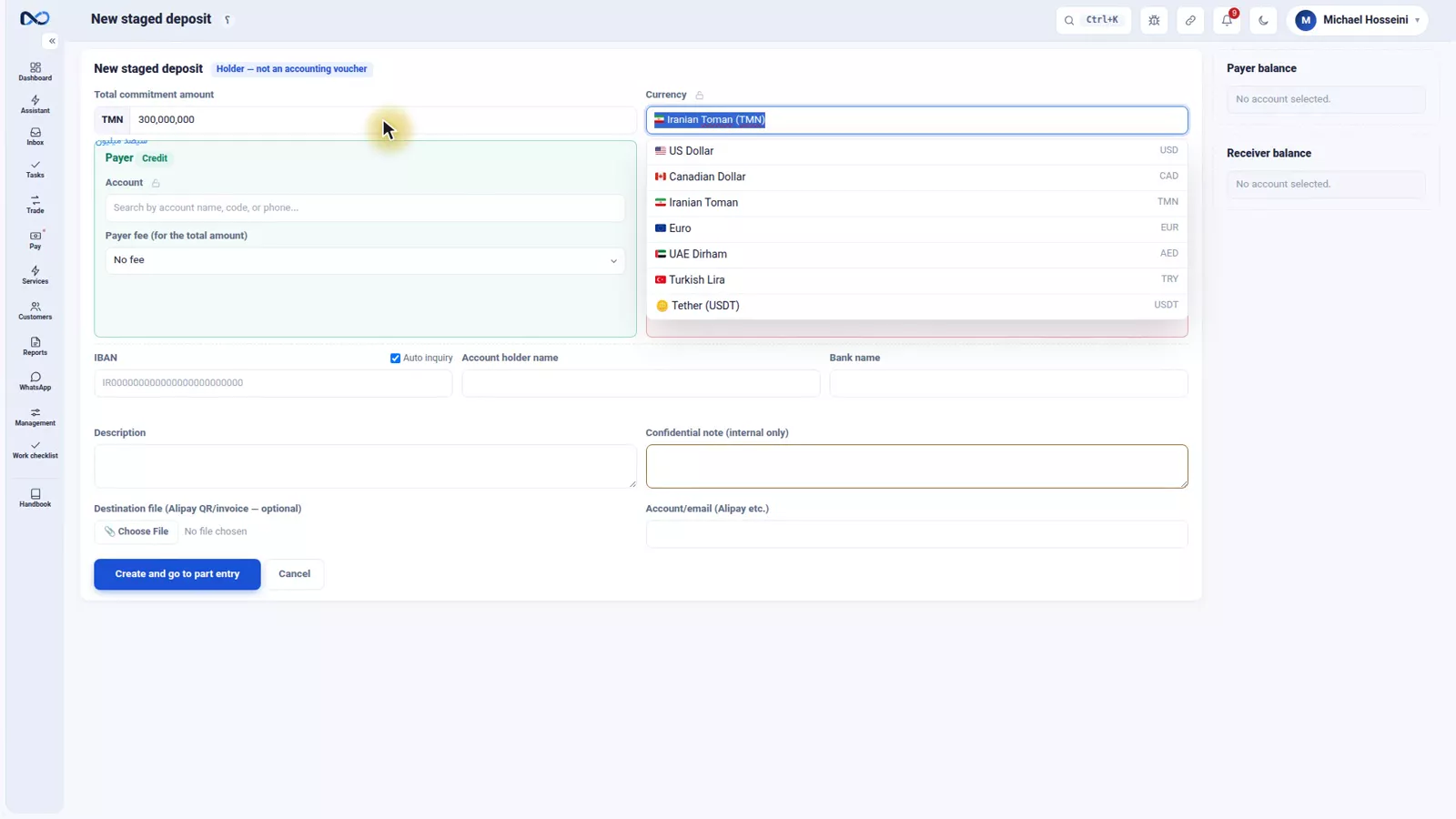
The first field on the commitment form is the total amount and its currency — in the example, 300,000,000 Iranian Toman. This is the whole of the promise, not the first instalment: Hossein Kalantari is to receive 300,000,000 Toman, and the office intends to pay it into his account in several rounds.
Payer, payee and the destination account
The payer is the account the money leaves — in the example the office's own TD Business account. Next to it sits the payer fee, which applies to the entire commitment. Use it only if you agreed a single fee for the whole thing; if each payment carries its own, leave it empty and enter the fee on the part instead.
The payee is who the money is meant to reach: Hossein Kalantari. Below that comes the destination account — the IBAN it has to be paid into, the account holder's name and the bank. Type the IBAN and Nexto works out the bank from the digits on its own. A guard runs right here: if the same IBAN was already recorded in the last twenty-four hours, Nexto warns you, so a busy day does not produce the same destination twice.
Add a description, then press Create and go to part entry. Nexto saves the commitment and takes you straight to its own page, ready for the first payment.
The commitment page
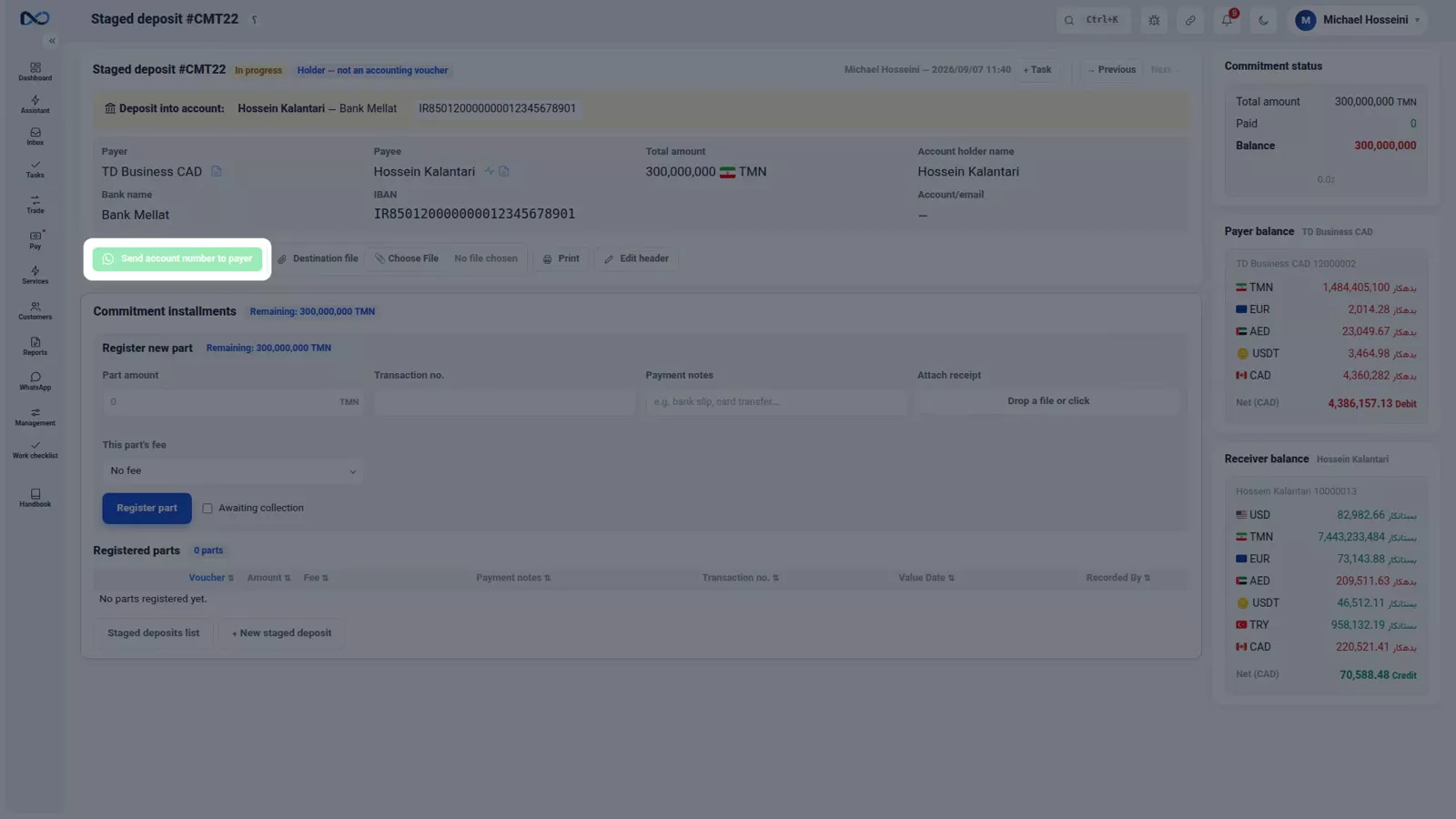
The top of the page says plainly what this document is: a holder, not an accounting voucher. Three numbers tell the whole story — total amount, paid, and balance. At this point nothing is paid and the full 300,000,000 is outstanding. From here, one click sends the amount and the account number to the payer over WhatsApp, so whoever makes the payment has the details without you retyping them.
Register a part
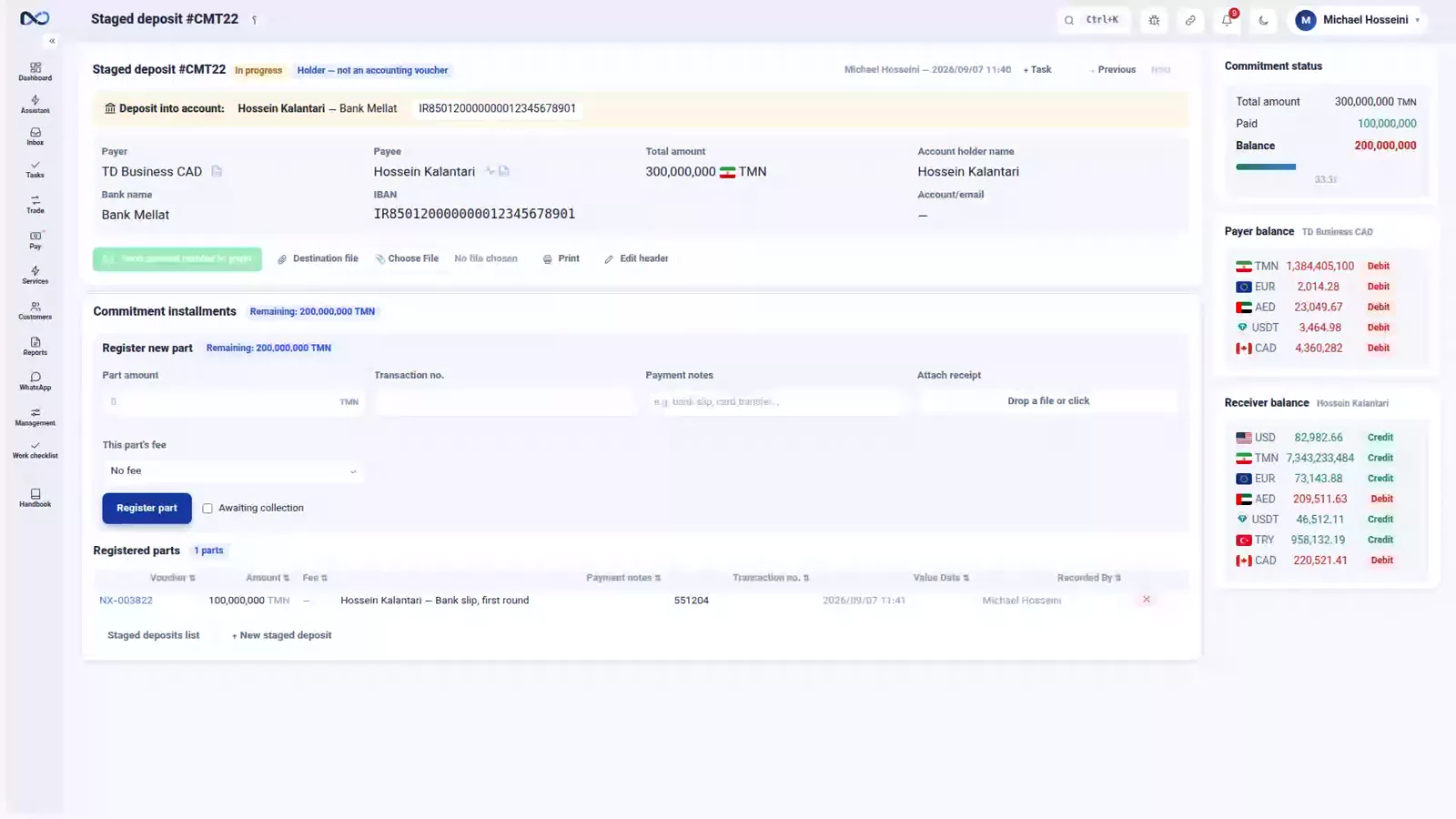
Each real payment is registered as a part. In the example the first payment is 100,000,000: you enter the amount, the bank tracking code and a note, and if that payment carried a fee, it goes in the fee field on the part.
Press Register part and the numbers move: paid becomes 100,000,000 and the balance 200,000,000. Every part is a real voucher, so the bank account and Hossein Kalantari's account were both updated at that exact moment.
The list of parts, and closing the commitment
The registered parts are listed below with their attached slip and tracking code, so the evidence for each payment stays with it. One rule matters here: never hide a fee inside the part amount. It has a field of its own, and if you fold it into the amount neither the balance nor the expense report comes out right.
A commitment closes itself as soon as the balance hits zero. If the customer changes his mind before that, open Edit header and use the Close commitment button. It asks for a reason, and that reason stays on the commitment.
Deposit requests
The destination, before you know the source
A deposit request is the other side of the story: the customer has given an IBAN and wants money to reach it, before anyone has decided where it will come from or when. Put the two next to each other and they are easy to keep apart — the commitment is your promise, the deposit request is the destination of that promise.
Recording a request
The form is short. Amount and currency — 300,000,000 Iranian Toman in the example. The requester: Shirin Moradi. Then the IBAN and the account holder, and again the bank is worked out from the digits.
Three options sit underneath: a WhatsApp notice to the requester, active, and urgent. Urgent is the one worth understanding — it puts the request at the top of every list and at the front of the allocation queue. Press Register request and Nexto takes you to the allocation page, because that is the next step.
The request list and its four states
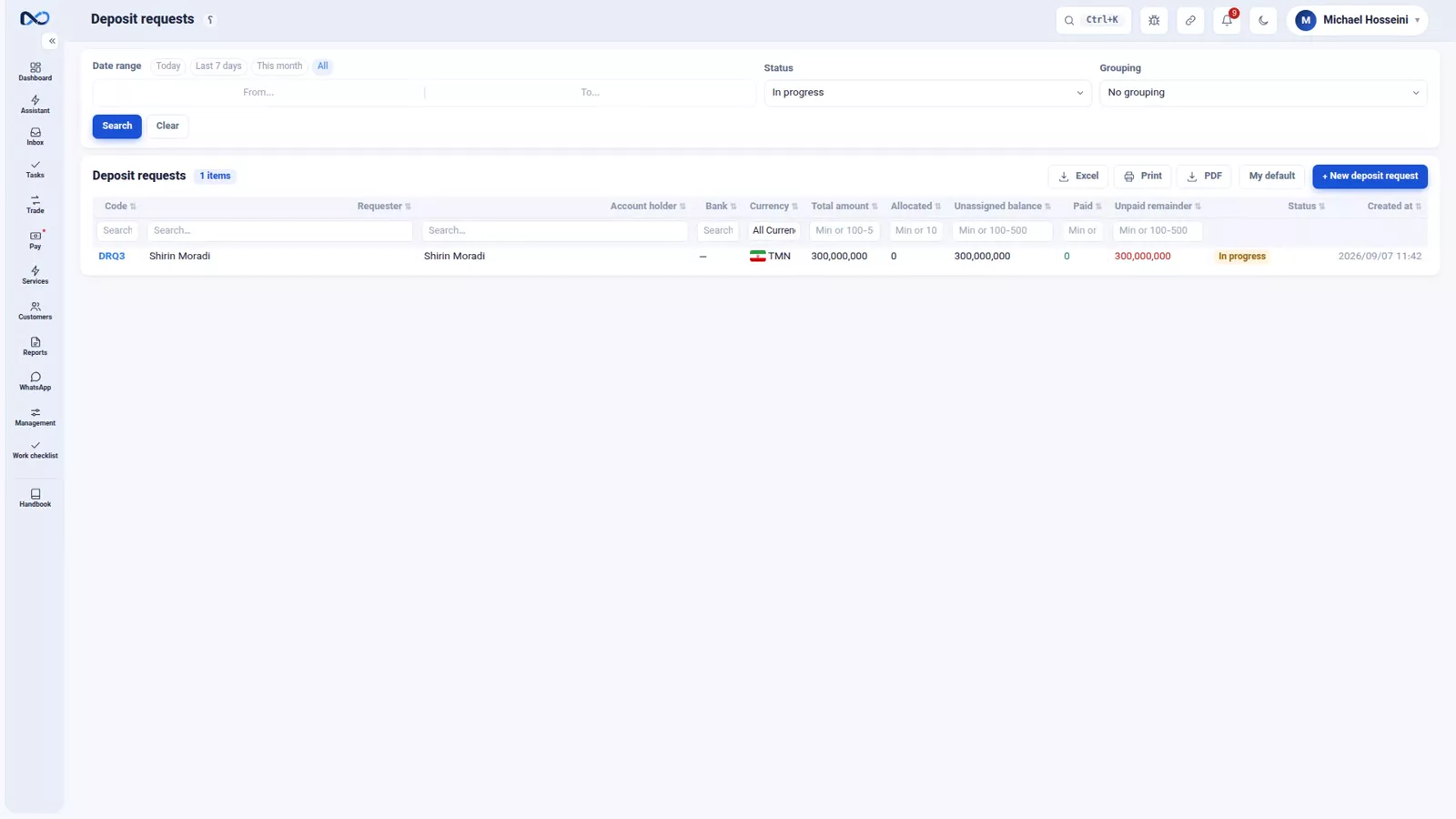
Every deposit request is in one of four states: not started, in progress, closed, or cancelled. Two columns, allocated and paid, tell you how far it has actually got — which is a different question from what state it is in.
Deciding who is actually going to deliver the money is the subject of rial routing and payment readiness.
Following up per customer
For daily follow-up there is one place worth knowing. At the top of every customer statement, next to their balances, sit that customer's open items — open commitments and open deposit requests, each with a counter — and one click sends a picture of them to the customer's WhatsApp. To see what is unfinished with a customer, you do not have to wander between pages.
How the two fit together
In practice they are one chain. The customer gives an IBAN: a deposit request. You promise how you will deliver it: a commitment. Each time you pay a piece of it: a part. Balance zero, and both are closed.
Tips and warnings
- A commitment is not a voucher. Nothing appears in a balance until you register a part.
- The total amount is the whole promise. Do not put the first instalment there.
- Choose one place for the fee: the header if a single fee covers the commitment, the part if each payment carries its own. Not both.
- Never fold a fee into the part amount. It has its own field, and hiding it breaks both the balance and the expense report.
- Fill in the bank tracking code on every part and attach the slip. That is what makes it traceable later.
- If you close a commitment early, write a real reason. It stays on the document for whoever reads it months later.
Where to go next
The previous episode, transfers, receipts and payments, covers the payment that has already happened. Next comes rial routing and payment readiness, which answers the question this episode leaves open: who actually delivers the money. Open items on the statement are covered in the customer statement, and the one-click sending relies on WhatsApp: groups, templates and the send queue.
FAQ
What is a payment commitment in Nexto?
It is the record of a payment that will happen later: who promised how much, to whom, out of which account. It is a holder rather than a voucher, so it changes no balance until a part is registered against it.
How is a commitment different from a transfer?
A transfer is a payment already made and booked; a commitment is one promised and not made yet. Being paid in several rounds is not the difference — a commitment can be settled in one payment.
What is a part?
A part is one real payment made against a commitment. Each part is a genuine voucher that updates both accounts as you register it and brings the balance down; at zero the commitment closes itself.
Where should I enter the fee, on the commitment or on the part?
On the header if you agreed one fee for the whole commitment, on the part if each payment carries its own. Either way it needs its own field — folding it into the part amount breaks the balance and the expense report.
What is a deposit request?
It is the destination: the customer has given an IBAN and wants money to reach it, before anyone has decided where from or when. The commitment is the promise; the deposit request is where it has to land.
Where do I see everything still open with one customer?
At the top of that customer's statement, next to their balances: open commitments and open deposit requests, each with a counter, plus a one-click button that sends a picture of them to the customer's WhatsApp.
Full video transcript
Any transfer whose payment is put off to the future is a payment commitment. The customer has given you an account number and you are going to send his dollars to it; he wants a dollar remittance; or any other remittance - either way it has not happened yet and it is going to happen later. We record that promise to pay - it is not a voucher yet - so that everyone knows who promised how much to whom. This is one of the most used forms in Nexto. Then whenever a payment is made - in one step or in several - we register a part for it; each part is a real voucher and it brings the balance down until it reaches zero.
How is it different from a transfer? A transfer is a payment that has already happened and been booked; a commitment is a payment you promised and have not made yet. Being multi-step is not what defines this form; the promise inside it is. The commitment form. At the top: total amount and currency - 300,000,000 Iranian Toman. This is the whole of the promise you made: Hossein Kalantari wants 300,000,000 Toman from us, and we are going to pay it into his account in several rounds.
The payer: the account this money leaves from - here our own TD Business account. And the payer fee, for the whole amount: if you agreed one fee for the entire commitment, it goes here; if each part carries its own fee, leave this empty and enter it on the part. The payee: who the money is meant to reach - Hossein Kalantari. And the destination account: the IBAN it must be paid into, the holder name and the bank. Type it in, and Nexto works out the bank on its own.
And one small guard that works right here: if this same IBAN was already recorded in the last twenty-four hours, it warns you - so the same IBAN is not entered twice by mistake. A description, and then Create and go to part entry. The commitment is saved and Nexto takes us straight to its own page, to the first payment. This is the commitment page - and at the top it says: holder, not an accounting voucher. Three numbers tell the whole story: total amount, paid, and balance.
Right now nothing is paid and 300,000,000 is outstanding. And from here, with one click, you send the amount and the account number to the payer over WhatsApp. The first part: we paid in 100,000,000. The amount, the bank tracking code, a note - and if this payment carried a fee, it goes right here. Register part. Look: the balance is now 200,000,000 and paid is 100,000,000. Every part is a real voucher; which means the bank account and Hossein Kalantari’s account were both updated at that very moment.
The registered parts are listed right below, with the attached slip and the tracking code. The fee must not be hidden inside the part amount; it has a field of its own, otherwise neither the balance nor the expense report comes out right. A commitment closes itself once its balance hits zero; and if the customer changes his mind, open Edit header and use the Close commitment button: it asks you for a reason, and that reason stays on the commitment.
Now the other side of the story. A deposit request means the customer has given an IBAN and wants money to reach it - before you have decided where from and when. The commitment is your promise; the deposit request is the destination of that promise. The list is empty; let us record the first one: Shirin Moradi, 300,000,000 Iranian Toman into her own IBAN. Amount and currency: 300,000,000 Iranian Toman. The requester: Shirin Moradi. Then the IBAN, and the account holder - the bank is worked out from those digits on its own.
And there are three useful options: a WhatsApp notice to the requester, active, and urgent. That last one puts this request at the top of every list and at the front of the allocation queue. Register request. The request is saved and Nexto takes us to the allocation page - because that is the next step. And here is the list of requests; who is going to deliver this money is a decision we make in the next episode. Every request has four states: not started, in progress, closed, cancelled - and the allocated and paid columns tell you how far it has got.
And one important place for daily follow-up: the customer statement. At the top of every customer statement, next to their balances, you see their open items - open commitments and open deposit requests, with a counter - and for each of them one click sends a picture of those very items to the customer WhatsApp. To know what is unfinished with this customer, you do not have to wander between pages. In practice these work together: the customer gives an IBAN - a deposit request; you promise how you will deliver it - a commitment; each time you pay a piece of it - a part; balance zero - both closed.
And in the next episode we will see that this how you deliver it is sometimes not from your own account at all.
Try it yourself right now
A complete private demo with sample data — no installation, no credit card.
Create free demo