
Where trade profit comes from
Edge vs board is not profit. How Nexto computes real trade profit from your weighted purchase average, plus the deal form and the three anchor methods.
Watch this video on: YouTube
Most exchange dealers, and quite a few accountants, treat two different numbers as one. The first is the edge against the board: how your rate compared with today's price. The second is real trade profit: what remained once you account for what you paid for that currency.
They are not the same number and do not always point the same way. Treat them as one and at month's end you will be looking at profit that does not exist, and possibly distributing it.
Here is where real profit comes from, how Nexto keeps your purchase average, why a same-moment buy-and-sell is different, and the setting that measures profit when neither side of a trade is your reference currency.
What you will learn
- Edge vs board against real trade profit, and when the two disagree
- How the weighted purchase average is built, and why sales are measured against it
- Where to read your position: how much you hold and at what average
- How to record a deal, one buy and one sell at the same moment
- What the three anchor methods do, and why you pick one and keep it fixed
- Why a stale rate board makes every profit figure imaginary
Two numbers, not one
The edge against the board is the number we met in buying and selling currency: your rate minus today's board rate, times the amount. It tells you whether you sold well against today's price. But it is not profit, because it has nothing to do with what you paid for that currency.
Real profit comes from the price you paid. If the dollar you sold today at 228,000 Iranian Toman was one you bought last month at 218,000, the real profit on each dollar is 10,000 Toman — not the 1,400 the board comparison shows.
The weighted purchase average
You did not buy dollars once at one price; you bought ten times at ten prices. So which is "your" purchase price? Nexto takes the weighted average of everything you hold, in proportion to the amounts: 100 Dollars bought at 200,000 Toman and 300 Dollars bought at 220,000 give a weighted average of 215,000 Toman, not the midpoint of the two rates.
Nexto keeps this figure for every currency and calls it the position: how much you hold, and at what average. Every buy shifts the average; every sell is measured against it. You maintain none of it by hand.
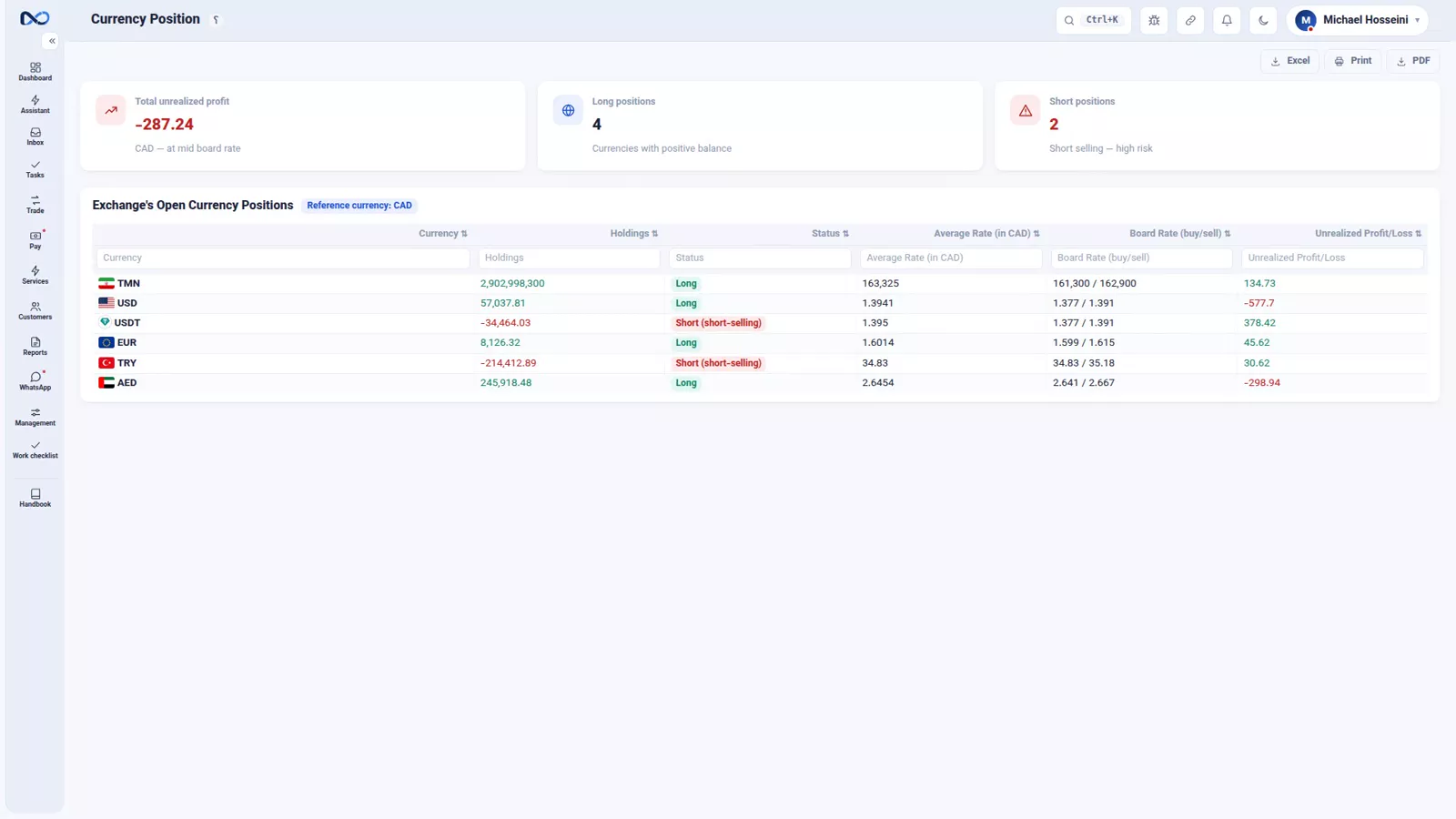
Seeing real profit on a trade
Pick a currency you actually hold
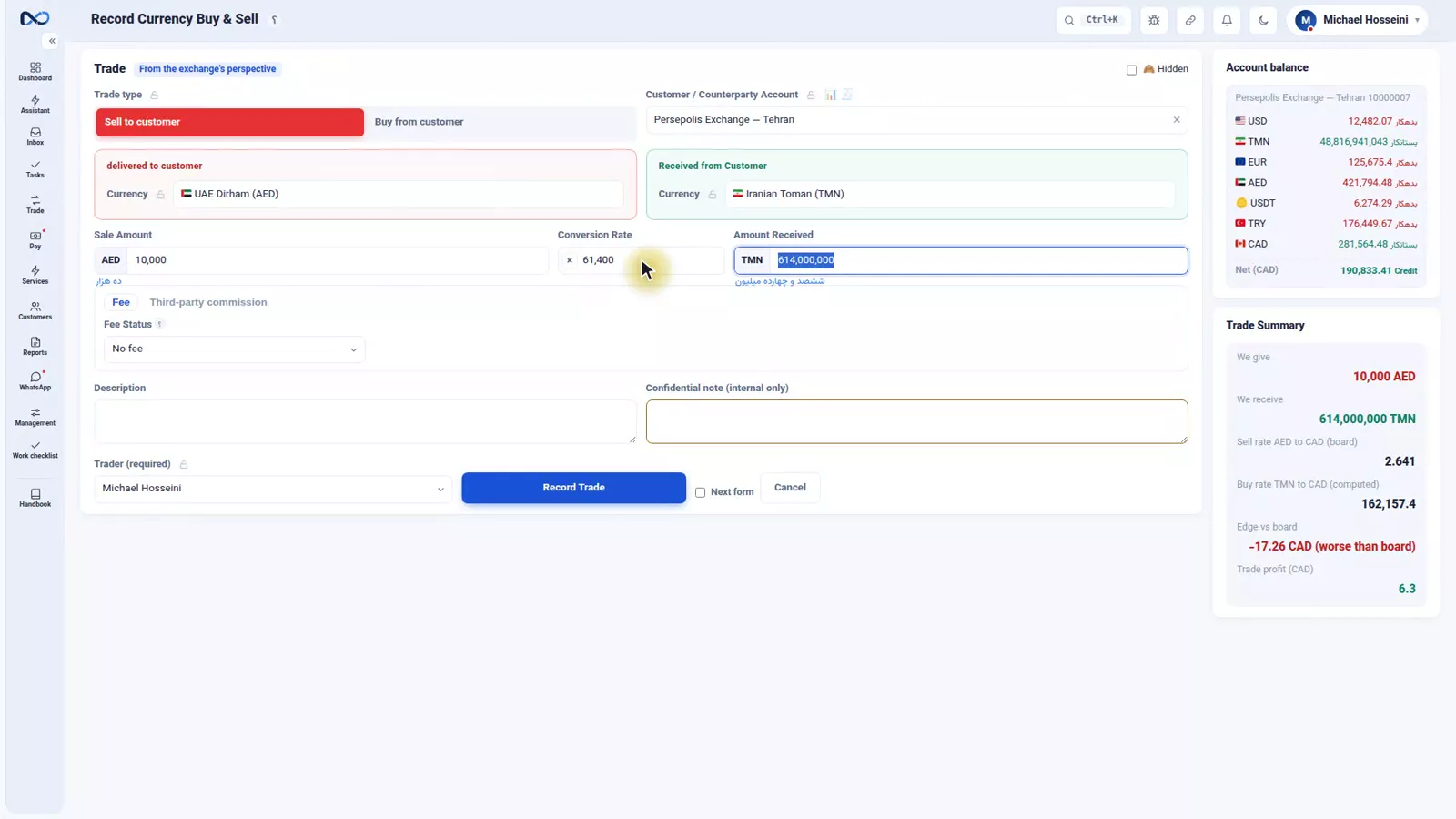
The reference currency has no position, because everything is measured against it. So to see real profit, sell a currency you do hold that is not your reference currency: 10,000 UAE Dirham for Iranian Toman, sold to Persepolis Exchange.
Read both numbers in the summary
The amount is 10,000 and the rate is 61,400 Toman. Both figures now sit side by side in the summary panel, and their direction is not even the same: against today's board this sale is slightly worse than the market, yet the trade profit is positive, because the dirhams were bought at a lower average.
Record it and open the entries
Add a description and record. On the voucher page, expand the entries and a row appears that was not there before: trade profit, the same 6 Canadian Dollars the summary panel showed. That row is what gets summed at month's end in the profit-and-loss report.
A buy can create profit too
If you had earlier sold a currency you did not hold — gone short, as the market calls it — and now buy to cover, the profit or loss is realised at the moment of that buy. Nexto works this out on its own.
The deal: buying and selling in the same moment
Every dealer meets this several times a day. You buy 10,000 US Dollars from Bosphorus FX at 226,300 Toman and, at that very moment, sell them to Persepolis Exchange at 226,600 Toman. The dollars never reach your holdings — you take with one hand and give with the other.
A deal's profit is the profit of those two trades, not a weighted average, because the dollars never entered your position to be measured against anything. The sell rate minus the buy rate, 300 Toman, times 10,000 Dollars, is 3,000,000 Toman, less fees, commission and costs.
Why it has its own form
Record a deal as two ordinary trades and the dollars enter your average and leave it again, the profit is smeared across two vouchers, and you can no longer say what this deal earned. The double form also creates two vouchers, but ties them together and keeps the deal's profit separate.
Filling in the double form
Enter the currency and amount, 10,000 US Dollars against Iranian Toman; the seller, Bosphorus FX, at a buy rate of 226,300; the buyer, Persepolis Exchange, at a sell price of 226,600. The profit-on-this-deal panel recomputes live as you fill it in.
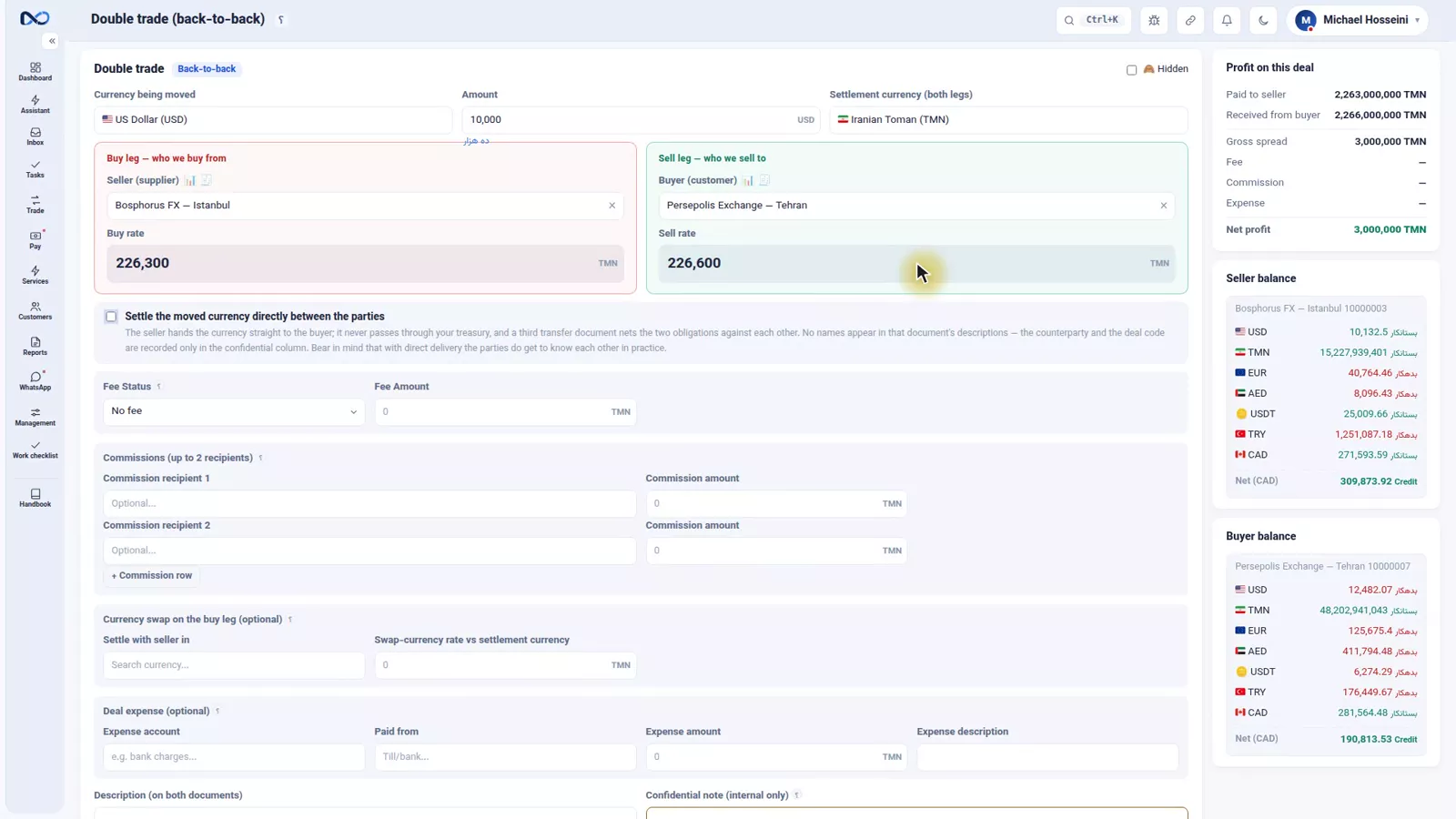
The direct settlement checkbox means the two sides settle with each other and the money does not pass through your hands. Fee, brokers' commission and costs come off this deal's profit and each has its own place on the form. Book the deal and Nexto creates two tied vouchers. Deals also get their own report: one row per deal, with outgoing, incoming, commission, cost and net profit.
The three anchor methods
Sell UAE Dirham and receive Turkish Lira and neither side is a Canadian Dollar. Profit still has to be computed in Canadian Dollars, so Nexto must give both sides a Canadian-Dollar value. That mechanism is the anchor, set in the settings. Take selling 10,000 UAE Dirham and receiving 133,000 Turkish Lira.
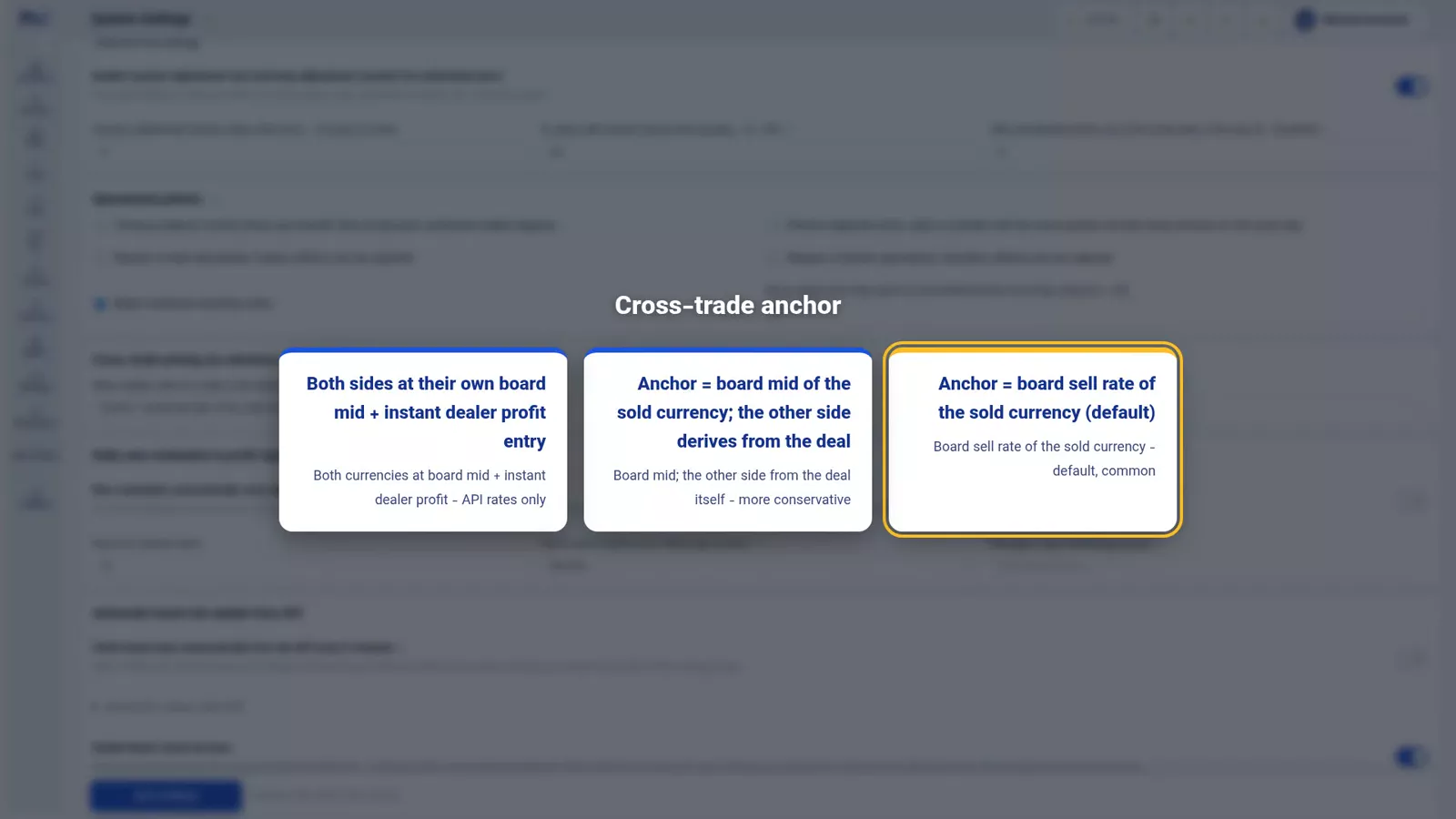
Method one, board sell. The dirhams you gave are converted at the board's dirham sell rate: 3,786 Canadian Dollars. The lira you received take no rate from the board; they enter your position at that same 3,786. Only the dirham side's profit is realised today, against its purchase average; any profit or loss on the lira side waits until you sell the lira or revalue at month's end.
Method two, board mid. The same, but using the mid of the board's buy and sell rates — a little more conservative.
Method three, both sides at mid. The dirham at its own board mid, the lira at its own board mid. If the Canadian-Dollar value of the lira you received exceeds that of the dirhams you gave, the gap is booked right then as dealer profit. More precise, but it needs a live board for both currencies, which is why it only turns on with an API rate.
None of the three is wrong. Pick one and do not change it, or profits from one month cannot be compared with another.
Everything leans on the board
Both of these profits lean on the rate board: edge vs board directly, trade profit indirectly, because the purchase average is built from trades whose rates were measured against that day's board. A stale board means imaginary profit — and imaginary profit means distributing profit that does not exist.
It is all summed at month's end in the profit-and-loss report, by currency pair — a report that opens only for a user with permission to see profit.
Tips and warnings
- Do not quote the edge-vs-board figure as profit. It says whether you sold well today, not what you paid.
- The reference currency has no position and produces no trade profit — it is the yardstick.
- A deal belongs on the double form; two separate trades give the money and none of the information.
- Fee, brokers' commission and costs belong in their fields on the deal form.
- Choose an anchor method once and leave it alone; method three only turns on with an API rate.
- Update the board every day. Every profit number inherits its errors.
Where to go next
The previous episode is cash trades, the till and cashier orders; next comes transfers, receipts and payments. Since everything here leans on the board, re-read the rate board and its guards; FX revaluation and closing the period settles an unrealised lira position, and where is the profit? puts trade profit beside the other sources.
FAQ
What is the difference between edge vs board and trade profit?
Edge vs board is your rate minus today's board rate, times the amount: whether you sold well against today's price. Trade profit is measured against the weighted average you actually paid. On one trade the two can point in opposite directions.
How does Nexto calculate my purchase price for a currency?
As a weighted average of everything you hold, in proportion to the amounts bought at each price. For example, 100 Dollars at 200,000 Toman and 300 Dollars at 220,000 give an average of 215,000 Toman.
Why does a trade in my reference currency show no trade profit?
Because the reference currency has no position — it is the yardstick every other currency is measured against, so there is no purchase average to compare a sale with.
What is a deal and why does it need the double form?
A deal is a buy and a sell of the same currency at the same moment, to two different parties. The double form creates two vouchers but ties them together, so the deal's profit stays separate instead of being smeared across your purchase average and two unrelated vouchers.
What is the anchor setting for?
For trades where neither side is your reference currency, such as selling UAE Dirham for Turkish Lira. It tells Nexto how to value both sides in the reference currency: board sell, board mid, or both sides at mid.
Full video transcript
Let's start this part with a confession: most exchange dealers, and even many accountants, mix up two things: the edge-vs-board profit, and the real trade profit. These two are different, and if you treat them as one, at month's end you'll see a number that doesn't exist. We saw edge vs board last time: your rate minus today's board, times the amount. It answers this question: compared with today's price, did I sell well or badly? It's a useful number, but it isn't profit, because it has nothing to do with what you yourself paid for that dollar.
Real trade profit comes from somewhere else: from the price you yourself paid for the dollar. If the dollar you sold today at 228,000 was one you bought last month at 218,000, the real profit on each dollar is 10,000 toman, not 1,400. But you didn't buy dollars once; you bought ten times at ten prices. So which is your purchase price? Nexto takes a weighted average: all the dollars you hold, in proportion to their amounts. Example: 100 dollars at 200,000, 300 dollars at 220,000, the weighted average comes to 215,000.
Nexto keeps this figure for each currency and calls it the position: how much of that currency you hold and at what average you bought it. Every buy shifts the average and every sell is measured against it. You do nothing; you just need to know profit comes from here. Now let's see it on a voucher. One note: the reference currency itself has no position, because everything is measured against it. So to see real profit, we sell a currency we hold a position in and that isn't the reference: ten thousand dirhams for toman, to Persepolis Exchange.
The amount is ten thousand, the rate 61,400 toman. And in the summary panel both figures sit together: edge vs board, and the trade profit. Notice they aren't identical, their direction isn't even alike: against today's board we sold slightly worse, yet the trade profit turns out positive, because our average buying price for the dirham was lower. A description, and record. The voucher page opens and we expand the entries. This time a row appears that wasn't there before: trade profit, the same six Canadian Dollars.
That very row is what gets summed, at month's end, in the profit-and-loss report. And a case that confuses many: a buy can create profit too. If you had earlier sold a currency you didn't have, gone short, as the market calls it, and now you buy to cover it, the profit or loss is realized at the moment of that buy. Nexto works this out on its own. And a case every dealer meets several times a day: the deal. You buy from one and sell to another at the same moment, you buy ten thousand dollars from Bosphorus FX at 226,300 toman and, at that very moment, sell them to Persepolis Exchange at 226,600 toman.
The dollars never even reach your holdings; you take with one hand and give with the other. The deal's profit is the profit of these two trades, not a weighted average. Because the dollars you bought and sold at the same moment never entered your position to be measured against the average. The difference between the sell and buy rates, three hundred toman, times ten thousand dollars: three million toman, minus fees, commission and costs. That's it.
Why a separate form? If you record two separate trades, the first dollar enters your average and then leaves; the profit is spread across two vouchers and you can no longer tell what this deal earned. The double form also creates two vouchers, but it ties them together and keeps the deal's profit separate. The double form: currency and amount, ten thousand dollars against toman. The seller, Bosphorus FX, at a buy rate of 226,300. The buyer, Persepolis Exchange, at a sell price of 226,600.
As you fill it in, the profit-on-this-deal panel computes live. The direct settlement checkbox means the two sides settle with each other and the money doesn't pass through your hands. Fee, brokers' commission and costs all come off this deal's profit and have their own place in this form. A description, and book the deal: Nexto creates two vouchers, tied together, and the voucher page opens. And every deal has its own report: deal profits, one row per deal, with outgoing, incoming, commission, cost and net profit.
I'll just point it out; we come back in the reports chapter. And that setting we skipped past in the settings part. When you sell dirhams and receive Turkish lira, neither side of the trade is a Canadian Dollar. Profit has to be computed in Canadian Dollars, so Nexto must assign a Canadian-Dollar value to both sides of the trade; the name for this is the anchor. Example: you sell ten thousand dirhams and receive one hundred thirty-three thousand lira.
It has three methods. Method one, board sell: the dirhams you gave are converted to Canadian Dollars at the board's dirham sell rate, that comes to 3,786 Canadian Dollars. The lira you received takes no rate from the board; it enters your position at that same 3,786. So today only the dirham side's profit, against its purchase average, is realized, and any profit or loss on the lira side waits until you sell the lira or revalue at month's end. Method two, board mid: the same thing, only instead of the sell rate, the mid of the board's buy and sell, a little more conservative.
Method three, both sides at mid: the dirham at its own board mid, the lira at its own board mid; if the Canadian-Dollar value of the lira you received exceeds the dirhams you gave, that gap is booked right then as dealer profit. It's more precise, but it needs a live board for both currencies, which is why it only turns on with an API rate. None is wrong; just pick one and don't change it, or profits across months can't be compared. And now the most important sentence: both of these profits lean on the board.
Edge vs board directly; trade profit indirectly, because the purchase average is built from trades whose rates were measured against that day's board. A stale board means imaginary profit, and imaginary profit means distributing profit that doesn't exist. And all of this is summed here at month's end: the profit-and-loss report, by currency pair. But this report opens only for someone who has permission to see profit, not every user who posts a voucher needs to see your margin.
To wrap up: edge vs board tells you whether you sold well; trade profit tells you what actually remained; profit comes from the weighted purchase average; a deal takes its profit right then from the opposite trade; pick an anchor method once and keep it fixed; and fix the board every day, or none of it means anything.
Try it yourself right now
A complete private demo with sample data — no installation, no credit card.
Create free demo