
The rate board and its guards
The Nexto rate board sets the buy, sell and mid rates every trade profit is measured against, plus automatic rates and the three guards that catch a wrong rate.
Watch this video on: YouTube
Most dealers think of the board as the thing that tells the customer today's price. In Nexto it has a second job, and that one matters more. Every trade you book has its rate compared with the board at that moment, and the gap between the two is written down as the profit on that trade.
That turns a housekeeping task into an accounting one. An old board does not just mislead a customer — it produces wrong profit on every document you enter that day. So the rule is short: refresh the board every morning before the first trade, even on a day when you expect to trade nothing at all.
This episode continues from settings, currencies and your first users: reading a board row, refreshing it by hand, wiring it to a rate source, and the three guards that stop a wrong rate before it becomes a voucher.
What you will learn
- How to read a board row: buy, sell, the mid price and the last refresh time
- How to update a rate by hand, and how to wire a currency to a rate source
- How the coefficient, the addend and the spread turn a market rate into your rate
- Why rounding matters on the board a customer looks at
- What the warning, the error and the unusual-profit guard each catch
The board itself
The board is one row per active currency: your buy rate, your sell rate, and the mid price worked out between the two — and it is the mid that trade profit is measured from, not the buy or the sell. The last column tells you when each rate was refreshed, which is the fastest way to spot a currency nobody has touched for a week.
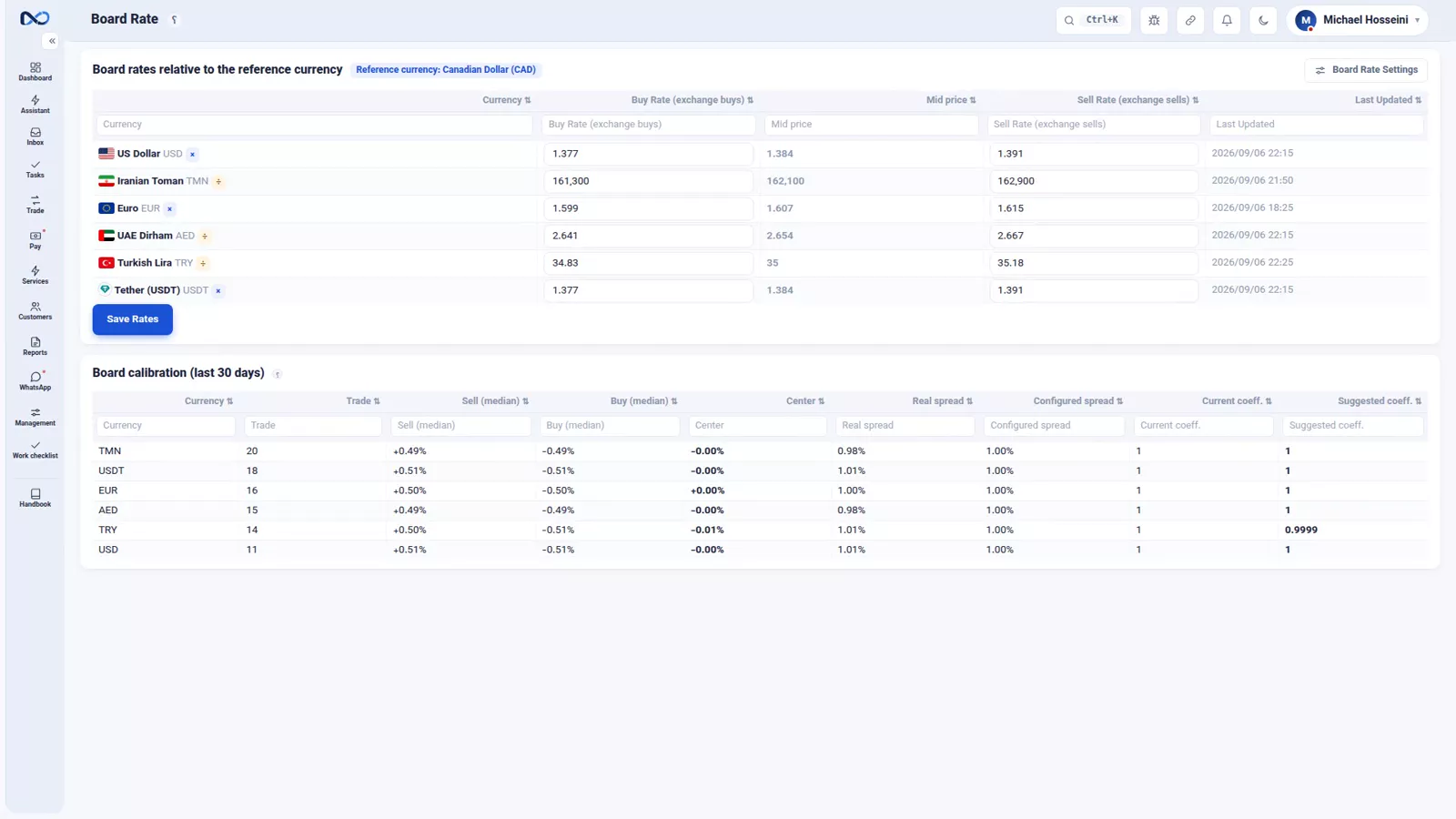
Refreshing a rate by hand is exactly as simple as it looks: change the number and save. In the demo office the Toman sell rate moves from 162,900 up to 163,300, and that is the whole operation.
Letting the board update itself
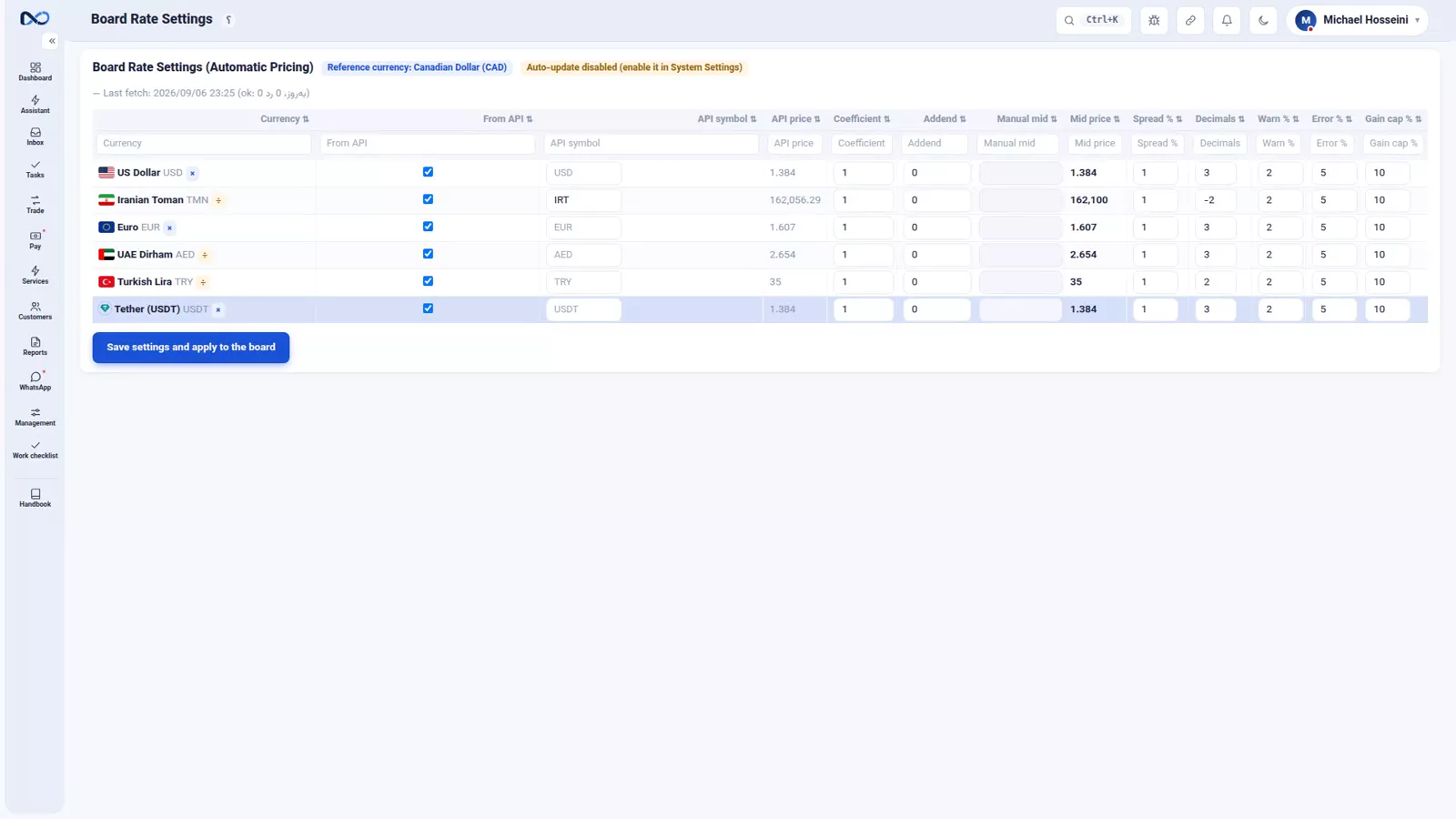
You do not have to type rates in every morning. In the board rate settings each currency can be wired to a rate source so that it refreshes on its own. But a market rate is not your rate, and the settings around it are what turn one into the other.
Coefficient and addend
The coefficient multiplies the market rate by a number of your choosing; the addend adds a fixed amount. If the market says 162,000 and you sell half a percent above that, the coefficient carries the difference every time the source updates.
Spread
The spread is the distance between your buy and your sell, as a percentage. Give it one percent and Nexto builds a buy half a percent below the centre and a sell half a percent above it. One number in, two rates out, and the pair stays consistent however often the market moves.
Rounding
Rounding keeps the board readable. Round the Toman to the nearest hundred so a customer is not shown a broken figure, and leave the small-unit currencies a few decimal places. Rounding is presentation, not accuracy: accuracy is the decimals setting on the currency itself.
The three guards
All three guards are a percentage distance from the board, and each catches a different kind of mistake: the warning, the error, and the unusual-profit warning. Typically the warning fires up to five percent away from the board and the error takes over beyond that.
A rate too far from the board
Start a trade — 5,000 US Dollars into Toman — and enter the rate deliberately wrong, at 258,000, about fourteen percent above the board. Nexto stops there and shows a red error saying the rate is too far from the board. This is the guard that catches an extra zero, or a rate typed in upside down, before it becomes a document.
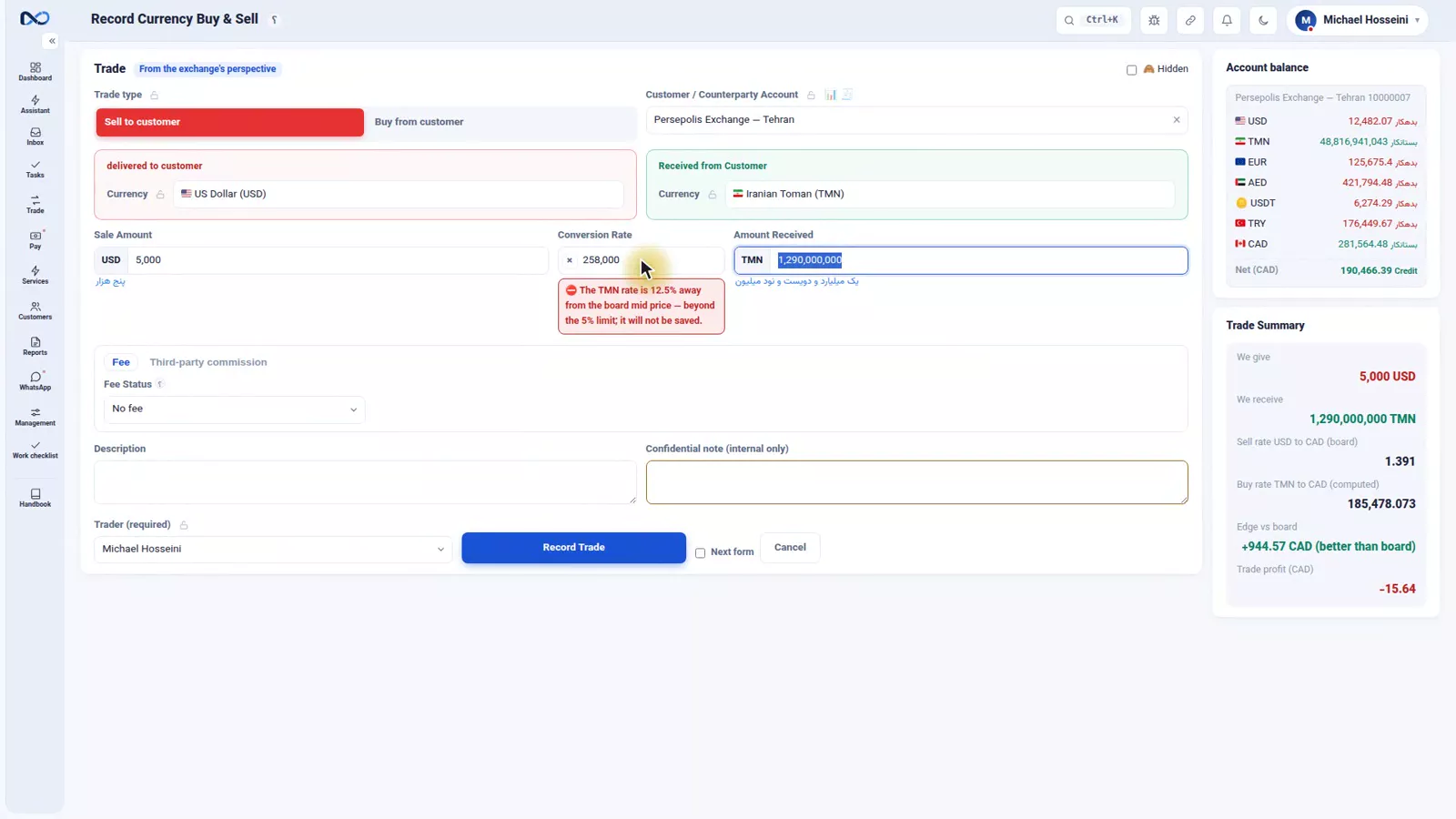
Put the rate right — 228,000, less than one percent above the board — and the error clears. The trade summary then shows the edge against the board with its number, so you see the margin you are taking before you commit. Booking the trade itself belongs to buying and selling currency.
The unusual-profit warning
The third guard is the one fewer people know about. If a trade shows more profit than that kind of trade normally does, Nexto says so. It is a hint about the board, not an accusation: unexpected profit usually means the board is out of date rather than that you have just made an extraordinary deal.
Tips and warnings
- Refresh the board before the first trade of the day, every day. Profit is measured against it whether it is current or not.
- The mid price is what profit is measured from, so moving only the sell rate moves the mid too.
- If you automate the rates, set the coefficient, addend and spread first. A raw market rate on your board means you are quoting at cost.
- Treat the red error as information, not an obstacle. It exists precisely for the rate you did not mean to type.
- When the unusual-profit warning appears, check the board before you celebrate. A stale rate looks exactly like a good day.
Where to go next
The previous episode, settings, currencies and your first users, covers the base settings, the currency list and the rate mode each currency needs before the board makes sense. Next is opening balances from the old ledger, which brings your existing balances in — and which needs a correct board, because the opening revaluation is priced from it. Once you are trading, where trade profit comes from picks up the board-versus-rate story in full, and buying and selling currency shows the trade this episode only started.
FAQ
Why does the rate board affect my profit?
Because every trade's rate is compared with the board at the moment it is booked, and the gap between the two is recorded as the profit on that trade. If the board is out of date, that recorded profit is wrong.
How often should I update the rate board?
Every morning before the first trade, and again whenever the market moves during the day. Refresh it even on a day with no trading, so the board never quietly becomes a week old.
What does the spread setting do?
It sets the distance between your buy and your sell as a percentage. A one percent spread builds a buy half a percent below the centre and a sell half a percent above it, so you enter one number and get both rates.
Why is Nexto blocking my trade rate?
Because the rate is further from the board than the error threshold allows — in the example, fourteen percent above it. The guard is there to catch an extra zero or a rate entered the wrong way round. Correct the rate and the error clears.
What does the unusual-profit warning mean?
It means a trade is showing more profit than that kind of trade usually does. In practice that is nearly always a sign the board has not been refreshed, so check the board before accepting the number.
Full video transcript
Most exchange dealers think the board is there to tell the customer what today's price is. But in Nexto the board has a second job, and it matters more: every trade you book has its rate compared with the board at that moment, and the gap between the two is written down as the profit on that trade. Which leads to one simple rule: an old board means wrong profit. So every morning, before the first trade, refresh the board — even on a day when you do no trading at all.
This is the board. One row for every active currency: your buy rate, your sell rate, and the mid price that is worked out between the two, which is what the profit is measured from. The last column tells you when each rate was refreshed. Refreshing it is as simple as this: you change the number and save. We take the toman sell rate from 162,900 up to 163,300. You do not have to type them in by hand. In the board rate settings you can wire each currency to a rate source so that it refreshes itself.
But the market rate is not your rate — so there are a few more settings, and they are what turn the market rate into yours. The coefficient and the addend: you tell it to multiply the market rate by such-and-such a number, or to add such-and-such an amount to it. For instance the market says 162,000 and you sell half a percent above that. The spread: the distance between buy and sell, as a percentage. One percent means the software builds a buy half a percent lower and a sell half a percent higher, all by itself.
You give one number, you get two rates. And the rounding: round the toman to the nearest hundred so the board does not show a broken figure; the small-unit currencies keep a few decimal places. And now the part this episode takes its name from. Three numbers that catch three kinds of mistake, and all three of them are a percentage distance from the board: the warning, the error, and unusual profit. Let us see what that looks like in practice. We start a trade: five thousand dollars into tomans.
The board's cross rate for that pair — dollars into tomans — is about two hundred and twenty-seven thousand. We get the rate deliberately wrong — two hundred and fifty-eight thousand, about fourteen percent above the board. And right there the software stops: a red error saying the rate is too far from the board. This is the thing that catches an extra zero, or a rate entered upside down. We put the rate right: two hundred and twenty-eight thousand, less than one percent above the board.
The error goes away, and in the trade summary the edge against the board is shown with its number. We are not going to book this trade — that is the subject of the buying-and-selling episode. And the third guard, the one fewer people know about: the unusual-profit warning. If a trade shows more profit than it normally would, it says so — because unexpected profit usually means the board is out of date, not that you are a genius. Refresh the board every morning; if you automate it, put your own coefficient and spread on top of it; and keep the guards switched on.
Real profit starts right here. Next episode: we bring your balances in from your old books.
Try it yourself right now
A complete private demo with sample data — no installation, no credit card.
Create free demo