
Customers and accounts: categories, limits and groups
How to create a customer in Nexto, pick the right account category, add names in other scripts, set a credit limit, and deactivate instead of deleting.
Watch this video on: YouTube
An account is the most basic thing in Nexto. Every voucher you post connects two accounts, and every report you read is built out of them. A customer, your till, the bank, a crypto wallet, a partner's capital, the rent you pay — all of them are accounts, and what separates them is the category you pick when you create them.
This is the last episode of the day-one chapter. Opening balances from the old ledger moved your existing numbers into Nexto; this one is about the records those numbers hang on: how to create a customer, which optional fields are worth the extra minute, and what to do with a customer who stops trading with you.
What you will learn
- What the account categories are, and where each one lands in your reports
- How to create a customer account and which optional fields are worth filling in
- How to store a customer's name in another script, and use the same panel for nicknames
- How a credit limit warns you later, at the moment you post a voucher
- Why an account is deactivated and never deleted
Accounts and their categories
Accounts in Nexto come in categories: customer, cash box, bank, digital wallet, capital, asset, expense and income. Nexto creates some of them from the start — the trading profit account and the fee account, for example — but in every category you can still build a fresh account of your own.
The difference between the categories shows up in the reports. Cash box, bank and wallet accounts are your money. A customer account becomes your receivables and payables. Capital is the partners' share. Expense and income flow into profit and loss. Get the category wrong and none of your figures are wrong either — they simply end up in the wrong place.
The customer list
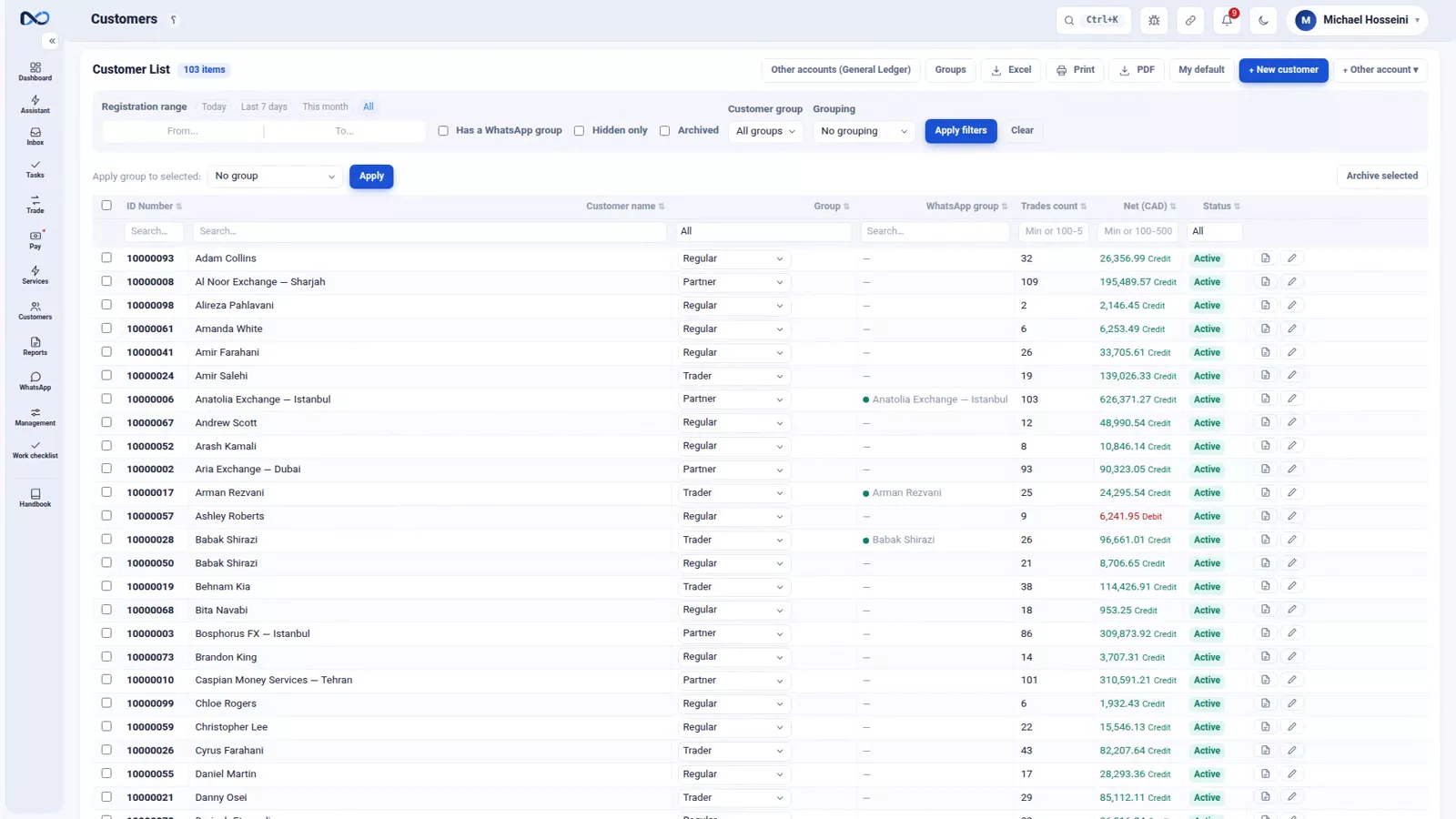
The customer list is a small report in its own right. Each row carries the ID number, assigned automatically, the group, the customer's WhatsApp group, the number of trades, the net of their account in your reference currency, and the status.
Creating a customer, step by step
Step 1 — Choose the account type
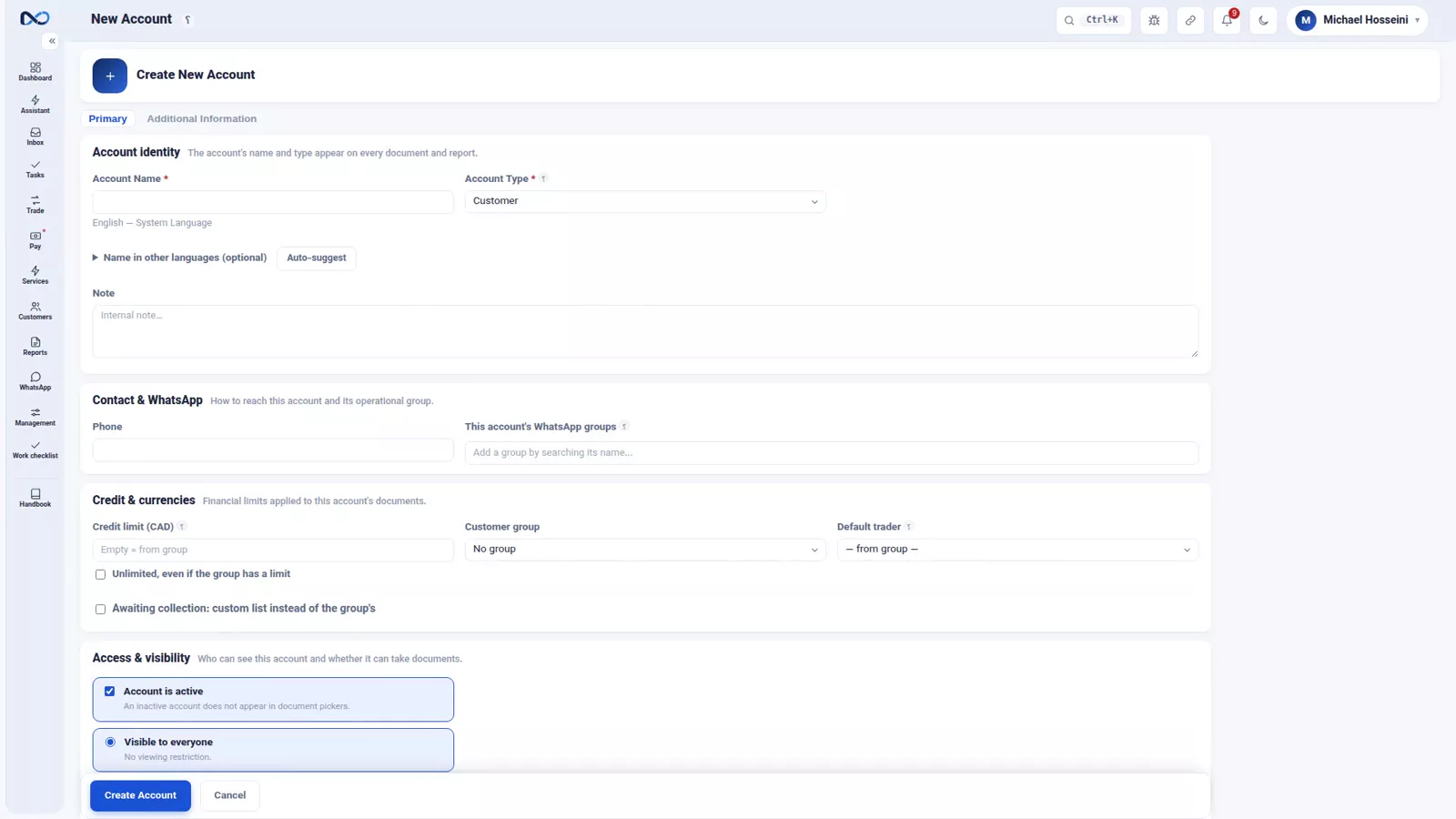
The first choice on the new account form is the account type. Customer, cash box, bank, wallet, capital and asset are created right here. Accounts in the remaining categories, such as expense or income, are created from the general ledger instead. For an ordinary customer, pick Customer.
Step 2 — Name, phone and internal note
The only required field is the name. The rest are optional, but two repay the effort immediately: the phone number, which WhatsApp and quick searches run on, and the internal note, for something only your own staff should know.
Step 3 — Add the name in other languages
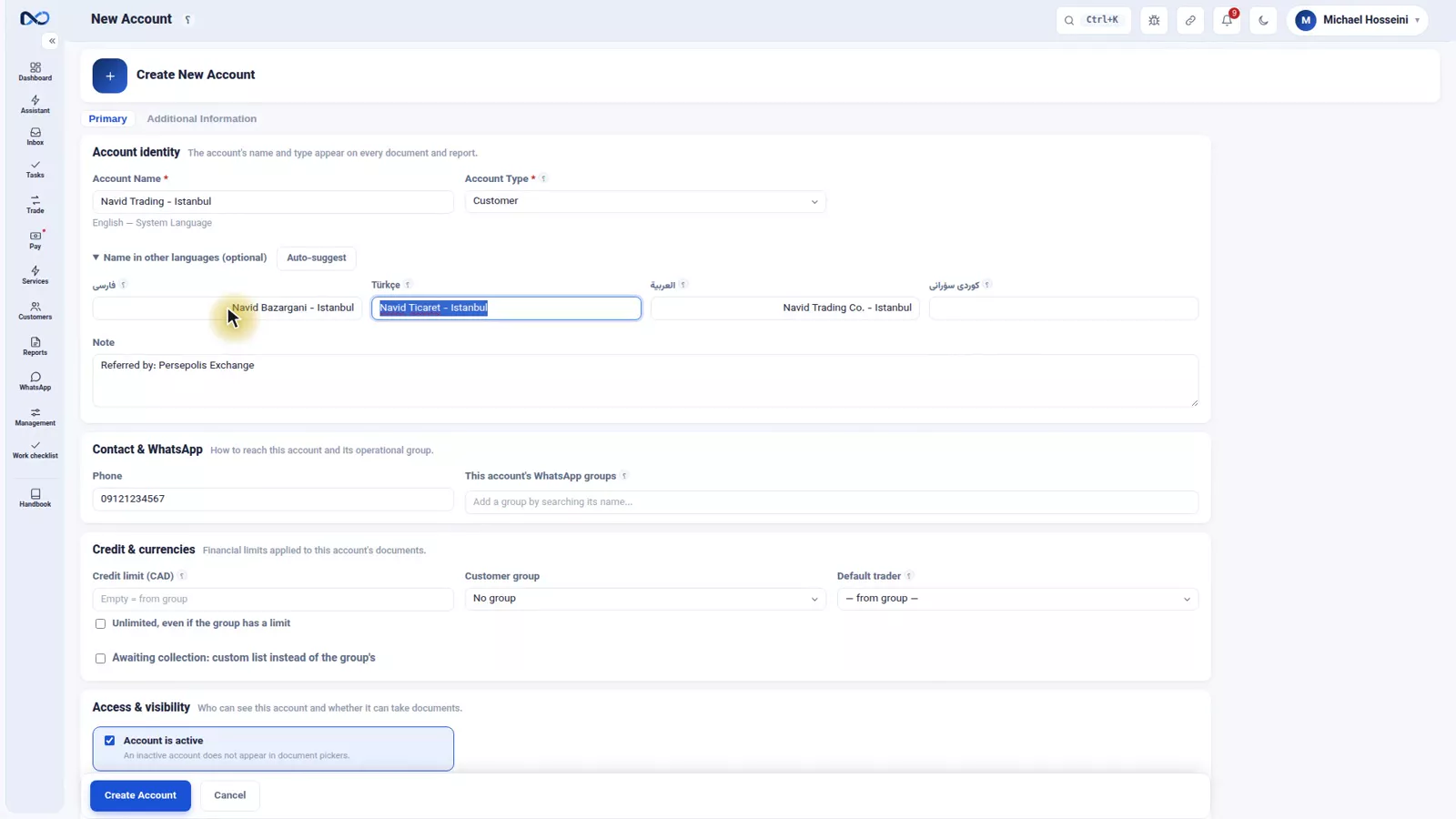
The panel for names in other languages is for exchanges that work across borders. Set a customer's name in another script — in the recording, the Turkish and the Arabic spelling — and any document or message in that language uses that name.
The same panel hides a useful trick. If you also know a customer by a nickname, type the nickname into one of these boxes. Search scans every language, so the nickname finds them too.
Step 4 — Set a credit limit
The credit limit is the most this customer is allowed to owe you. It blocks nothing here; it comes back later, when you post a voucher and Nexto tells you the customer has gone over it. For a new customer set a low limit — raising it afterwards takes a minute.
Step 5 — Pick a group
Customer groups are yours to define; in the recording they are Trader, Regular and Partner. The benefit arrives later: you can pull a separate report for each group, or apply one setting to a whole group at once.
Step 6 — Decide the visibility level
A normal account is visible to everyone. A hidden account is visible only to users who hold the permission to see hidden accounts. It is for partners' personal accounts and other sensitive records, not a general habit.
Step 7 — Create
Press Create and the account exists, with its own ID number. From that moment you can post vouchers to it.
Accounts that are not created on this form
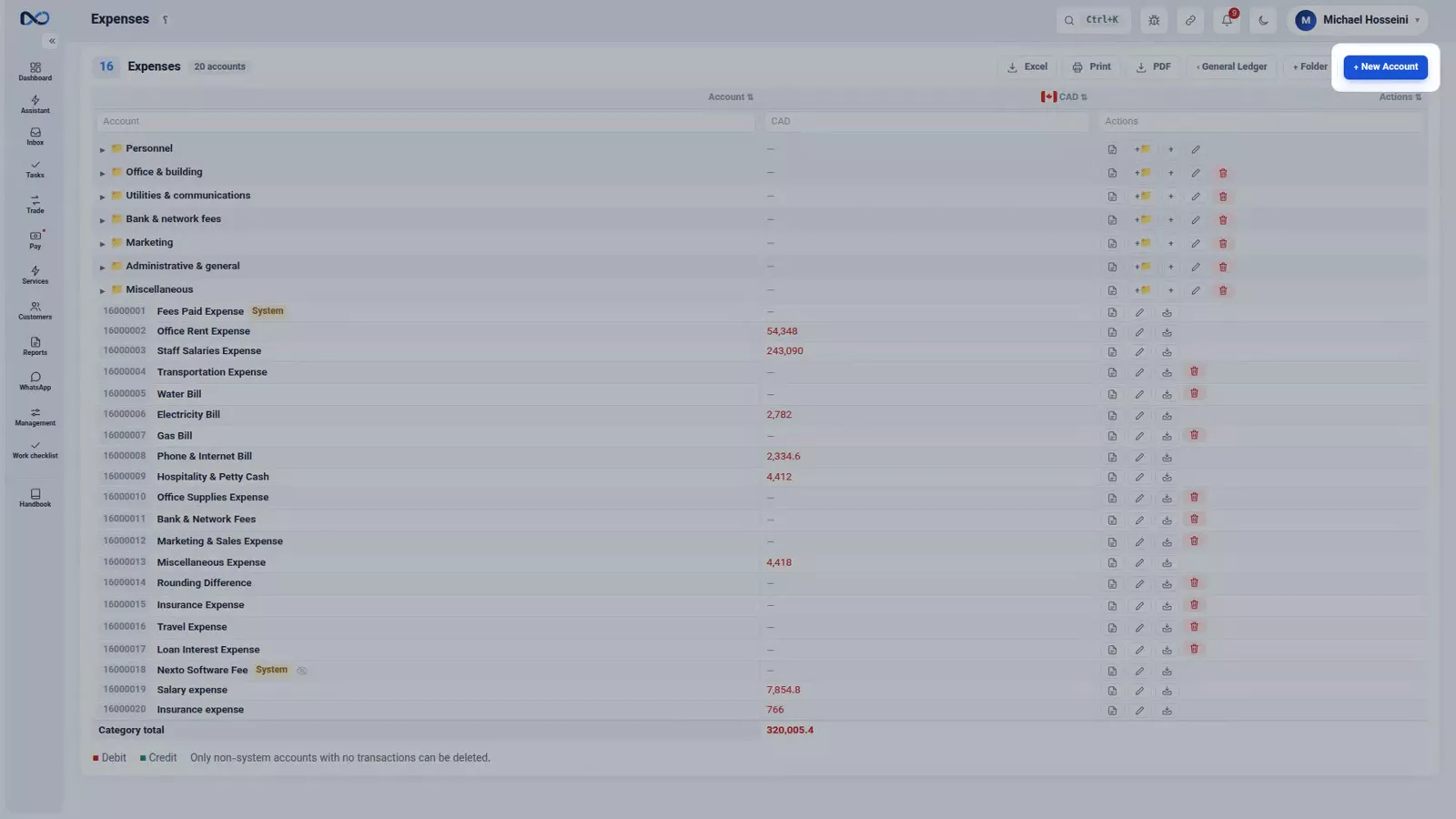
For an account in one of the remaining categories — a new expense heading, say — go to the general ledger, open that category and use New Account there. It is the same form, with the category already chosen for you.
Deactivate, never delete
An account is not deleted in Nexto. If a customer no longer works with you, deactivate them: they leave the lists and the pickers you use when posting, and their history stays where it was. Deleting them would orphan every voucher they appear in, so Nexto does not allow it.
In practice it is one checkbox: open the account's edit page and uncheck Active. When they come back, check it again.
Tips and warnings
- If you are unsure of the type, ask where you want to read this number later: in your cash position, in your receivables, or in profit and loss.
- Fill in the phone number even for customers you never message. Search and WhatsApp both rely on it.
- Set the credit limit while you are creating the account. A limit you meant to set is worth nothing at the moment the voucher is posted.
- Never delete a customer to tidy the list. Deactivate them: the list gets shorter, the ledger stays intact.
Where to go next
The previous episode, opening balances from the old ledger, gets your old numbers into Nexto. Next comes the one everything has been building towards: buying and selling currency, where a customer, two currencies and a rate turn into a voucher. The permission behind hidden accounts belongs to users, permissions and two-step sign-in, and each customer's WhatsApp group is put to work in WhatsApp: groups, templates and the send queue.
FAQ
What are the account categories in Nexto?
Customer, cash box, bank, digital wallet, capital, asset, expense and income. The category decides where the account appears in your reports: your money, your receivables and payables, the partners' share, or profit and loss.
Which fields are required when I create a customer?
Only the name. The phone, the internal note, the other-language names, the credit limit, the group and the visibility level are all optional — but the phone, the limit and the group are worth setting straight away.
What does the credit limit actually do?
It is the maximum this customer is allowed to owe you. Nexto does not stop you at the account form; it warns you later, when you post a voucher that takes the customer past the limit.
Can I delete a customer I no longer trade with?
No. Deleting would orphan their vouchers, so Nexto does not allow it. Deactivate them instead: they leave the lists and pickers, their history stays, and one checkbox brings them back if they return.
Full video transcript
An account is the most basic thing in Nexto: every voucher connects to two accounts, and every report is built from them. Accounts come in categories: customer, cash, bank, digital wallet, capital, asset, expense, and income. Nexto creates some for you from the start, such as trading profit or the fee account, yet in each category you can still build a fresh account. So where does the difference show up? In the reports. Cash, bank and wallet become your money, a customer becomes receivables and payables, capital becomes the partners' share, and expense and income flow into profit and loss.
Get the category wrong and the numbers are right but end up in the wrong place. This is the customer list, and it's a small report in itself: the ID number, assigned automatically, the group, the customer's WhatsApp group, the number of trades, the net of their account in the reference currency, and the status. Let's make one. The first choice is the account type. Customer, cash box, bank, wallet, capital and asset you create right here; accounts in other categories, like expense or income, you make from the general ledger, inside that category.
For an ordinary customer, Customer. The only required field is the name. The rest are optional but worth filling in: the phone for WhatsApp and search, the internal note for something only you should know. The names-in-other-languages panel is for international exchanges: set a customer's name in another script and any document or message in that language uses it. We fill in the Turkish spelling and the Arabic one. And a handy trick: if you also know a customer by a nickname, type it into one of these boxes, search scans every language, so the nickname finds them too.
The credit limit: the most this customer is allowed to owe. Later, when you post a voucher, the software itself warns you that they've gone over it. For a new customer set a low limit; raising it takes a minute. The customer group: you define the groups yourself, here Trader, Regular and Partner. The benefit shows up later: you can pull a separate report for each group, or apply one setting to a whole group at once. And the visibility level: a normal account is visible to everyone; a hidden account only to users who have permission to see hidden accounts.
For partners' personal accounts or sensitive ones. Create, and the account is made, with its own ID number. From this moment you can post vouchers to it. And if you want an account in another category, say a new expense, you go to the general ledger, the expense heading, and New Account. Same form, only the category is pre-selected. And the last point, which matters: an account is not deleted. If a customer no longer works with you, deactivate them, they leave the lists and pickers but their history stays.
Deleting would orphan their vouchers, and Nexto won't allow it. In the account's edit page, just uncheck Active, that's it. Whenever they come back, check it again. Get the account type right, fill in the name and phone, set the credit limit and group from the start, and deactivate instead of deleting. Next chapter we move to the daily work: your first buy and sell.
Try it yourself right now
A complete private demo with sample data — no installation, no credit card.
Create free demo