
Crypto and Tether, from wallet to voucher
How Nexto treats Tether as an ordinary currency, records an on-chain transaction from its hash, AML-checks the counterparty's address, and reconciles your crypto wallet against the blockchain.
Watch this video on: YouTube
Most exchange offices now take Tether alongside the US Dollar, the UAE Dirham and the Iranian Toman, and the usual worry is that crypto needs a second set of books. It does not. In Nexto, Tether is a currency like any other: you buy it, you sell it, you carry a position in it, and its profit is worked out with the same weighted average as everything else. Trading Tether against the Dollar uses the form you already know from buying and selling currency.
What is genuinely different is the money movement. Bank money arrives with a slip and you decide whether to believe it. Crypto money arrives on a network that has already recorded the whole transaction, and you can check it yourself. This episode is about that difference: the wallet as an account, recording a transaction from nothing but its hash, and the two guards that keep a fake token or a double entry out of your ledger.
What you will learn
- Why a Tether wallet is just another account, with a balance, a statement and a place in the treasury book
- How to record an on-chain transaction by pasting its hash
- What Nexto reads from the network for you, and the one field you still have to fill in
- How to AML-check the counterparty's address before the voucher is posted
- Why the currency is identified by the token contract address and never by its name
- How the duplicate-hash guard stops the same deposit being counted twice
- How to read the warning when your wallet balance and the blockchain disagree
The wallet is an account
An account from the digital wallet category
Your Tether wallet in Nexto is an account, created from the digital wallet category. It has a balance, a statement, and a place in the treasury book and the reports, exactly like a cash box or a bank account. Nothing about it is special-cased, which is why every report you already use keeps working once crypto is in the picture.
The address makes it yours
There is one thing you record for a wallet that you do not record for a cash box: when you create the account, you also enter the network and the wallet address. That address is what later tells Nexto which end of a transaction is yours, so get it right at creation time.
Recording an on-chain transaction
Your customer has sent you Tether and has given you nothing but a string of characters. That string is the transaction hash, and it carries everything: which network, which currency, how much, into which wallet, and whether the network has confirmed it.
Step 1 — Paste the hash
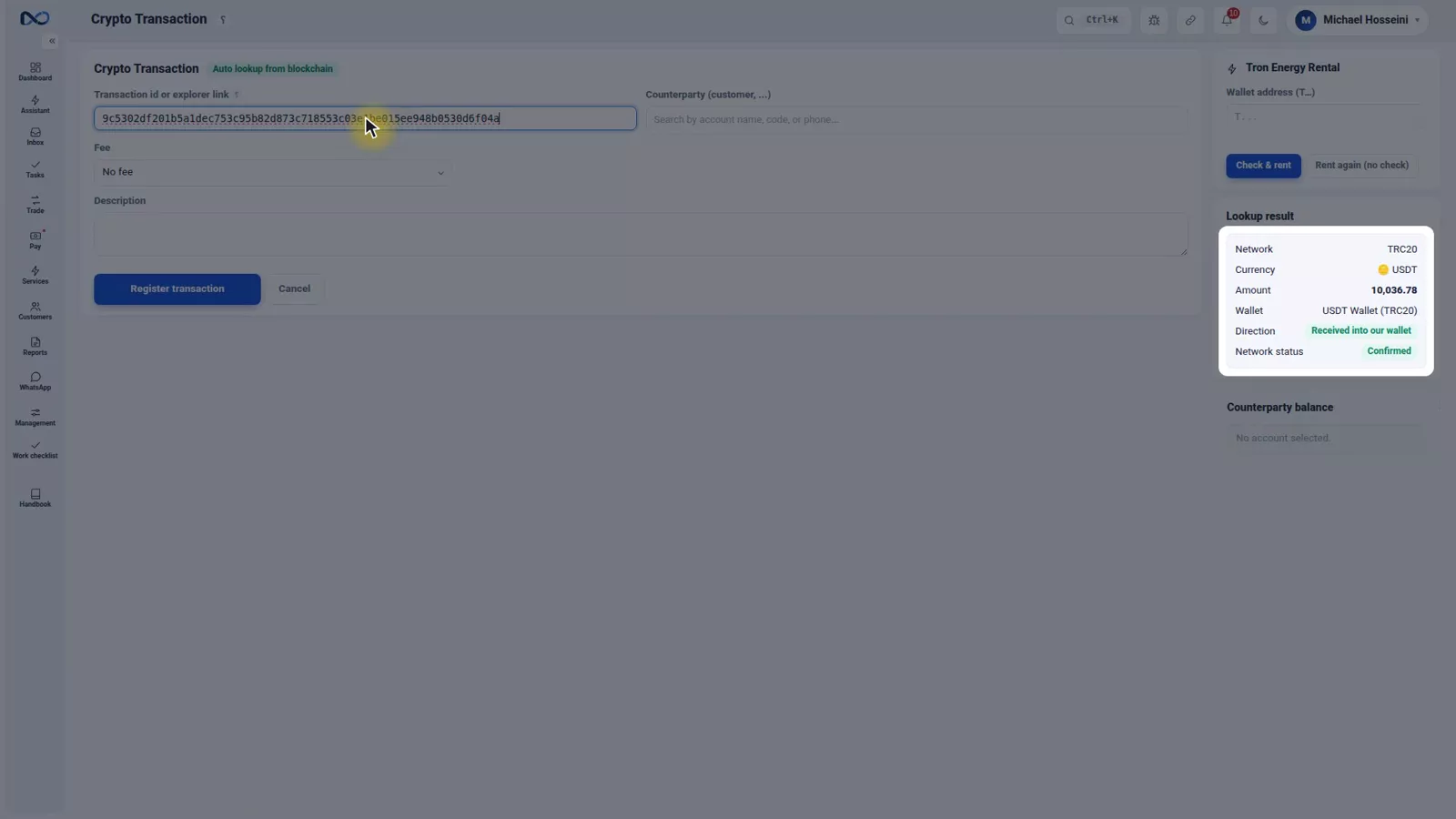
Open the crypto transaction form and paste the hash into its box. You do not tell Nexto the network or the currency; it works that out from the hash itself and queries the network directly.
Step 2 — Read what came back
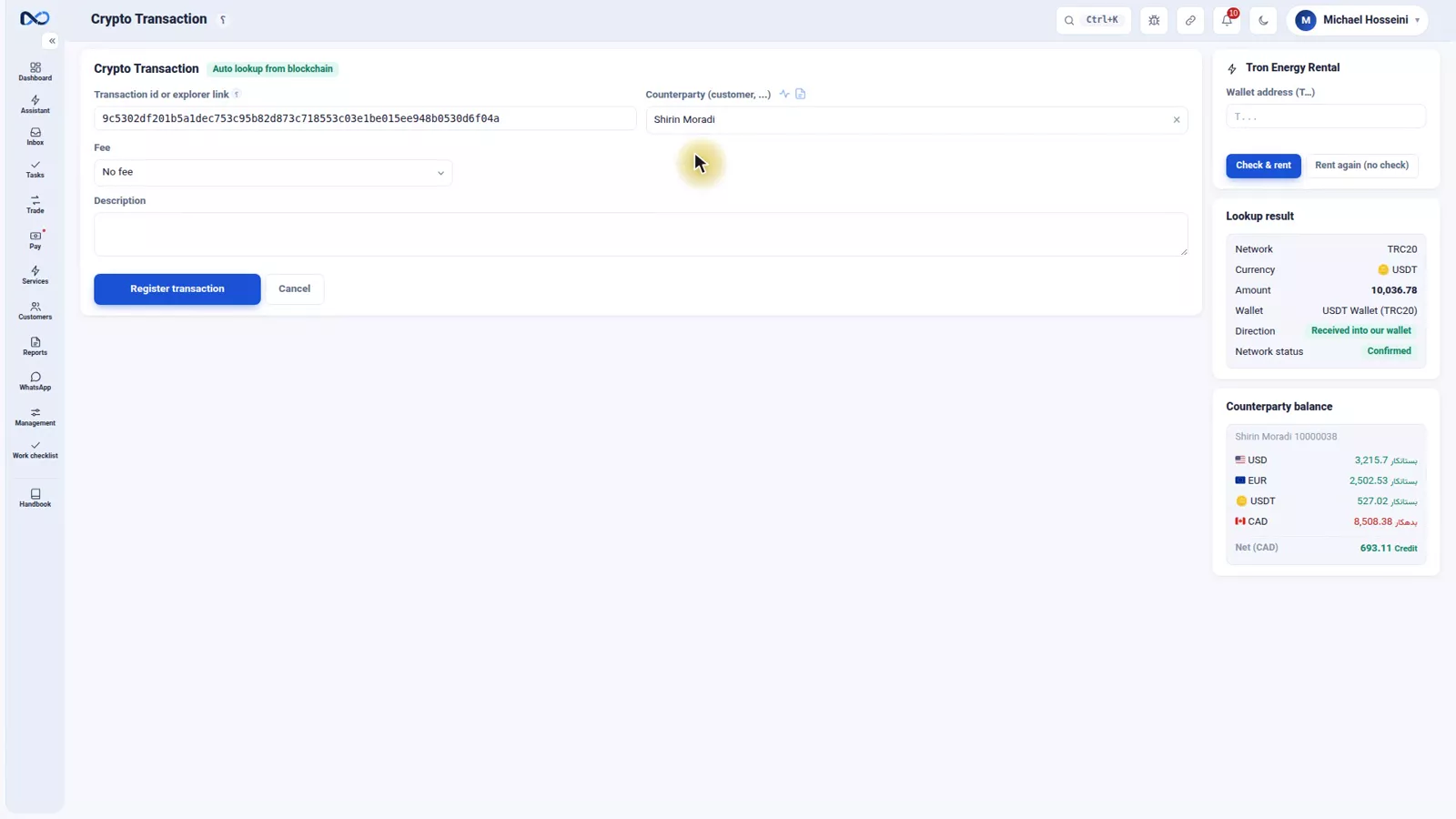
The lookup returns both ends of the transaction. Nexto sees which end matches your own wallet address and shows it under its own name — USDT Wallet in the recording — and from that works out the direction: a receipt into your wallet. The network, the currency, the amount and the chain's confirmation are filled in as well. You typed none of it.
Step 3 — Name the counterparty
There is exactly one thing the network cannot tell you: who the money belongs to. Pick the customer — in the recording, Shirin Moradi. That is the only judgement you have to make on this form.
Step 4 — AML-check the crypto address
Before you record it, there is something that can be done right here: next to the lookup result sits a button called "AML check counterparty". Press it and the sender's address goes to the service, and within seconds the risk score, the risk level, the address label and the flags on record come back — right here, before anything is posted to the ledger. If that address has a history with a mixer, a sanctioned entity or a hack, you see it before the voucher exists. And never read the number alone: the score can be low while the flags say this address has had indirect contact with somewhere high risk. The same address a second time comes from the cache and takes nothing off your credit.
Step 5 — Fee, description, register
The fee field works like the one on a transfer: the fee you charge the customer for this transaction, or one you pay them, with an amount and a currency. The network fee the blockchain itself took is a different thing and has nothing to do with this box. In the recording there is no fee. Add a description and press the register button, which only becomes active once the lookup has completed — so nothing can be recorded without the network's confirmation behind it.
Step 6 — Check the voucher
The voucher posts with two sides, exactly like a transfer: your USDT Wallet and the customer account. The hash stays on the voucher as the tracking code, so the transaction can be verified on the network at any time.
Wallet against chain
On the same page, after every entry, Nexto measures the balance of that wallet against what the blockchain says. If the two disagree, the warning tells you how much the ledger says, how much the chain says, and the hashes of the transactions that exist on the network but are missing from your ledger.
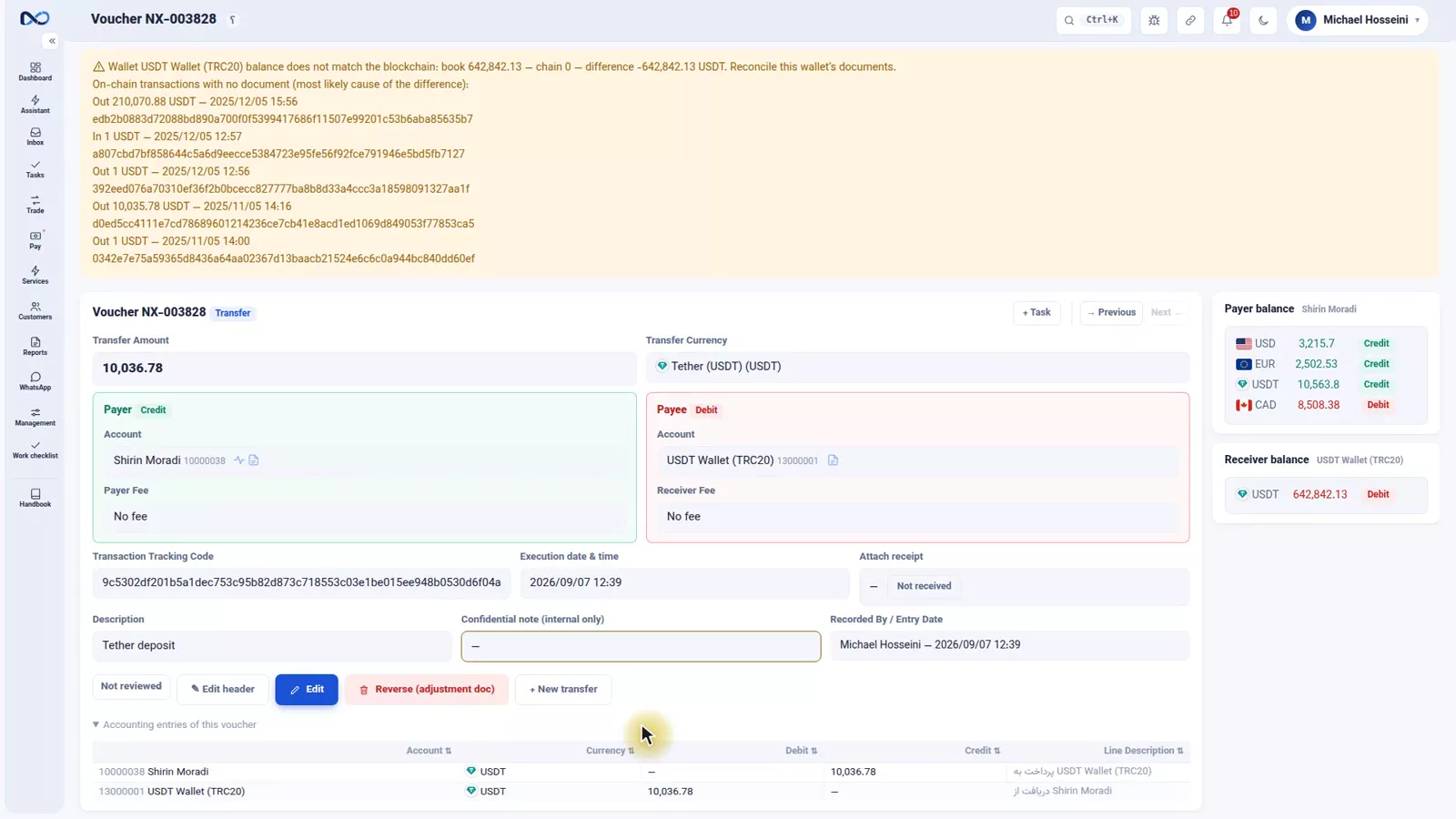
In the recording the two do not match, because the demo wallet borrows its address from a real wallet. In real work this warning means one thing: you have missed a transaction. The value of it is timing — you find out the same day, not at month end when nobody remembers what happened.
Two guards
A hash can only be recorded once
Paste the same string a second time and the lookup will run, you can name the counterparty and press save, and Nexto refuses it: this transaction has already been recorded. One deposit is never counted twice.
The currency is the contract, not the name
This is the important one. On the network there are dozens of tokens whose name is Tether or something close to it, and that is the common scam: a token whose name reads exactly USDT but whose contract is something else and whose value is zero, a token called UDST with two letters swapped, or USD Coin, which is a different currency altogether. Somebody sends you one of those, your wallet shows the name Tether, you count it as Tether and you hand over the Toman.
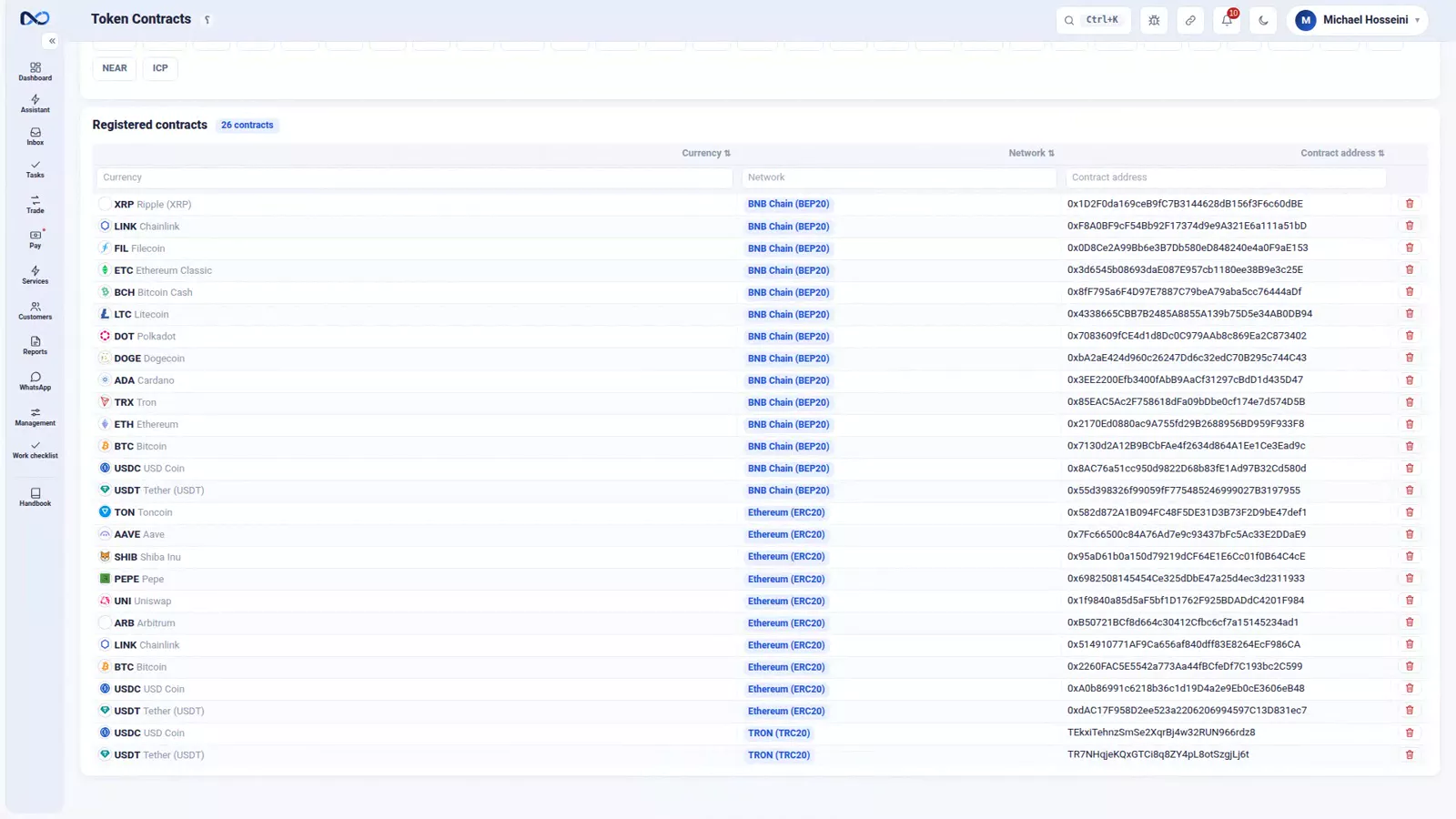
Nexto identifies the currency by the address of the token contract, not by the name. Anything arriving from a different contract address does not count as Tether, whatever it calls itself. A person almost never reads a contract address, and reading it would tell them nothing. This is a job only a machine can do.
The token contracts page
The official contract address for each crypto currency on each network is already in place on the token contracts page; all you do is say which ones are active. By default only Tether is on, and for most exchange offices that is enough. The threshold for the wallet-versus-chain warning is on this page too.
Tips and warnings
- Enter the network and the wallet address correctly when you create the wallet account. If the address is wrong, Nexto cannot tell which end of a transaction is yours.
- The register button stays inactive until the lookup finishes. If it will not light up, the problem is the lookup, not the form.
- The fee box is your fee to the customer. Never put the blockchain's own network fee there.
- Run the AML check on an incoming address before you register, not after. The whole value is in seeing the flags before the voucher sits in the ledger — and in reading the flags, not just the score.
- Do not judge an incoming token by the name shown in a wallet app. Only the contract address decides whether it is Tether.
- Treat the wallet-versus-chain warning as work to do today. Every hash it lists is real on the network and missing from your books.
- Trading Tether needs nothing new: the ordinary trade form, and the same position and profit rules as any other currency.
Where to go next
The previous episode, cheques, covers the other instrument that is both there and not there. Next is expenses, group documents and manual entries. If the trading side of Tether is what you need, go back to buying and selling currency and where trade profit comes from — Tether behaves exactly as they describe.
FAQ
Is Tether a separate module in Nexto?
No. Tether is a currency like any other: you trade it on the ordinary trade form, it carries a position, and its profit is calculated with the same weighted average as the US Dollar or the UAE Dirham. Only the movement of the money is different, because it happens on a network.
How do I record an incoming Tether payment?
Open the crypto transaction form, paste the transaction hash, wait for the lookup, then pick the customer the money came from and register it. Nexto reads the network, the currency, the amount, the direction and the confirmation from the chain itself.
What is a transaction hash?
It is a transaction's unique identifier on the network. That one string establishes which network it was on, which currency moved, how much, into which wallet, and whether it is confirmed. Nexto keeps it on the voucher as the tracking code.
How does Nexto stop a fake USDT token being booked as Tether?
It identifies the currency by the token contract address, not by the token's name. Anything arriving from a different contract address does not count as Tether, whatever it is called. The official addresses are already loaded on the token contracts page.
What happens if I paste the same hash twice?
Nexto refuses the entry and tells you the transaction has already been recorded, so one deposit is never counted twice.
My wallet balance does not match the blockchain. What now?
Nexto shows how much the ledger says, how much the chain says, and the hashes that are on the network but not in your ledger. Work through those hashes and record the missing ones; the difference normally means a transaction was missed.
Full video transcript
So far we have seen the US Dollar, the UAE Dirham and the Iranian Toman. Tether is a currency in Nexto too, like the rest: you buy it, you sell it, you carry a position, and its profit is worked out with the same weighted average. Trading Tether against the Dollar is the same form as episode eight and there is nothing new in it. What is new is this: Tether money moves on a network, and the network has already recorded everything. With bank money you look at the slip and you believe it.
With crypto you do not have to believe anything; you can check it yourself on the network. Every transaction has a unique identifier, it is called a hash, and that one string tells you everything: which network, which currency, how much, into which wallet, and whether the network has confirmed it or not. And your wallet in Nexto is an account, from the digital wallet category: it has a balance, it has a statement, it appears in the treasury book and in the reports - just like a cash box or a bank.
There is one difference: when you created this account, you also recorded the network and the address of your wallet. It is that address that later tells Nexto which end of each transaction is yours. Your customer has sent you Tether and has given you nothing but a string. This is the crypto transaction form: into this box you paste the hash. You do not have to say which network it is or which currency; Nexto works it out from the hash itself and queries the network directly.
This is the result of the lookup. The network gives both ends of the transaction; Nexto sees which end is our wallet address and shows it under its own name: USDT Wallet. From that it works out the direction: a receipt into our wallet. The network, the currency, the amount and the confirmation from the chain are all right here too. You typed none of it. The only thing you have to say yourself is which customer this money came from: Shirin Moradi.
And the most important point of this episode: Nexto does not identify the currency by its name. The currency is recognized from the address of that token contract on the network - why, in a moment. The fee: just like a transfer, it means we charge the customer a fee for this transaction or we pay them one; you give the amount and the currency. The network fee that the blockchain itself took has nothing to do with this. Here there is no fee. A description, and Register transaction; this button only becomes active once the lookup is complete - so that nothing is recorded without the network confirmation.
The voucher is booked. Our USDT Wallet and the Shirin Moradi account are the two sides of it - exactly like a transfer. The hash stays on the voucher as the tracking code, so you can check it on the network whenever you want. And one more thing on this same page: after every entry, Nexto measures the balance of this wallet against what is on the blockchain. Here, because our wallet is a sample and we borrowed its address from a real wallet, the ledger and the chain do not agree, and it warns you: how much the ledger says, how much the chain says, and the hashes of the transactions that are on the network but not in the ledger.
In real work this warning means you have missed a transaction - and you find out the same day, not at the end of the month. The second guard: every hash can be recorded only once. We paste the same string again; the lookup runs, we name the counterparty, we save - and Nexto says: this transaction has already been recorded. Which means one deposit is never counted twice. And now that why. On the network there are dozens of tokens whose name is Tether or something close to it.
This is the common scam: a token whose name is exactly USDT but whose contract is something else and whose value is zero; a token called UDST with two letters swapped; or USD Coin, which is a different currency altogether. Somebody sends you a token like that; in your wallet you see the name Tether, you count it as Tether and you hand over the Toman. Nexto identifies the currency by the address of that token contract - the same address we have put there for you on the contracts page; anything with a different address, whatever it is called, does not count as Tether.
A person almost never reads a contract address, and even if they did, it is a long string that tells them nothing. This is a job only a machine can do. Here it is: Token Contracts. For every crypto currency, the official contract address on each network is already in place, and all you do is say which ones are active. By default only Tether is on; for most exchange offices that is enough. Any transaction that does not match this address does not count as Tether, whatever it is called.
And the threshold for the wallet-versus-chain warning is here as well. To sum up: Tether is a currency like any other, a wallet is an account like any other - with the address you recorded when you created it. To move money on the network: paste the hash, name the counterparty, save. The currency is identified by the contract address, not by the name; a duplicate hash is never recorded; and take the wallet reconciliation warning seriously, so that your ledger and the network stay the same.
Try it yourself right now
A complete private demo with sample data — no installation, no credit card.
Create free demo