
Expenses, group documents and manual entries
How to record office costs in Nexto with the expense form, pay several accounts at once with a group document, and use the compound manual entry safely.
Watch this video on: YouTube
Office rent, staff salaries, hospitality, the electricity bill. None of these is a trade, but the money still leaves your accounts and it still has to be recorded somewhere. Every payment covered so far in this course put a customer into debit. An expense is the case where nobody is put into debit at all.
That is the whole idea of this episode: with an expense the source does not matter — cash box, bank, any account will do — and the destination is what matters. The money lands in an expense account, and that debit never comes back to you. It was spent and it is gone. Which is also why unrecorded expenses are dangerous: your profit report shows a number that is not actually in your pocket.
This episode covers three ways to book money going out: the ordinary expense form, the group document for several payments at once, and the compound manual entry for the cases nothing else fits.
What you will learn
- How to record an expense and why no customer is charged for it
- What expense categories are, which ones ship with Nexto, and how to add your own
- How a group document pays several accounts from one fixed account in a single voucher
- Why the automatic total on a group document is a balance guard, not a convenience
- When to use the compound manual entry, and the single rule it enforces
- Where all of this shows up in the Profit and Loss report
Recording an expense
Step 1 — Say what it is for
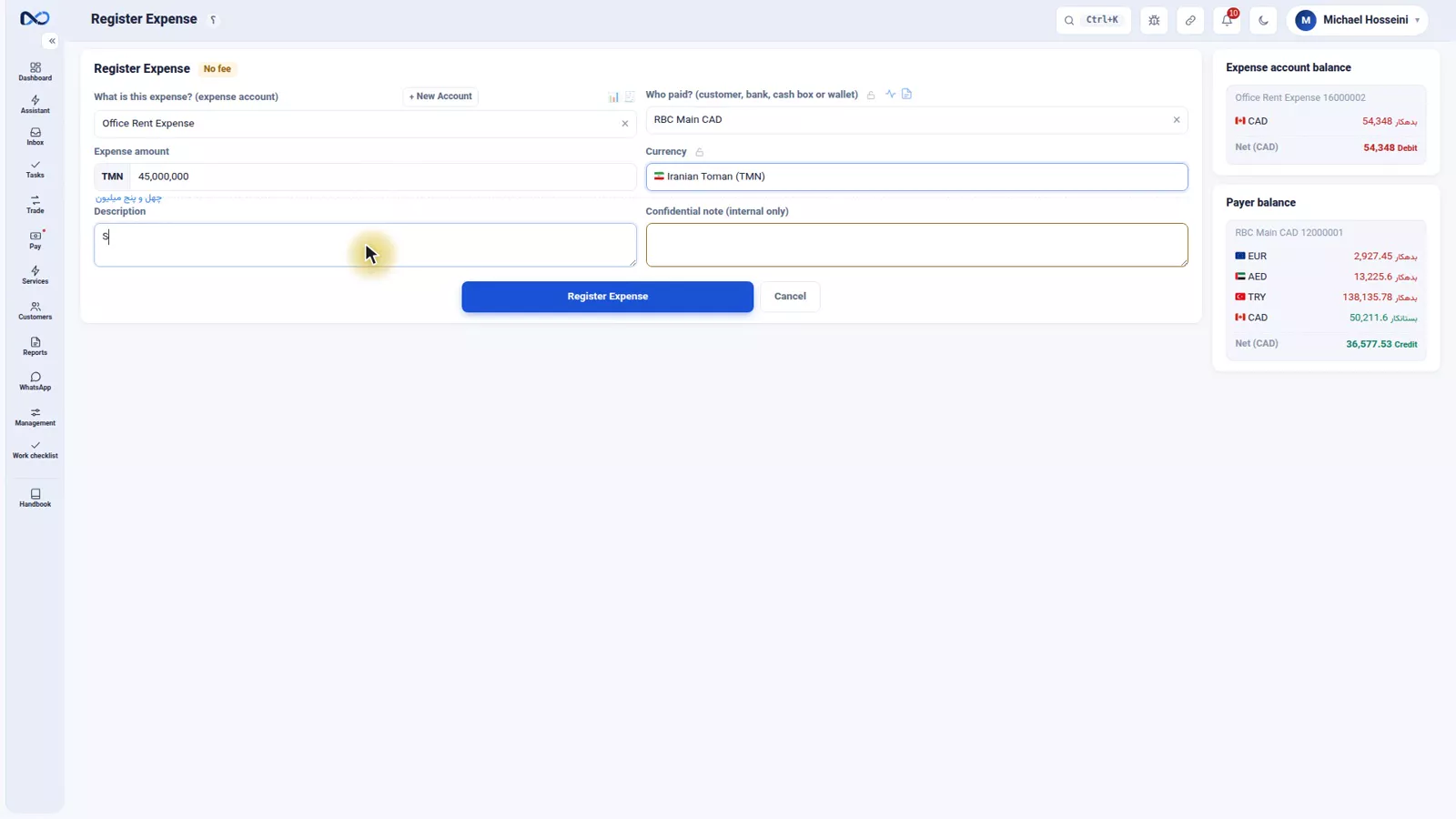
The expense form is the simplest form in Nexto: what it is for, which account, how much. The first field is the expense category — in the recording, Office Rent.
Step 2 — Choose the account that pays
Paid from: RBC in the recording, but it could just as easily be the cash box or any other account. This is the part that genuinely does not matter to the shape of the document — only to your treasury.
Step 3 — Amount and description
The amount: 45,000,000 Toman. Description: September rent. Then press the register button, and the voucher posts on the spot: an outflow in the paying account's book, a debit in the expense account.
Step 4 — Look at the voucher
The expense voucher has two lines and no more: RBC credited, the Office Rent expense account debited. That second line is the one that lands under "Expenses" in the Profit and Loss report at month end.
Expense categories
The "what it is for" field is the expense category — the same expense account type introduced in the customers and accounts episode. Nexto ships with the categories an exchange office uses most: rent, salaries, utility bills, hospitality and petty cash, bank fees. A button on the form lets you create your own.
It is worth being fussy here. The more precisely you break your categories out, the more your month-end report actually tells you. A single catch-all category answers no questions at all.
Group documents: several payments, one voucher
At month end you have paid salaries, and the electricity and the hospitality money has gone out too, all from the cash box. You could record these as three separate expenses, each one from the cash box to a different account. It works, and it is tedious.
A group document captures them all at once: one fixed side, and on the other side as many accounts as you like.
Step 1 — Set the fixed side
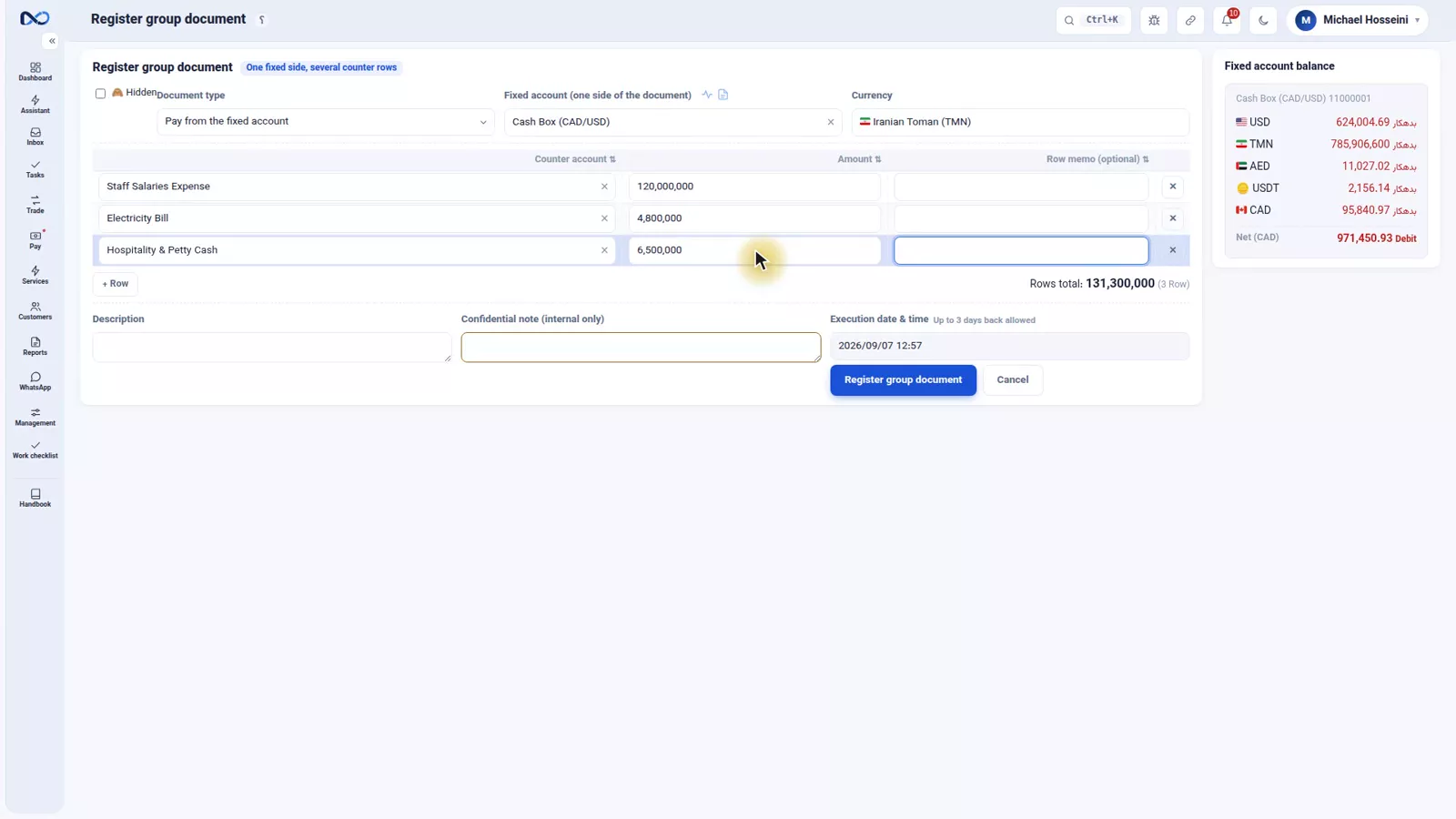
The fixed account is the cash box. The type says what it does: pay from the fixed account. Then the currency, Toman.
Step 2 — Add the rows
First row: staff salaries, 120,000,000. Second: the electricity bill, 4,800,000. Third: hospitality and petty cash, 6,500,000. Add as many rows as the month needs.
Step 3 — Let Nexto do the total
You do not add the rows up yourself. Nexto totals them and drops the result onto the fixed side: 131,300,000 Toman, straight out of the cash box.
That automatic total is the balance guard. The fixed side always equals the sum of the rows exactly, so this document can never go out of balance, and the ledger's grand total stays at zero — the rule from the fundamentals episode.
Step 4 — Describe it and post it
Add a description — expenses for the close of the month — and post. One document, three expenses, one withdrawal from the cash box.
The compound manual entry
The third case is the compound manual entry, and it deserves a warning before an explanation. This form is not there because the other forms cannot handle something. It is a very flexible and equally unforgiving form that most accountants already know: several receipts and payments, mixed together, in a single document. You write the rows yourself — which account is debited, which is credited, in what currency, how much — and you press the row button whenever you need another line.
A worked example
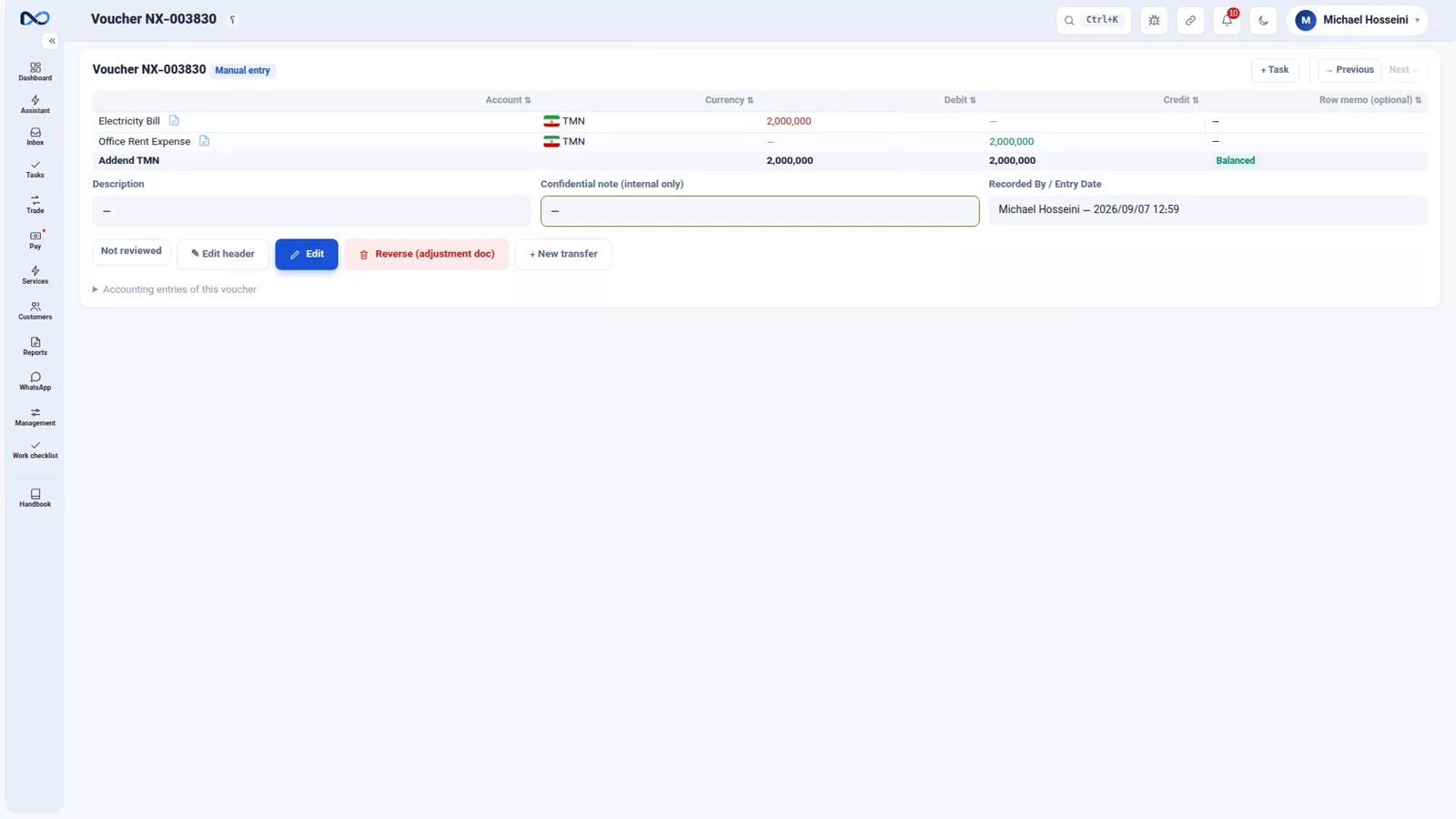
Two million Toman was booked to rent by mistake and actually belonged to the electricity bill. So: Electricity debited 2,000,000, Office Rent credited 2,000,000, currency stated on each row as Toman.
The one guard
Within each currency, the debits and the credits must be equal, or the document will not post. In the recording the crediting line is keyed as 1,500,000 and the balance indicator flags the mismatch; corrected to 2,000,000, it turns green and the entry books.
That single guard is the reason to be careful. The purpose-built forms watch your currency position, your profit and your fees. This one only keeps the balance. So the standing advice is simple: if a ready-made form exists for the task, use that one, and keep the manual entry for what genuinely has no form.
Where it all lands
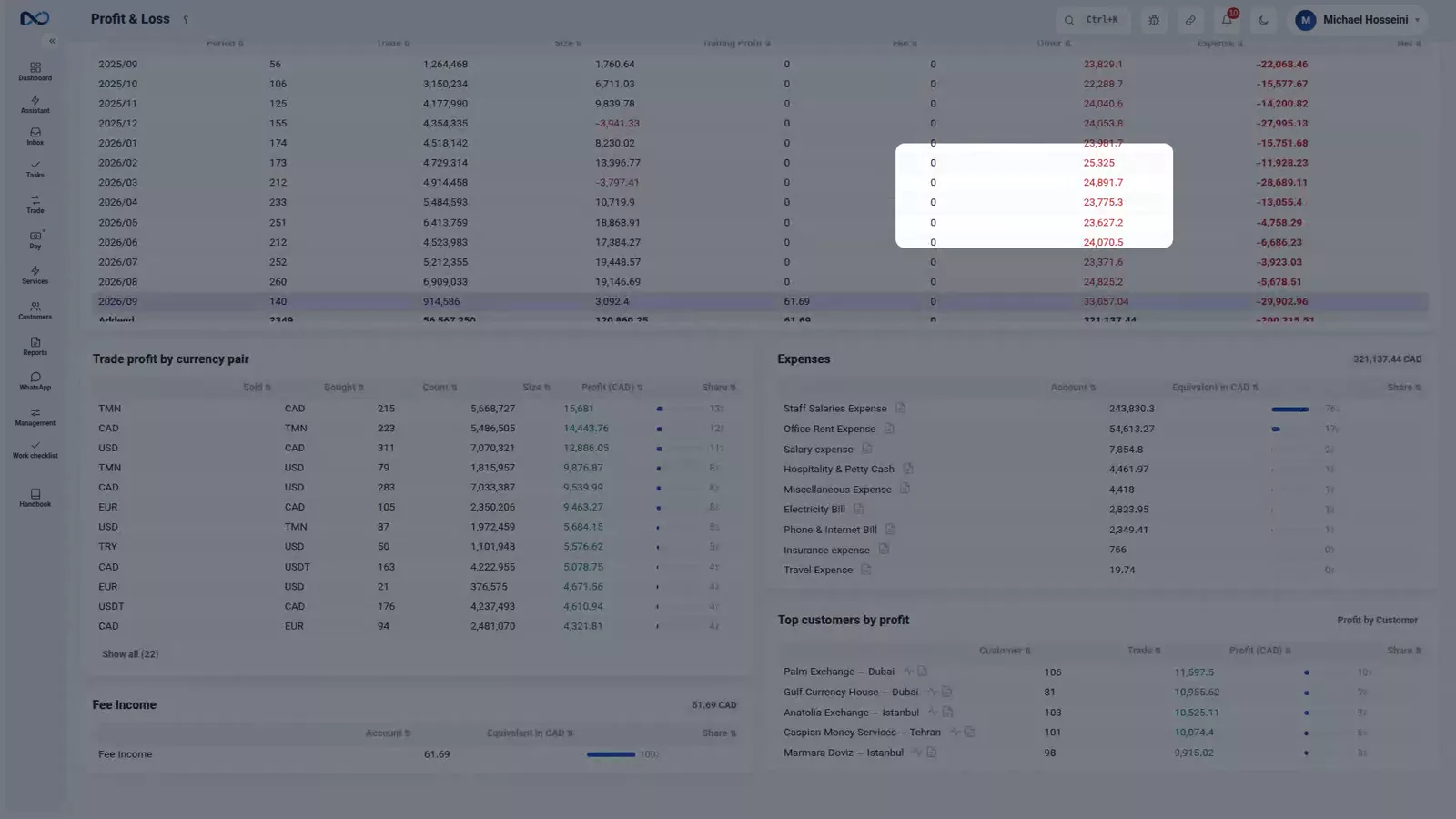
Expenses, group documents and manual entries all end up in the same place: the Profit and Loss report. Income at the top, expenses broken down by category, and what truly remained after them. Today's costs show up there immediately.
Tips and warnings
- An expense never puts a customer in debit. If you find yourself picking a customer, you are on the wrong form.
- Break your expense categories out properly. A vague category makes a vague month-end report.
- Expenses that are not recorded inflate your profit. The report can only be as honest as the entries behind it.
- A group document pays from one fixed account only. If the money came out of two different accounts, that is two documents.
- Never total a group document by hand. The automatic total is what makes the document impossible to unbalance.
- The compound manual entry checks balance and nothing else. It does not watch the currency position, the profit or the fees, so reach for a purpose-built form first.
Where to go next
The previous episode, crypto and Tether, covers the other kind of movement in this chapter. Next comes FX revaluation and closing the period, which turns these Toman-denominated costs into your reference currency and locks the month. To see how these numbers read at month end, go to where is the profit; for the account types behind the expense categories, see customers and accounts.
FAQ
What is the difference between an expense and a payment in Nexto?
A payment puts a customer into debit — the money is going somewhere on someone's behalf. An expense charges nobody: the source can be any account, and the destination is an expense account, where the debit stays. It was spent and it does not come back.
Why do unrecorded expenses matter so much?
Because your real profit is what is left after them. If they are missing from the ledger, the Profit and Loss report shows income that never turned into money you can take out of the business.
When should I use a group document instead of several expenses?
When several payments leave the same account at the same time — salaries, electricity and hospitality all out of the cash box, for instance. One fixed side, as many counter rows as you like, and Nexto totals them onto the fixed side automatically.
Can a group document go out of balance?
No. The fixed side is always set to the exact sum of the rows, which is why the ledger's grand total stays at zero no matter how many rows you add.
What does the compound manual entry check before it posts?
Only one thing: within each currency, the debits must equal the credits. The balance indicator flags a mismatch and the document will not book until it is fixed.
Where do expenses appear in the reports?
In the Profit and Loss report, under "Expenses", broken down by category, alongside income and the net result. Every expense voucher, group document and manual entry that touches an expense account feeds it.
Full video transcript
Office rent, staff salaries, hospitality, the electricity bill. These aren't trades, but their money still leaves your accounts and must be recorded somewhere. Until now, every payment we made put a customer in debit. An expense is different: its source doesn't matter — the cash box, a bank, any account will do — its destination is what matters: no customer is ever charged; the money simply lands in an 'expense account'. In the ledger, the payer is credited and the expense account is debited.
And this debit has no payment coming back — it was spent and it's gone. That's why your real profit is what's left after these; and if they aren't recorded, the profit report shows a number that isn't really in your pocket. The expense form is the simplest form in Nexto: what it's for, which account, how much. The category: Office Rent. Paid from: RBC — it could just as easily be the cash box or any other account. The amount: 45,000,000 Toman. Description: September rent.
That 'what it's for' is the expense category — the same 'expense' type we saw in the customers episode. Nexto already ships with the categories an exchange uses most: rent, salaries, utility bills, hospitality and petty cash, bank fees; and with this button you create your own. The more precisely you break them out, the clearer your month-end report. Register Expense. And the voucher posts the moment you click: in RBC's book an outflow, in the expense account a debit.
The expense voucher has two lines: RBC credited, the Office Rent expense account debited. That's it. And it's this very line that, at month-end, lands in the Profit and Loss report under 'Expenses'. Case two. At month-end you've paid salaries, and the electricity and hospitality money has gone out too — all from the cash box. You could record these as several separate expenses: each time from the cash box to one of the accounts. But that's tedious and repetitive.
A group document captures them all at once: one fixed side — the cash box — and on the other side as many accounts as you like. The fixed side: the cash box. Type: pay from the fixed account. Currency, Toman. And the rows: first, staff salaries, one hundred and twenty million. One more row: the electricity bill, four million eight hundred thousand. And one more: hospitality and petty cash, six million five hundred thousand. You don't total the rows yourself — Nexto adds them up and drops the total onto the fixed side: one hundred thirty-one million three hundred thousand Toman, straight out of the cash box.
That automatic total is the balance guard: the fixed side always equals the sum of the rows exactly, so this document can never go out of balance, and the ledger's grand total — the rule from the fundamentals episode — stays at zero. Description: expenses for the close of the month. And post it. One document, three expenses, one withdrawal from the cash box. Case three: the compound manual entry. This form isn't for a voucher the other forms can't handle — it's a very flexible and equally unforgiving form that most accountants already know: several receipts and payments, mixed together, in a single document.
You write the rows yourself: which account is debited, which is credited, in what currency, how much. An example: two million Toman that went to rent by mistake actually belonged to the electricity bill. Electricity debited two million; Office Rent credited. And you state each row's currency too: Toman. Need more rows? Press the 'Row' button; as many as you need. It has just one guard, but that one is enough: within each currency the debits and the credits must be equal, or it won't post.
Here we've keyed one and a half million on the crediting line, and the balance flags mismatched. We fix it to two million, and it turns green. Book it. And a word of advice: if a ready-made form exists for a task, use that one; the forms watch the currency position, the profit and the fees, while this form only keeps the balance. And all of it comes together in one place: the Profit and Loss report — income, expenses by category, and what truly remained.
Today's costs are sitting right here. To wrap up: in an expense, the destination is always an expense account and the source can be any account. Several payments from one account: the group document, with an automatic total that keeps it balanced. And the compound manual entry: the accountant's flexible tool, with a single guard — balance in every currency.
Try it yourself right now
A complete private demo with sample data — no installation, no credit card.
Create free demo