
FX revaluation and closing the period
How FX revaluation in Nexto converts foreign-currency income and expense to your reference currency at today's mid rate, and how to close a fiscal period.
Watch this video on: YouTube
Say you have taken 10,000,000 Toman in fees. In the ledger that ten million stays in Toman, but your profit report is in Canadian Dollars. Until it is revalued, every time you pull a report Nexto converts that ten million at that day's rate — one figure today, a different figure tomorrow, on the same completed work.
Revaluation fixes exactly that. It converts the foreign-currency balances of your income and expense accounts to your reference currency at today's mid rate and locks them there: the 10,000,000 Toman goes out, roughly 62 Canadian Dollars comes in, and that fee income becomes a settled number.
This is the last piece of month end, and it comes with its natural companion: closing the period, so nobody can quietly change a month you have already reported on.
What you will learn
- What FX revaluation converts, and what it leaves alone
- How to read the revaluation preview before you accept it
- What the revaluation voucher actually books
- How to run revaluation automatically every night, with the day's profit on WhatsApp
- How to open and close a fiscal period, and what a closed period blocks
- The order to do things in at month end
What revaluation touches
Revaluation only goes after income and expense: fees, other income, expenses.
It does not touch the trades' currency position or trade profit. Those were measured against the rate board and locked at the moment of the trade, the mechanism explained in where trade profit comes from. Revaluation is not a second attempt at pricing your trades; it is the step that stops your other income and costs floating with the daily rate.
Running it by hand
Step 1 — Read the preview
The revaluation page shows a preview before it does anything: which account, in what currency, what balance, debit or credit, and its equivalent in the reference currency at the board's mid rate. At the bottom sits the total.
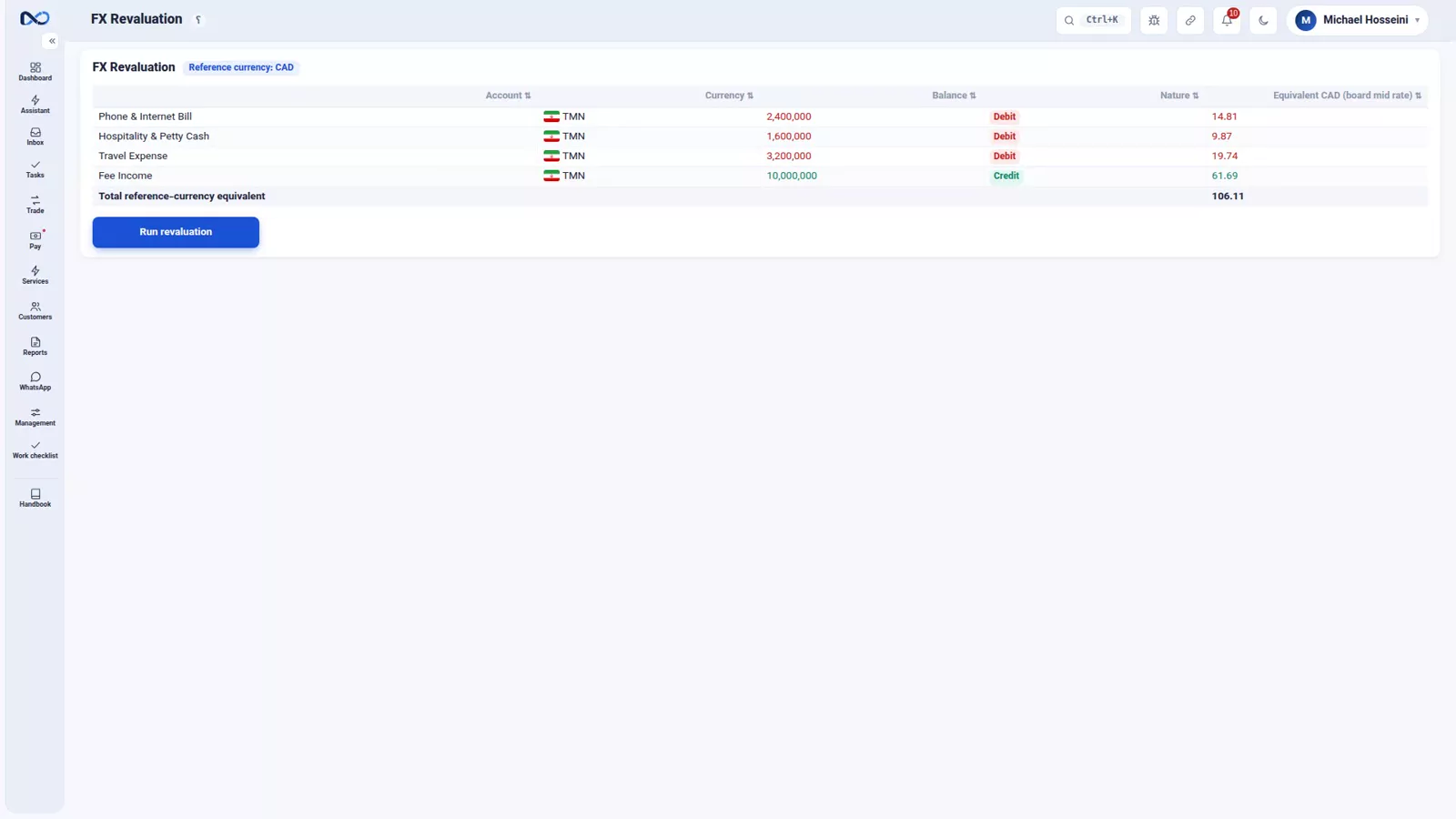
Revaluation feeds straight into the profit report, so read the preview line by line before you accept it.
Step 2 — Check the rate behind it
The rate used is your own board's mid rate, so the standing advice from the rate board episode applies here more than anywhere else: an accurate board is an accurate revaluation. A board nobody updated produces a revaluation nobody should trust.
Step 3 — Run it and accept
Run revaluation, then accept. The voucher posts: for each account the Toman balance goes out and its Canadian Dollar equivalent comes in, with the FX Revaluation clearing account on the other side of every line.
Running it automatically
You have two ways to do this. Manually, from the revaluation page, whenever you need it. Or you switch it on in settings, and it runs by itself every night with the day's profit report going to the manager's WhatsApp. The settings ask for three things: the time it should run, the WhatsApp session that sends the message, and the manager's group.
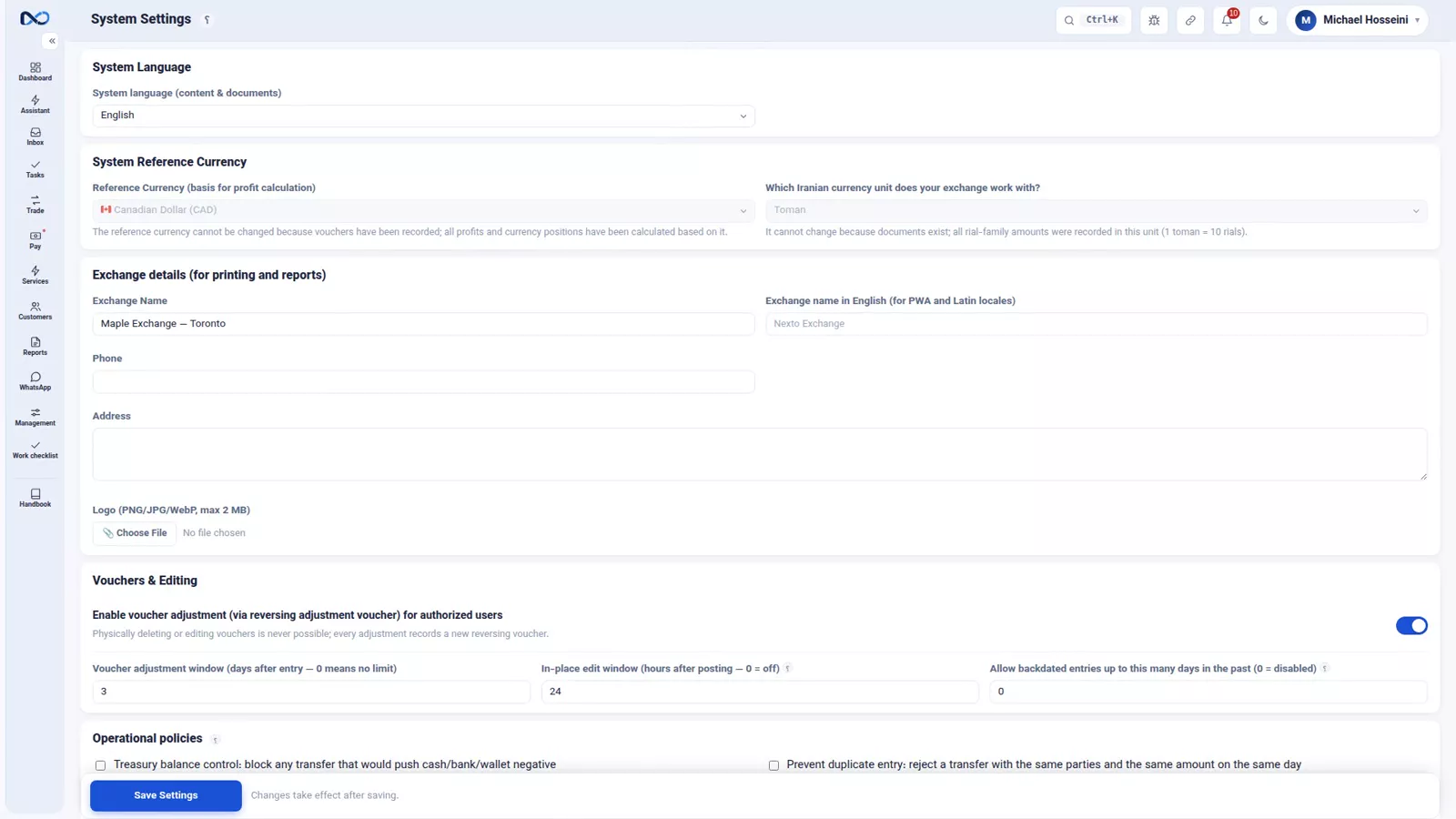
Automatic is the recommendation, for a plain reason: revaluation is the kind of task that gets forgotten, and each time it is, that day's report drifts further from reality — quietly, without anything telling you.
Reading the result
The outcome shows up in the Profit and Loss report. The cards along the top give trading profit, fee income, other income, expenses and the net. Trading profit comes from the trades themselves and revaluation does not touch it; income and expense, once revalued, add up at the locked rate instead of at whatever today's rate happens to be.
Closing the period
Once the month is over and you have pulled its reports, you close it.
Step 1 — Define the period
On the fiscal periods page, define the period — August, the first to the thirty-first, for example — and open it. It takes its place in the list with the status Open. At this stage nothing is locked.
Step 2 — Close it
Then close the period and accept. From that moment no document dated inside that range can be posted or amended, by mistake or design.
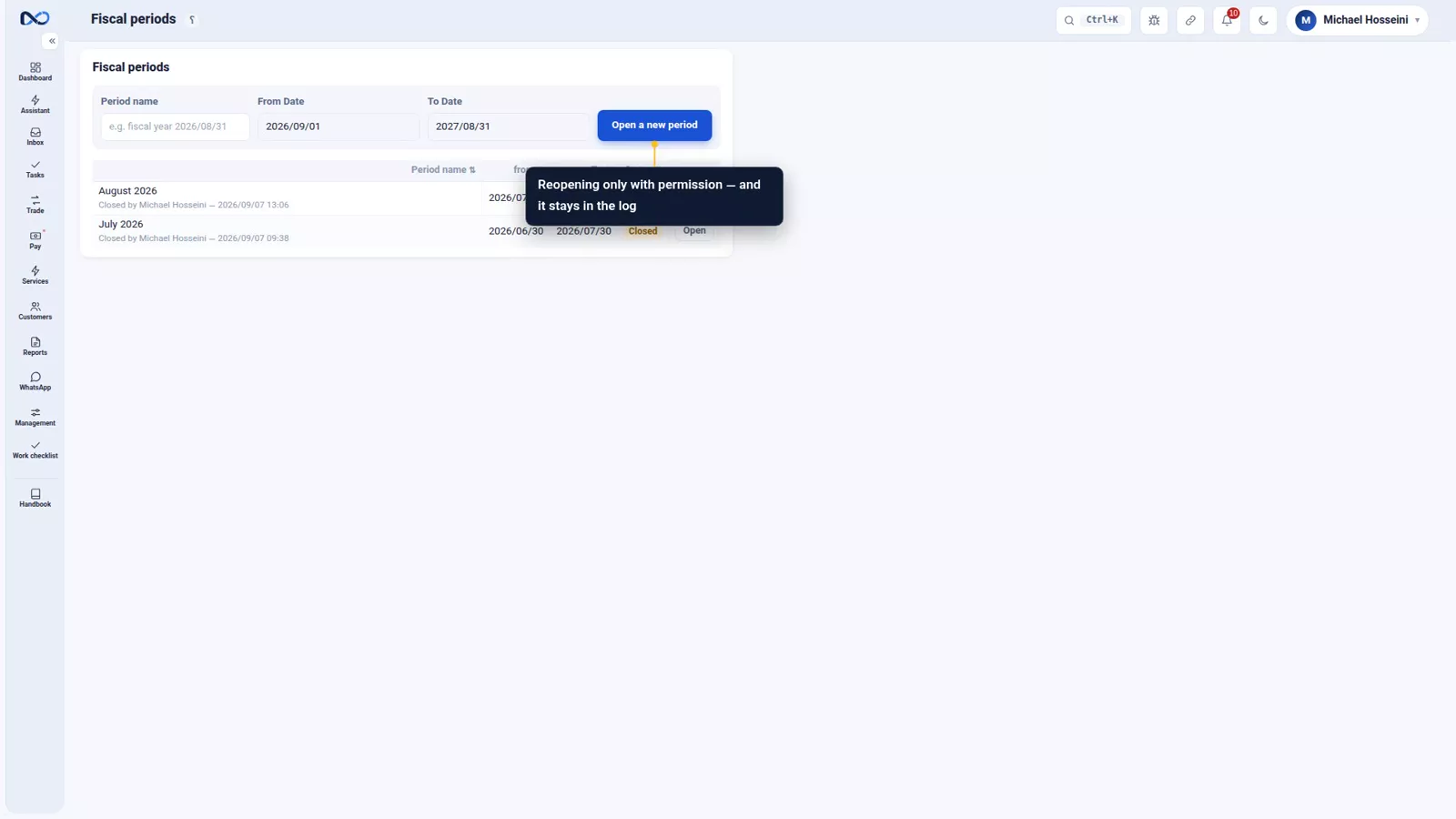
If a change is genuinely needed, a manager with the right permission can reopen the period — and that reopening is recorded in the log.
The month-end sequence
In order:
- Get the rate board right.
- Run revaluation, or confirm the automatic run happened overnight.
- Pull the Profit and Loss report.
- Close the period.
Tips and warnings
- Never revalue against a stale board. The revaluation is only as good as the mid rate behind it.
- Read the preview before accepting. Once the voucher is posted it is a document like any other.
- Do not expect revaluation to change your trade profit. It never touches the currency position or trade profit.
- If you run it by hand, run it consistently. Skipped days are what make a profit report drift.
- Close the period only after you have pulled and checked the month's reports.
- Reopening a closed period needs permission and it is logged. Treat it as an exception, not a routine.
Where to go next
The previous episode, expenses, group documents and manual entries, creates most of the balances that revaluation converts. This closes the crypto and period-close chapter; next comes WhatsApp: groups, templates and the send queue, which carries the nightly profit message. For the report itself see where is the profit, and for the mid rate this rests on, the rate board and its guards.
FAQ
What does FX revaluation actually do?
It converts the foreign-currency balances of your income and expense accounts into your reference currency at the rate board's mid rate, and locks them at that rate. Without it, the same completed work is reported at a slightly different value every day.
Does revaluation change my trade profit?
No. It only affects income and expense — fees, other income and expenses. The currency position and the trade profit were measured against the board and locked at the moment of each trade, and revaluation leaves them alone.
What rate does revaluation use?
Your own rate board's mid rate. This is why the board has to be accurate before you run it: an inaccurate board produces an inaccurate revaluation and an inaccurate profit report.
Should I run revaluation manually or automatically?
Automatic, run each night from settings, is the recommendation. Revaluation is easy to forget, and every skipped day pushes the profit report further from reality without any visible sign. The automatic run also sends the day's profit report to the manager's WhatsApp group.
What happens when a period is closed?
No document dated inside that period can be posted or amended, deliberately or by accident. A manager with the right permission can reopen it if it is truly necessary, and the reopening is recorded in the log.
What is the right order of tasks at month end?
Get the rate board right, run revaluation or confirm the overnight run, pull the Profit and Loss report, then close the period.
Full video transcript
You've taken 10,000,000 Toman in fees. In the ledger that ten million stays in Toman; but your profit report is in Canadian Dollars. Until it's revalued, every time you pull a report Nexto converts that ten million at that day's rate: one figure today, a different one tomorrow. Revaluation is exactly this: convert the foreign-currency balances of income and expense to the reference currency at today's mid rate and lock them right there: ten million Toman goes out, about sixty-two Canadian Dollars comes in.
Revaluation only goes after income and expense: fees, other income, expenses. It doesn't touch the trades' currency position or the trade profit; those were measured against the board and locked at the moment of the trade — you remember the profit episode. This is the revaluation page. Before doing anything, it shows a preview: which account, in what currency, what balance, debit or credit, and its equivalent in the reference currency at the board's mid rate.
And at the bottom, the total of all of it. Revaluation affects the profit report, so before you accept it, look it over line by line. The rate is your own board's mid; again the same standing advice: an accurate board, an accurate revaluation. Run revaluation, and accept. The revaluation voucher posts: for each account, the Toman balance goes out and its Canadian-Dollar equivalent comes in; the other side of every line is the 'FX Revaluation' clearing account.
You have two ways. Whenever you need it, manually, from this page. Or switch it on in settings so it runs automatically every night and the day's profit report goes to the manager's WhatsApp: the run time, the WhatsApp session that sends it, and the manager's group. We recommend automatic; we save it. Because revaluation is the kind of task that gets forgotten, and every time it's forgotten, that day's report drifts a little from reality — and you don't notice.
And the result is in the Profit and Loss report. The cards along the top: trading profit, fee income, other income, expenses, and the net. Trading profit comes from the trades themselves and revaluation doesn't touch it; income and expense, after revaluation, add up at the locked rate, not at each day's rate. And closing the period. Once the month is over and you've pulled its reports, you define a period — say August, the first to the thirty-first — and open it.
The period is created and takes its place in the list, with the status 'Open'; so far nothing is locked yet. And you close it: Close period, accept. From now on no document dated inside that range can be posted or amended — neither by mistake nor on purpose. And if it's truly needed, a manager with permission can reopen it; that too stays in the log. The month-end sequence: get the board right, run revaluation or make sure it ran overnight, pull the Profit and Loss report, close the period.
To sum up: revaluation means converting foreign-currency income and expense to the reference currency at today's rate and locking it; it doesn't touch trade profit; and a closed period is a closed ledger. With this episode, the chapter on crypto and closing the period is done; next chapter: WhatsApp.
Try it yourself right now
A complete private demo with sample data — no installation, no credit card.
Create free demo