
Cheques, the ordinary route and the Sayad route
How to handle cheques in Nexto - register one, move it through cleared, bounced or endorsed, and run the five stages of the Sayad route with follow-ups.
Watch this video on: YouTube
A cheque is the only thing in an exchange office that both is and is not there. It is in your hand, but it has not become money yet. When someone pays cash you have the money that instant; when someone hands you a cheque you have a promise that may clear and may not. Count those two as the same thing and your holdings are lying to you.
Nexto keeps them apart on purpose. Cheques you have taken sit in cheques receivable, cheques you have given sit in cheques payable, and neither touches the treasury until the cheque is really collected or endorsed. This episode covers both routes a cheque can take: the ordinary one, and the Sayad route that most cheques in Iran arrive by today.
What you will learn
- Why cheques live in their own accounts and not in the cash box
- The settlement policy you choose once in settings, and what each option changes
- How to register a cheque with its due date, serial, bank and a photo
- How to move a cheque through its life cycle: cleared, bounced, endorsed, returned or voided
- The five stages of the Sayad route and the WhatsApp follow-up at each one
- How to stay ahead of due dates and track your cheque book leaf by leaf
The decision you make once
Because a cheque is not money, it gets its own accounts: cheques receivable for the ones you have taken, cheques payable for the ones you have given. That much is fixed.
What is not fixed is when the customer's own account should move. That is a policy you choose in settings: at registration — the common way — or at clearing. Choose it before you enter your first cheque, because it decides whether a customer's debt drops the day he hands you the paper or the day the bank pays.
The ordinary route
Step 1 — Register the cheque
Open the cheque form and start with the type: received if you are taking a cheque from a customer, outgoing if you are handing over one of your own. Then the amount — 80,000,000 Iranian Toman here — and the counterparty, Hossein Kalantari. The due date is the date written on the cheque itself, not today: the twenty-fourth of this month.
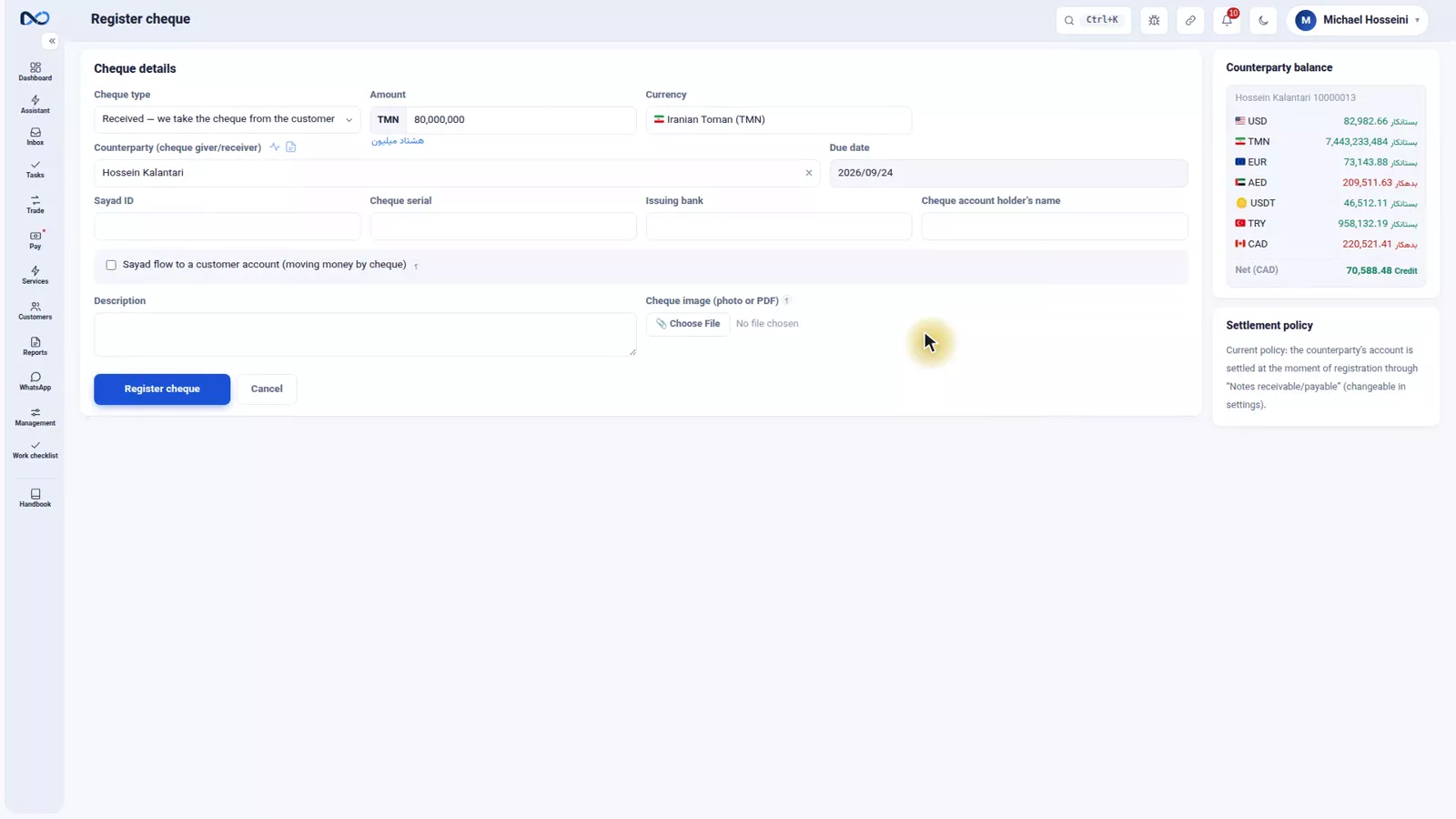
Below that go the cheque serial, the issuing bank and the name of the cheque account holder, exactly as written on the paper. You can attach a photo of the cheque too, which saves hunting for the paper weeks later. Register the cheque and it appears in the list.
Step 2 — Check what moved, and what did not
The cheque lands in cheques receivable, not in the cash box. Under the common policy Hossein Kalantari's account was settled against cheques receivable straight away, so his debt went down — but not a single rial has entered the treasury. That gap is the whole point.
The tabs across the cheque list are the life cycle of a cheque: open, cleared, bounced, endorsed, returned or voided. Endorsed is the one special to exchange work: a cheque you took and, instead of cashing it, passed on to somebody else. Nexto keeps its trail.
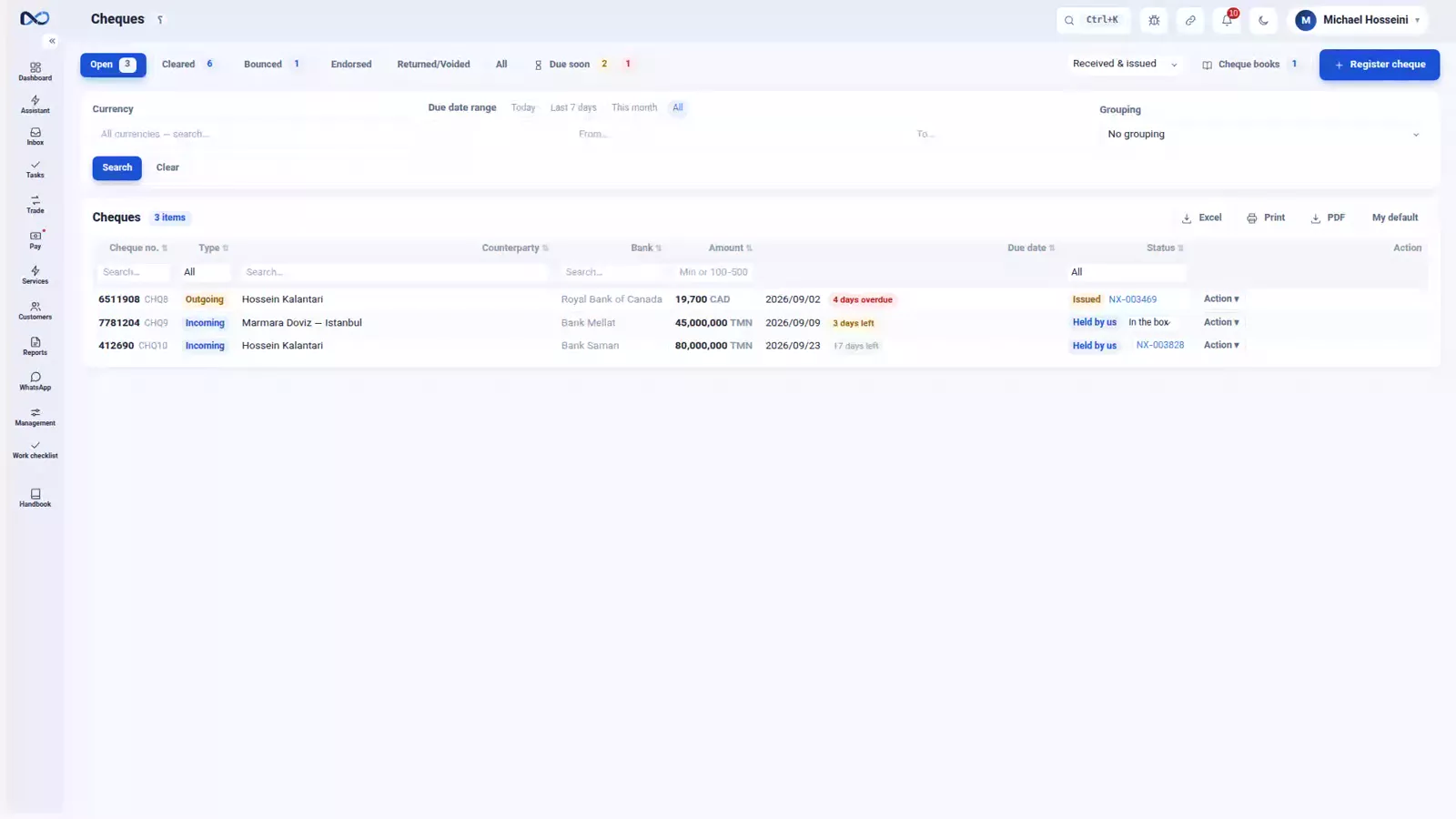
Step 3 — Change the status from the row
Every row has an action button, and you change the status from right there: clear the cheque, mark it spent, bounced or returned. Clearing asks which account the money went into — RBC Main here — and the amount moves out of cheques receivable into the bank.
The rule underneath all of it: until a cheque is really collected or really endorsed, it does not touch the treasury, and the voucher is booked at that moment and not before.
The Sayad route
Sayad is the Iranian central cheque registry, where every cheque is issued to one named account. The story runs the same way each time: the customer offers to settle his debt with a cheque, you give him an account number and IBAN — your own or a partner's — he registers the cheque in that name, you confirm it, and the paper still has to reach the bank. All five stages are in Nexto, each with a WhatsApp follow-up ready to send.
Step 1 — Tick Sayad flow and name the destination account
On the same cheque form, tick Sayad flow. Here a cheque for 120,000,000 Iranian Toman is coming in from Caspian Money Services, due on the twenty-fourth. As soon as the tick goes on, a new section opens: the destination account, the account the cheque has to be registered to. In this case a partner in Tehran, Persepolis Exchange.
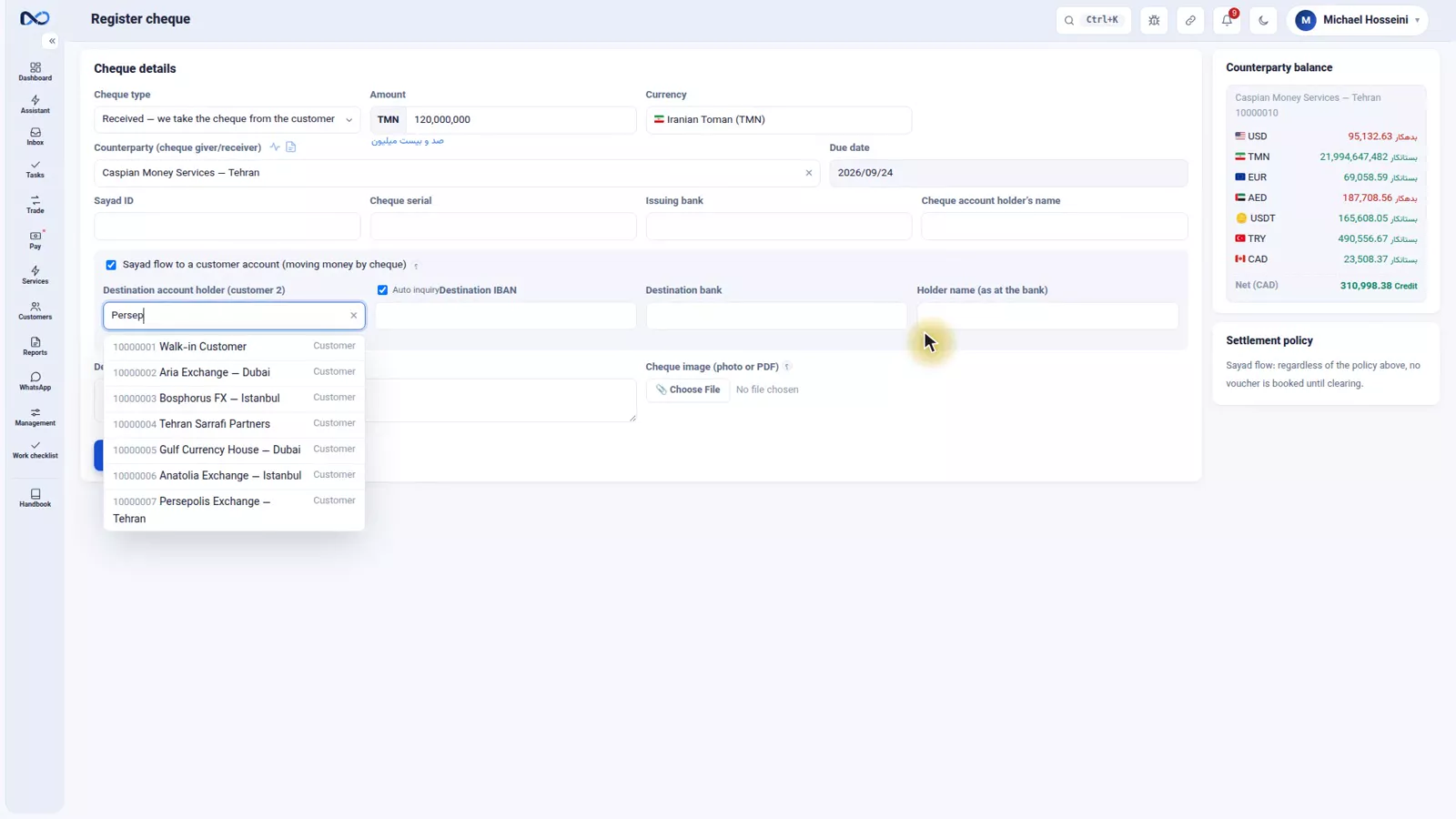
Fill in that account's IBAN, the destination bank and the holder name: the customer needs all three to register the cheque in Sayad, and they are exactly what the account-number WhatsApp message carries to him. Then the details of the cheque itself — Sayad ID, serial, issuing bank and who the cheque belongs to — and register it.
Step 2 — Send the account number, then mark it registered
In the list the Sayad cheque sits at the stage account announced. From its action button, one click sends the account number and IBAN to the customer over WhatsApp so he can register the cheque. When he has done it and told you, press registered in Sayad.
Step 3 — Confirm it in Sayad
Now it is your turn — or that of the colleague whose account it is — to confirm the cheque in the Sayad system, which brings it to the customer confirmed stage. If the account belongs to a partner, the confirmation message goes to them by WhatsApp so it is not forgotten. Confirming means the cheque is legally yours; the money still has not moved.
Step 4 — Deposited, then cleared
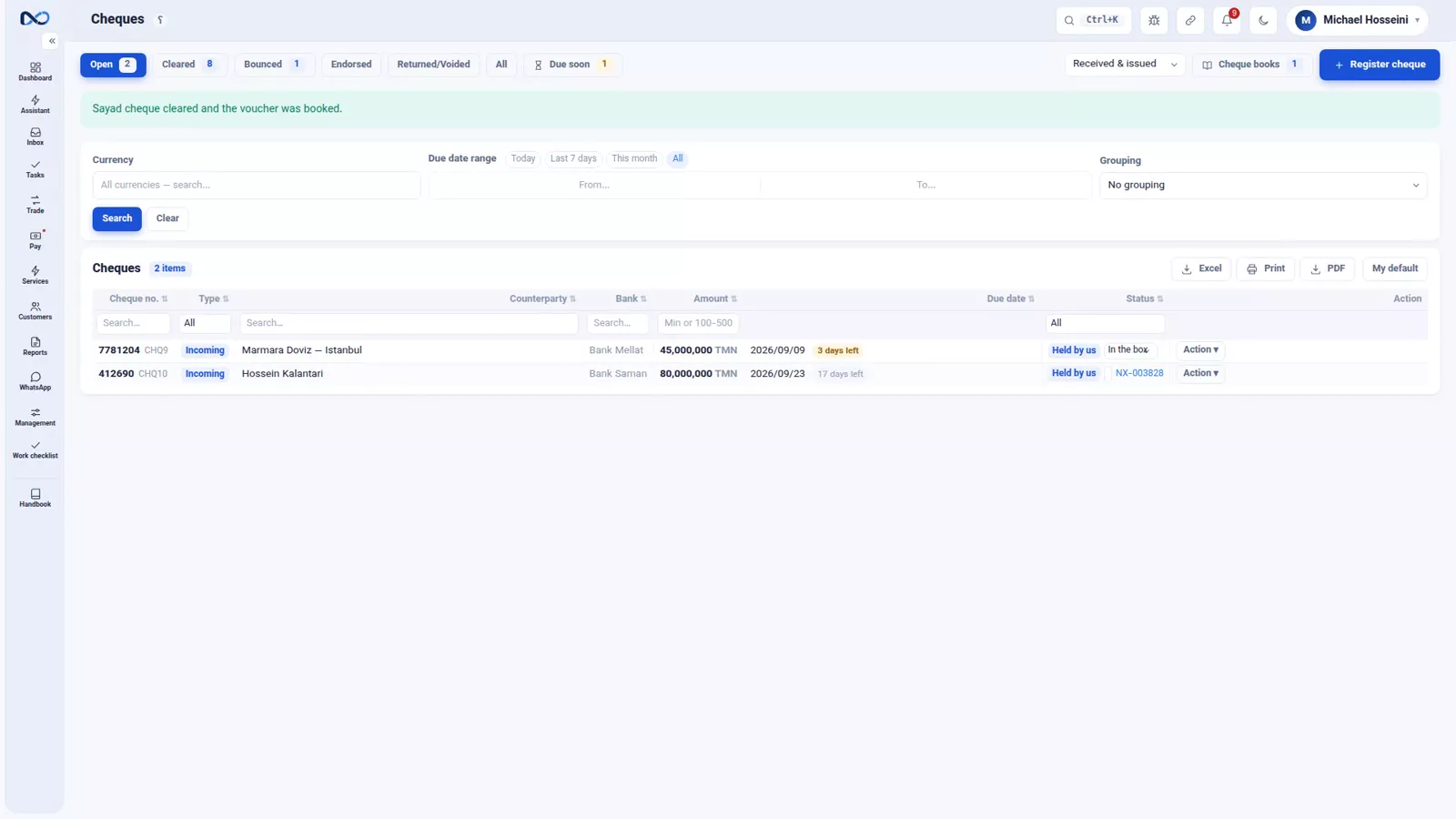
The paper cheque has to reach the bank, carried by the customer or by you: that is the deposited stage. When the bank clears it you set cleared, and at that instant the voucher is booked, the money moves out of cheques receivable into the Persepolis Exchange account, and the done message goes to the customer.
These are two buttons on purpose. Deposited only says the document is with the bank; the clearing is what turns the promise into a real voucher.
Due dates and cheque books
Two tabs keep cheques from slipping through. Due soon gathers every cheque falling due in the next few days, over a window you set in settings. And if you define your own cheque book, the cheque books tab tells you leaf by leaf which has been spent and which is untouched.
Tips and warnings
- A cheque in your hand is a promise, not money. Never read cheques receivable as part of your cash position.
- Choose the settlement policy in settings before your first cheque, and leave it alone afterwards.
- The due date is the date on the paper, not the day you register it. Get it wrong and the Due soon tab stops working for you.
- Update the stage the same day, and attach the photo while the cheque is still in your hand.
- Deposited is not cleared. Only clearing books the voucher and moves money out of cheques receivable.
- If you pass a cheque on, record it as endorsed rather than clearing it, so the trail stays intact.
Where to go next
The previous episode, rial routing and payment readiness, settles obligations without money moving; a cheque is the other way a payment is promised before it exists. Next comes crypto and Tether, which opens the closing chapter. The Sayad follow-ups rely on WhatsApp: groups, templates and the send queue, the settlement policy sits among the jobs in settings, currencies and your first users, and where is the money? shows why cheques stay out of the treasury.
FAQ
Why does a cheque not go into the cash box?
Because it is not money yet. Nexto keeps cheques you have taken in cheques receivable and cheques you have given in cheques payable, and books a voucher only when the cheque is really cleared or endorsed. Counting a cheque as cash makes your holdings wrong.
When does the customer's account move — at registration or at clearing?
Whichever you chose in settings. The common policy settles the customer's account against cheques receivable the moment the cheque is registered, so his debt drops that day even though nothing has reached the treasury. The other option waits for clearing.
What does the endorsed status mean?
It is a cheque you took and, instead of cashing it, passed on to somebody else. It is special to exchange work, and marking it endorsed keeps the cheque's trail in Nexto instead of ending it the moment the paper left your hands.
What is the Sayad route?
Sayad is the Iranian central cheque registry, where a cheque is issued to one named account. In Nexto it has five stages: the destination account is announced, the customer registers the cheque in Sayad, it is confirmed, the paper is deposited at the bank, and it clears.
What is the difference between deposited and cleared?
Deposited means the paper cheque has been handed in at the bank. Cleared means the bank paid, and that is the moment the voucher is booked and the money moves out of cheques receivable. They are separate buttons so the two are never confused.
How do I avoid missing a cheque that is falling due?
Use the Due soon tab, which collects every cheque due within a window you set in settings. If you also define your own cheque book, the cheque books tab shows leaf by leaf which cheques are spent and which are untouched.
Full video transcript
A cheque is the only thing in an exchange office that both is and is not there: it is in your hand, but it has not become money yet. When someone pays cash, you have the money that instant; when someone hands you a cheque, you have a promise that may clear or may not. If you count those two as the same thing, your holdings are lying to you. That is why Nexto keeps cheques in separate accounts: cheques receivable for the ones you have taken, cheques payable for the ones you have given.
And when the customer account should move is a policy you choose in settings: at the moment the cheque is registered - the common way - or at the moment it clears. Let us register an ordinary cheque. Type: received - we take a cheque from the customer; if we hand over one of our own, it is outgoing. Amount 80,000,000 Iranian Toman, counterparty Hossein Kalantari, and the due date - the date written on the cheque itself: the twenty-fourth of this month.
The cheque serial, the issuing bank and the name of the cheque account holder - exactly as written on the paper. You can also attach a photo of the cheque, so that later you do not have to go hunting for the paper itself. Register cheque. The cheque is saved and we go to the cheque list. The cheque landed in cheques receivable, not in the cash box; and under the common policy, Hossein Kalantari account was settled against cheques receivable right away - his debt went down, but not a single rial has entered the treasury yet.
The cheque list and its tabs are the life cycle of a cheque: open, cleared, bounced, endorsed, returned or voided. Endorsed is special to exchange offices: a cheque you took and, instead of cashing it, passed on to somebody else - Nexto keeps its trail. Every row has an action button and you change the status from right there: clear the cheque, spent, bounced, return. We clear the Hossein Kalantari cheque - into which account? RBC Main. The money moves from cheques receivable into the bank.
The rule: until a cheque is really collected or endorsed, it does not touch the treasury - that is the gap between is and is not. An accounting voucher is only booked when the cheque is really cleared or really endorsed. Until that moment the cheque sits in cheques receivable and has not touched the treasury. And now the Sayad route - the way most cheques arrive in Iran today. Sayad is the Iranian central cheque registry, where every cheque is issued to one named account.
The usual story goes like this: the customer says he can settle his debt with a cheque. You give him your own account number and IBAN - or a partner one. He registers the cheque in Sayad in the name of that account. You confirm it in Sayad. And then the paper cheque itself has to be taken to the bank, by the payer or by the payee, before it becomes a completed movement of money. All of these steps are in Nexto, and for each step a WhatsApp follow-up message is ready to send.
On the cheque form we tick Sayad flow. A cheque for 120,000,000 Iranian Toman is coming in from Caspian Money Services, due on the twenty-fourth. And as soon as the tick goes on, a new section opens: the destination account - the account the cheque has to be registered to. Here, our partner in Tehran, Persepolis Exchange. The IBAN of that account, plus the destination bank and the holder name - the customer needs these to register the cheque in Sayad, and they are exactly what goes to him in the account-number WhatsApp message.
Then the details of the cheque itself: the Sayad ID, the serial, the issuing bank and who the cheque belongs to. Register cheque. The Sayad cheque is saved and appears in the list. The Sayad cheque has taken its place in the list and its stage is account announced. From the action button, one click sends the account number and IBAN to the customer over WhatsApp so that he can register the cheque in that name. The customer has registered it and told us so: we press registered in Sayad, and the cheque moves on.
Now it is our turn - or the colleague whose account it is - to confirm the cheque in the Sayad system: the customer confirmed stage. And if the account belongs to a partner, the confirmation WhatsApp message goes to them so that they do not forget. Confirming in Sayad means the cheque is legally ours, but the money has not moved yet. The paper cheque has to go to the bank - the customer takes it himself or we take it - and be deposited: the deposited stage.
And when the bank clears it, cleared: at that instant the voucher is booked, the money moves out of cheques receivable into the Persepolis Exchange account, and the done message goes to the customer. Until that moment nothing has hit the ledger: a cheque in your hand is a promise, not money, and Nexto keeps it that way on purpose. Deposited only says the document is with the bank; it is the clearing that turns the promise into a real voucher, and that is why these two steps are separate buttons rather than one.
Now the movement is complete. Five stages, all inside Nexto: the destination account, registered in Sayad, confirmed, the paper cheque deposited, cleared - and three follow-up messages, one click each. So that no cheque slips through, the Due soon tab brings together every cheque falling due in the next few days - we saw its window in settings. And if you also define your own cheque book, the Cheque books tab tells you leaf by leaf which one has been spent and which is still untouched.
Keep the cheque separate from the money, update its stage the same day, send the follow-up message with one click, and keep an eye on the due dates. With this episode the daily-work chapter is finished; next chapter: crypto and closing the period.
Try it yourself right now
A complete private demo with sample data — no installation, no credit card.
Create free demo