
Where is the profit? The Profit and Loss report
How Nexto builds net profit from three sources and two deductions, and how to read the Profit and Loss report, the side reports and the profit permission.
Watch this video on: YouTube
Ask someone who runs an exchange office how much they made last month and you usually get a feeling rather than a figure. The drawer looks healthy, customers kept coming, so it must have been a good month. That is not something you can plan with.
Profit in an exchange office is not one number sitting in one place. It arrives from three directions, and two other things eat into it. This episode walks through the Profit & Loss report, the side reports around it, and the single permission that decides who may look at any of it. It follows who owes you?, which covered the other half of the picture: money that is yours but not yet in your hands.
What you will learn
- The three sources of profit in an exchange office, and the two deductions
- How to read the five summary cards and the period trend
- How to find out which currency pair actually pays you
- Where to see expenses by heading and profit per customer
- What the commission, deal profit and equity reports are for
- Who should hold the Profit & Loss Report permission
How the net number is built
Three sources
The first and usually the largest is the rate difference on a trade: the edge between the price you bought at and the price you sold at. That one has an episode to itself, where trade profit comes from. The second is the fees you charge. The third is other income, meaning anything you earn that is neither a trade nor a fee.
Two deductions
Two things then come off. Your own expenses: rent, wages, the everyday running of the office, booked the way expenses, group documents and manual entries describes. And the commission you pay to introducers, the people who send customers your way.
Trading profit, plus fees, plus other income, minus expenses, minus introducer commissions. What is left at the bottom is the real profit.
The Profit & Loss report
The five cards and the trend
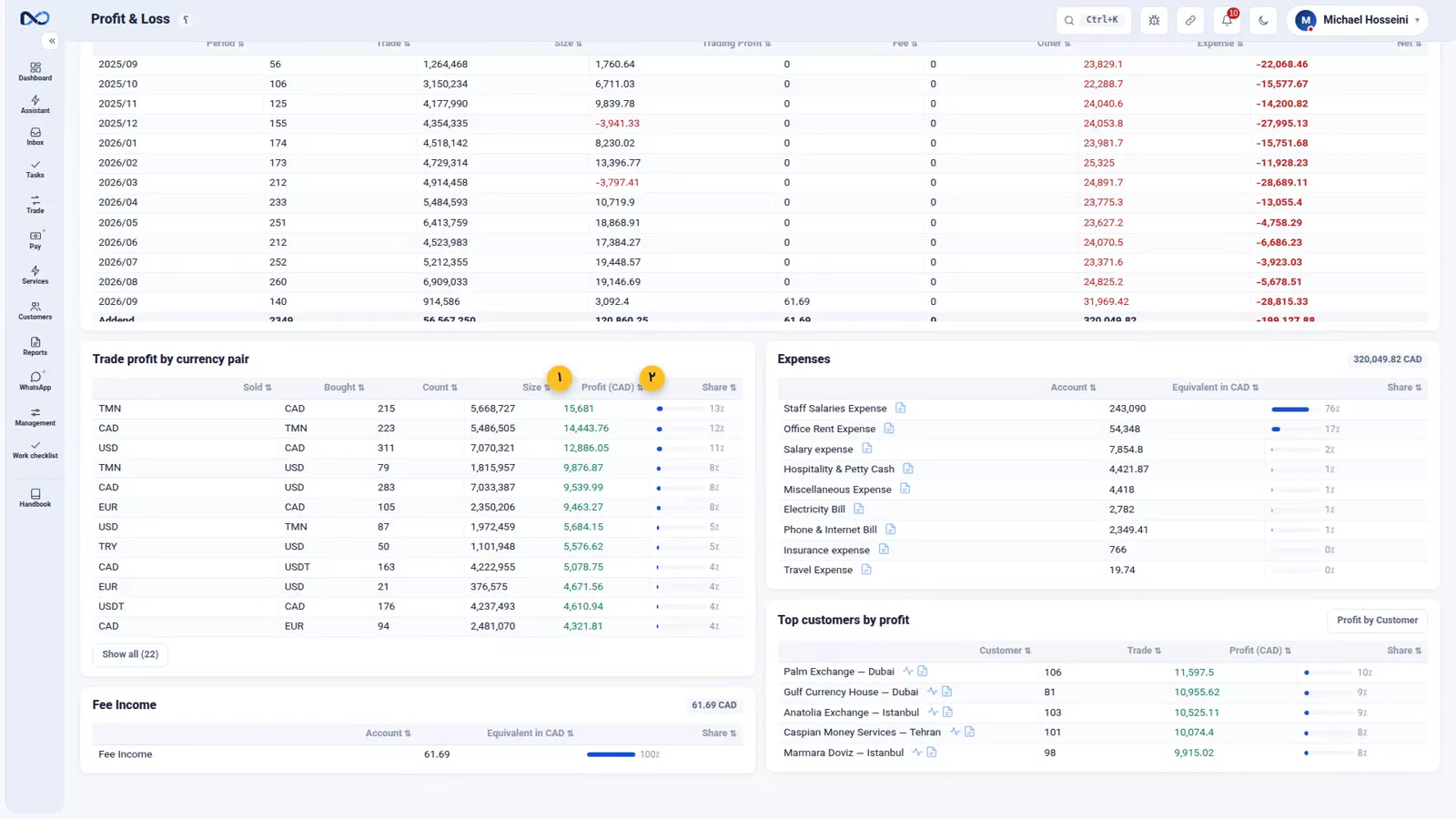
This is the main report. The top of the page carries five cards, one per part of that equation: trading profit, fees, other income, expenses, and net. Below them the same figures are broken out by period, daily, weekly or monthly, with size shown alongside trading profit, fee, other, expense and net. Size next to profit is what tells you whether a good month was a busy month or a well-priced one.
Which currency pair actually pays
Further down comes profit by currency pair, and it is the most useful block on the page. It is common to discover that the pair carrying the biggest share of your volume is also the one that leaves you the least. Instinct does not catch that; the split does. Once you can see it you can decide whether to reprice that pair, push a different one, or accept it as a service that brings people in.
Expenses by heading, and your best customers
At the bottom sit two more blocks: expenses by heading, under the same headings you booked them with, and the top customers for the range, your profit broken down per customer.
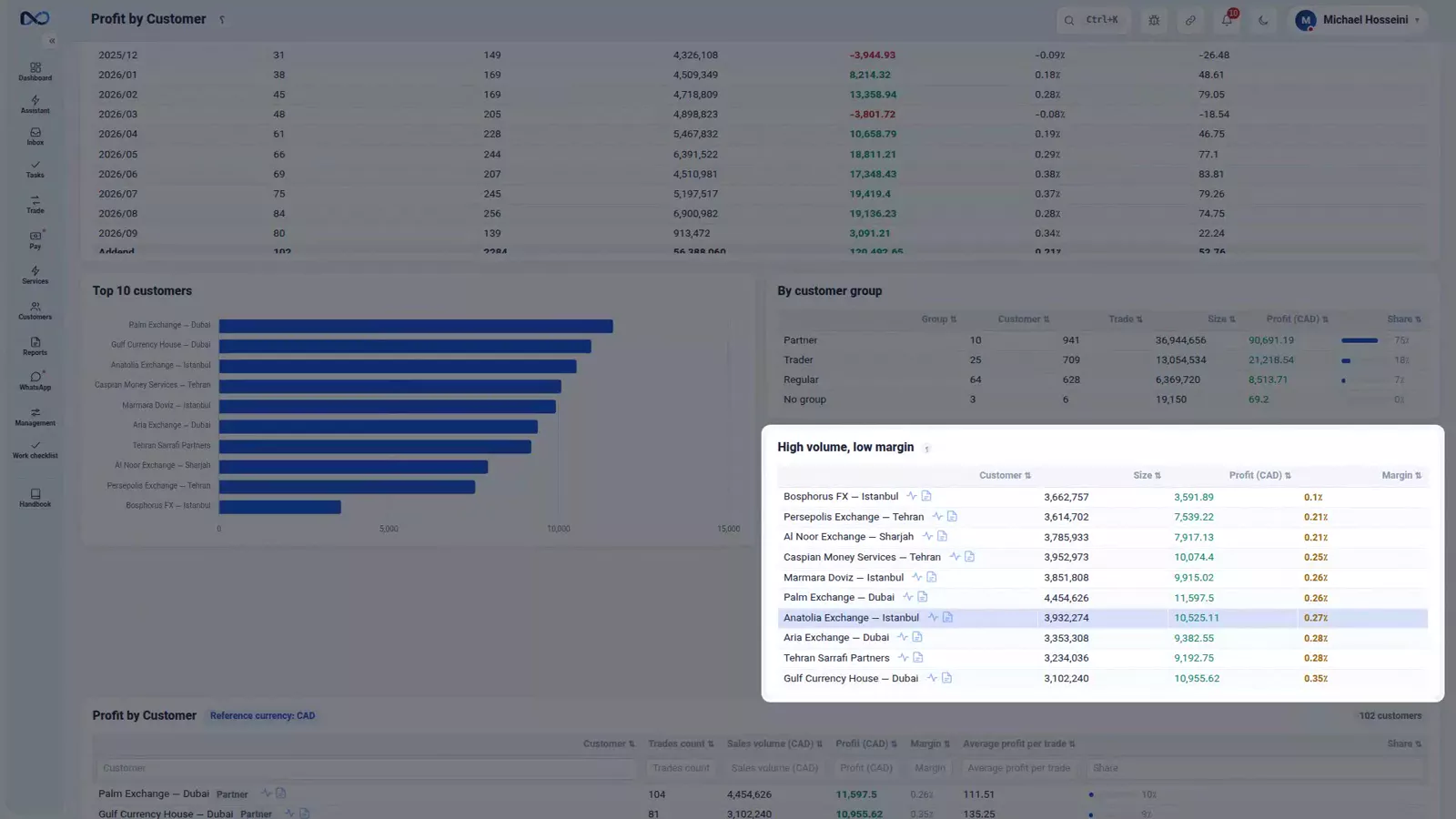
That second block answers a question every exchange office has and few can answer precisely: which customers are actually worth having. Behind it is a fuller report, profit by customer, with the top ten earners, a breakdown by customer group, and a "high volume, low margin" list, the customers who do plenty of business with you and leave you almost nothing.
The side reports
Commission paid to introducers
Introducer commission gets a report of its own rather than a line in the main one, because it is a customer-acquisition cost. For each introducer you see how much they brought you and how much they took, which is the only fair way to judge the arrangement.
Deal profit
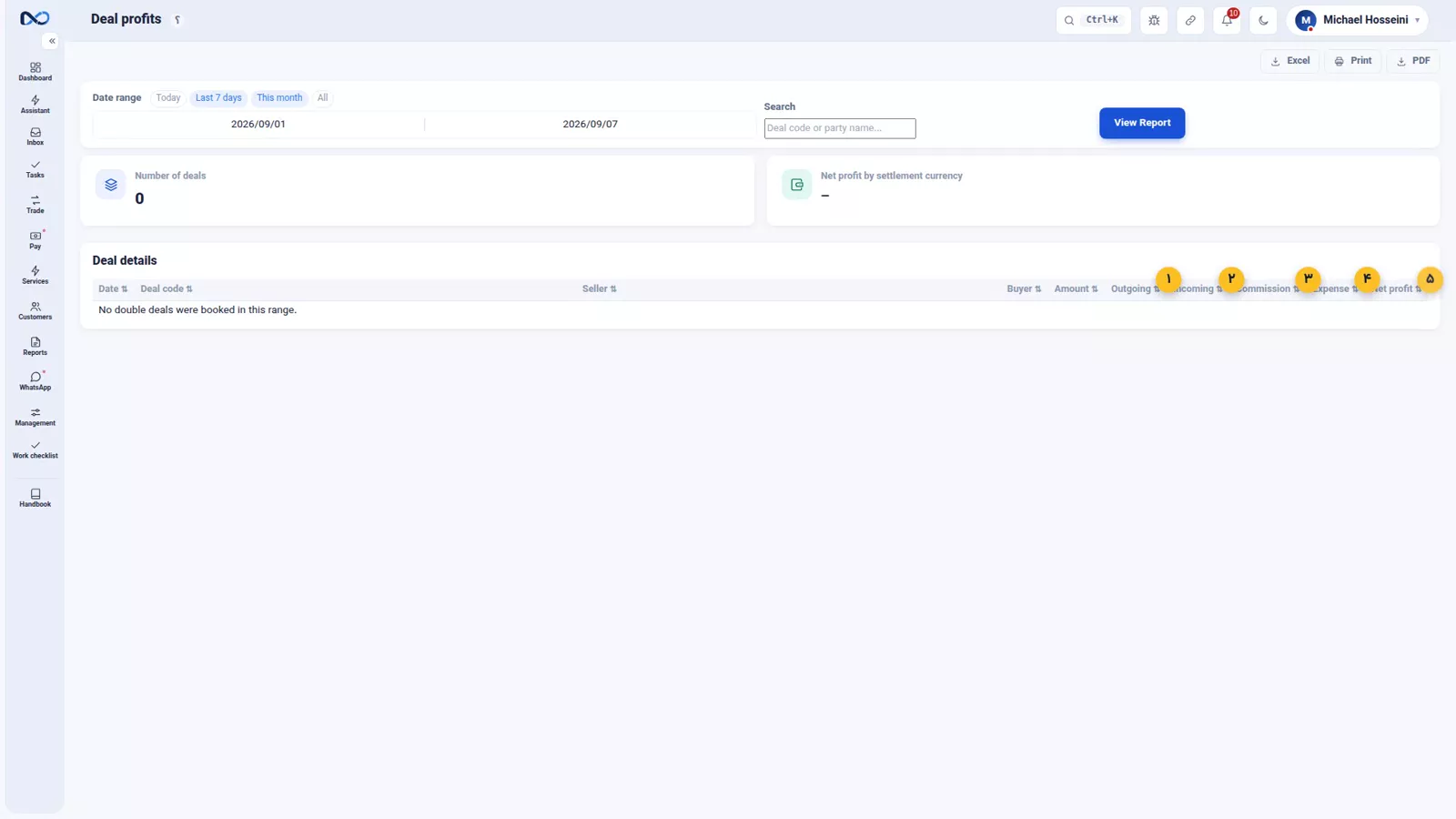
If you run deals, deal profit has a report of its own too. Its arithmetic differs from a simple trade: paid out, received, commission, expense, and the net of each deal.
Equity, balance sheet and trial balance
If the office has partners, the statement of equity tells you how much each partner put in, how much they took out, and what the accumulated profit is. It keeps the argument short when it is time to split the profit; the split itself belongs to payroll and profit sharing. For an accountant there are also the balance sheet and the trial balance: assets, liabilities and capital, by currency, with the total in your reference currency.
Who is allowed to see profit
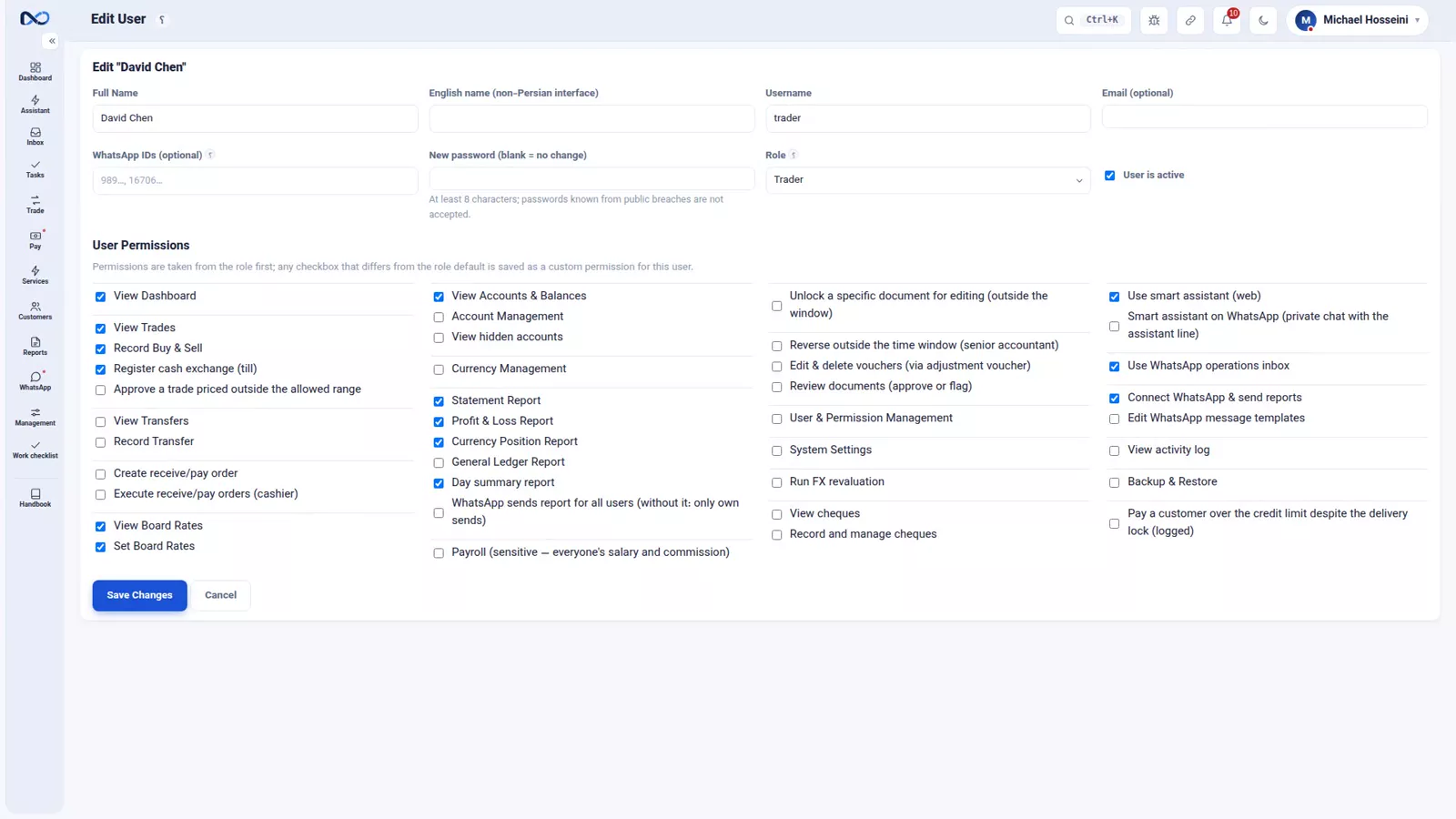
Seeing profit has a permission of its own, Profit & Loss Report. It is one tick and it governs everywhere at once: this report, the trade summary panel, the customer stats page, and what the AI assistant will answer. A colleague who books vouchers all day does not need to know your margin, so give it only to the people who genuinely need to know.
Tips and warnings
- A report is only as accurate as what you booked. Miss an expense or skip the revaluation and the net is not the real profit, it is a wrong number that looks like one.
- Introducer commission is a cost, not a discount. Judge each introducer on what they brought in against what they took out.
- The Profit & Loss Report permission is one tick for many pages at once. Ticking it to unblock a single screen opens all the others too.
- Before treating a month's net as final, close the period as described in FX revaluation and closing the period.
Where to go next
The previous episode, who owes you?, covers receivables and everything still half-finished. This one closes the reports chapter, and users, permissions and two-step sign-in opens the chapter on the team. For the mechanics behind the largest of the three sources, read where trade profit comes from; for the wider list of reports, the map of reports and exports.
FAQ
How does Nexto calculate net profit?
Trading profit plus fees plus other income, minus your expenses and minus the commission you pay to introducers. The five parts appear as five cards at the top of the Profit & Loss report, and the last card is the net.
Which report shows profit by currency pair?
The Profit & Loss report, below the period trend. It shows which pairs actually made money, which is often not the pair carrying the largest volume.
How do I see which customers are most profitable?
The bottom of the Profit & Loss report lists the top customers for the selected range. The fuller profit-by-customer report adds the top ten earners, a breakdown by customer group, and a high-volume, low-margin list.
Who can see profit figures in Nexto?
Only users who hold the Profit & Loss Report permission. Without it, profit stays hidden in the reports, in the trade summary panel, on customer stats, and in the assistant's answers.
What can make the profit report wrong?
Anything you did not book. A forgotten expense or a skipped FX revaluation changes the net figure, so the report is only ever as accurate as the documents behind it.
Full video transcript
The last and sweetest question: how much profit did I actually make? The answer is not one number; it is several numbers, coming from different places. An exchange's profit comes from three sources: the rate difference on a trade, which we went through in detail in the trade-profit episode, the fees you charge, and other income. And from those three, two things come off: your own expenses, and the commission you pay to introducers. What is left at the bottom is the real profit.
This is the main report. At the top, five cards: trading profit, fees, other income, expenses, and net. Then the trend by period: daily, weekly, monthly — with size, trading profit, fee, other, expense and net. Further down, profit by currency pair: which trades actually made money. And that split is the most useful thing on this page: sometimes it turns out that the biggest volume of your work sits on the pair that pays you the least — something you only find out from a report, not from instinct.
At the bottom of the page, two more things: expenses by heading — the ones we booked in the expenses episode — and the top customers of the range: your profit broken down per customer. That second one answers a question every exchange has and very few know precisely: which customers are actually worth having. The full report, profit by customer: the top ten earners, a breakdown by group, and “high volume, low margin” — the customers who do a lot of business with you but leave you nothing.
The commission you pay to introducers has a report of its own. Why separate? Because it is a customer-acquisition cost, and you need to see how much each of them brought you and how much they took. And if you run deals, deal profit has its own report too — we mentioned it in the trade-profit episode — because its profit logic differs from a simple trade: paid out, received, commission, expense, and the net of each deal. And if the exchange has partners, the statement of equity tells you how much each partner put in, how much they took out, and what the accumulated profit is — the thing that keeps the argument short when it is time to split the profit; the split itself we cover in the team chapter.
The balance sheet and the trial balance are here for the accountant too: assets, liabilities, capital — by currency, with the total in the reference currency. Seeing profit has a permission of its own: “Profit & Loss Report”. Not every user who books documents needs to see your margin — not in this report, not in the trade summary panel, not in customer stats, not from the assistant. Give this permission only to the people who genuinely need to know.
And one honest warning: these reports are only as accurate as what you have booked. Miss an expense, or forget the revaluation, and the number you are looking at is not the real profit. To sum up: three sources, two deductions, one net number; look at the currency pair and at your most profitable customers; and give the profit permission only to the right person. That closes the reports chapter; next chapter: the team and running the exchange.
Try it yourself right now
A complete private demo with sample data — no installation, no credit card.
Create free demo