
Who owes you? Debtors, aging and work in progress
How to see who owes your exchange office money in Nexto: the debtors and creditors report, the aging buckets, and the work in progress list.
Watch this video on: YouTube
In an exchange office the money you are owed is your money too - right up until you notice it has been sitting there for a month. Nothing has gone wrong and nobody has stolen anything; it simply was not chased, because nobody was reminded.
This episode is about three reports that do the reminding. Debtors and creditors tells you how much you are owed and by whom. The aging report tells you how long that money has been outstanding. Work in progress tells you what is half-finished and still needs someone to close it.
It follows where is the money, which covered the cash you already hold. This one is about money that is yours but not yet in a box.
What you will learn
- How to read the debtors and creditors report and why it never mixes currencies
- How to see the spread of a single currency across customers, cash boxes, banks and clearing accounts
- How the aging report turns one receivable into four buckets by age
- Which column to start from when you chase, and how to jump straight to a statement or a WhatsApp follow-up
- What counts as work in progress, and why it is worth a look every morning
Debtors and creditors: how much
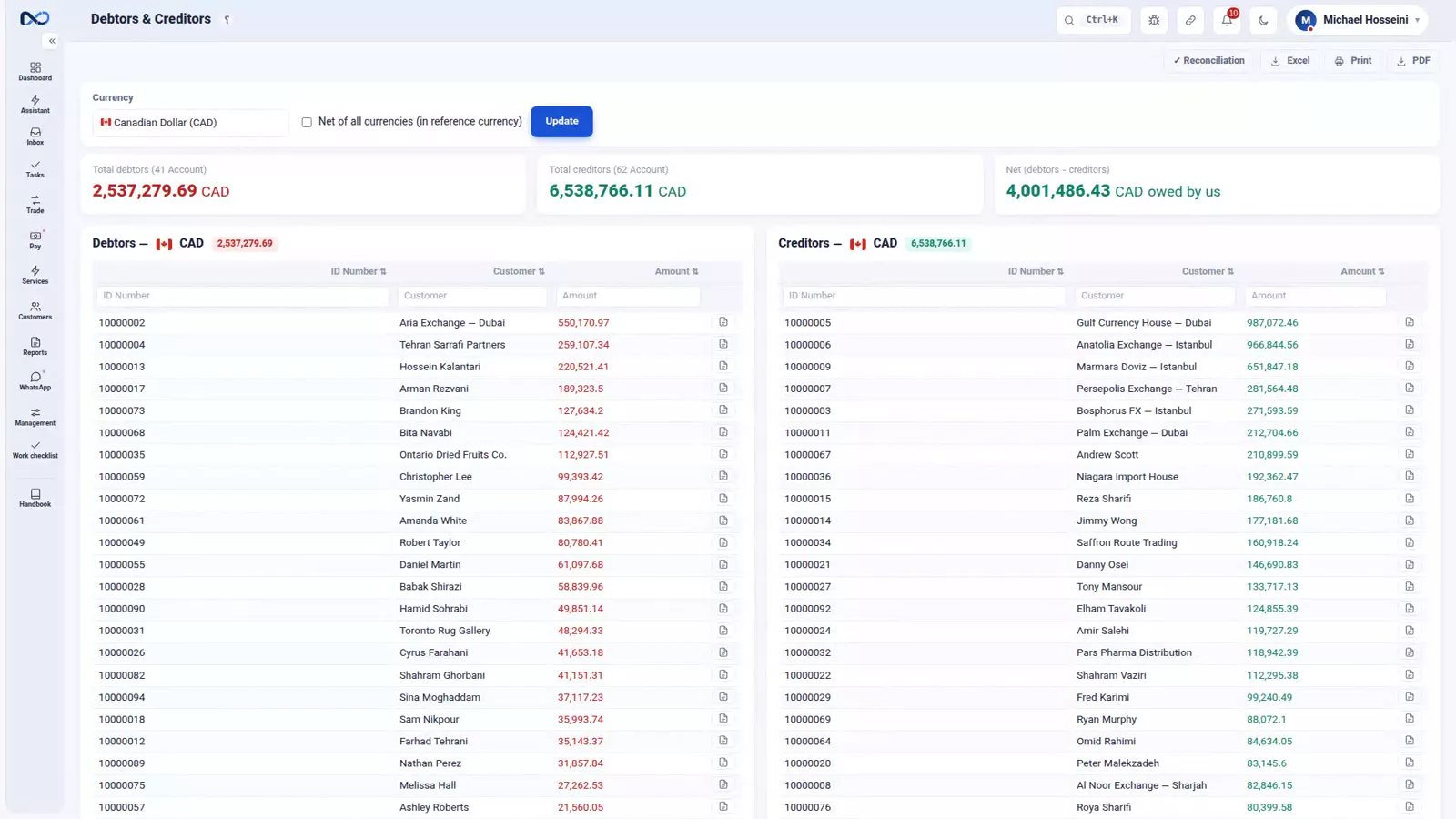
The report has two columns: the people who owe you, and the people you owe.
It splits everything by currency, and it does that on purpose. The same customer can be a debtor in one currency and a creditor in another at the same time - they owe you US Dollars while you owe them Iranian Toman - and those two facts are not allowed to cancel each other out. Nexto never mixes them.
You switch the currency to look at one at a time. If you do want a single figure per customer, tick "net of all currencies" and everything is converted into your reference currency, which in the recordings is the Canadian Dollar. And from any row, one click takes you to that customer's statement.
The same picture from the currency's side
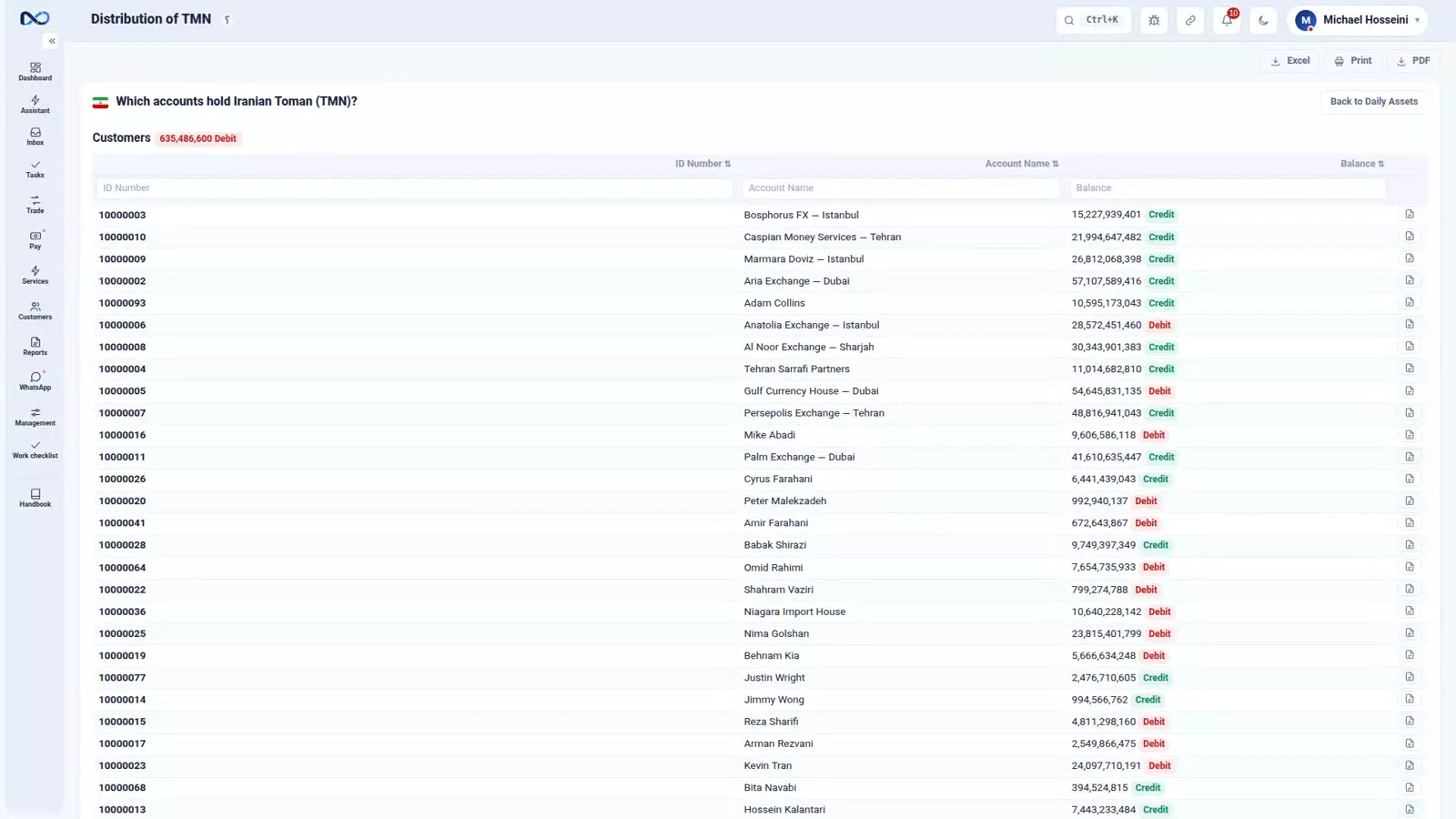
There is a second way to look at the same thing: from the currency rather than from the customer. Pick a currency - the Iranian Toman, say - and you get its spread across every account: customers, cash boxes, banks and clearing accounts, with who owes you how much and who is owed. This is the report that was quietly doing the work behind rial routing and payment readiness, and the view to open when the question is about a currency rather than a person.
The aging report: how long
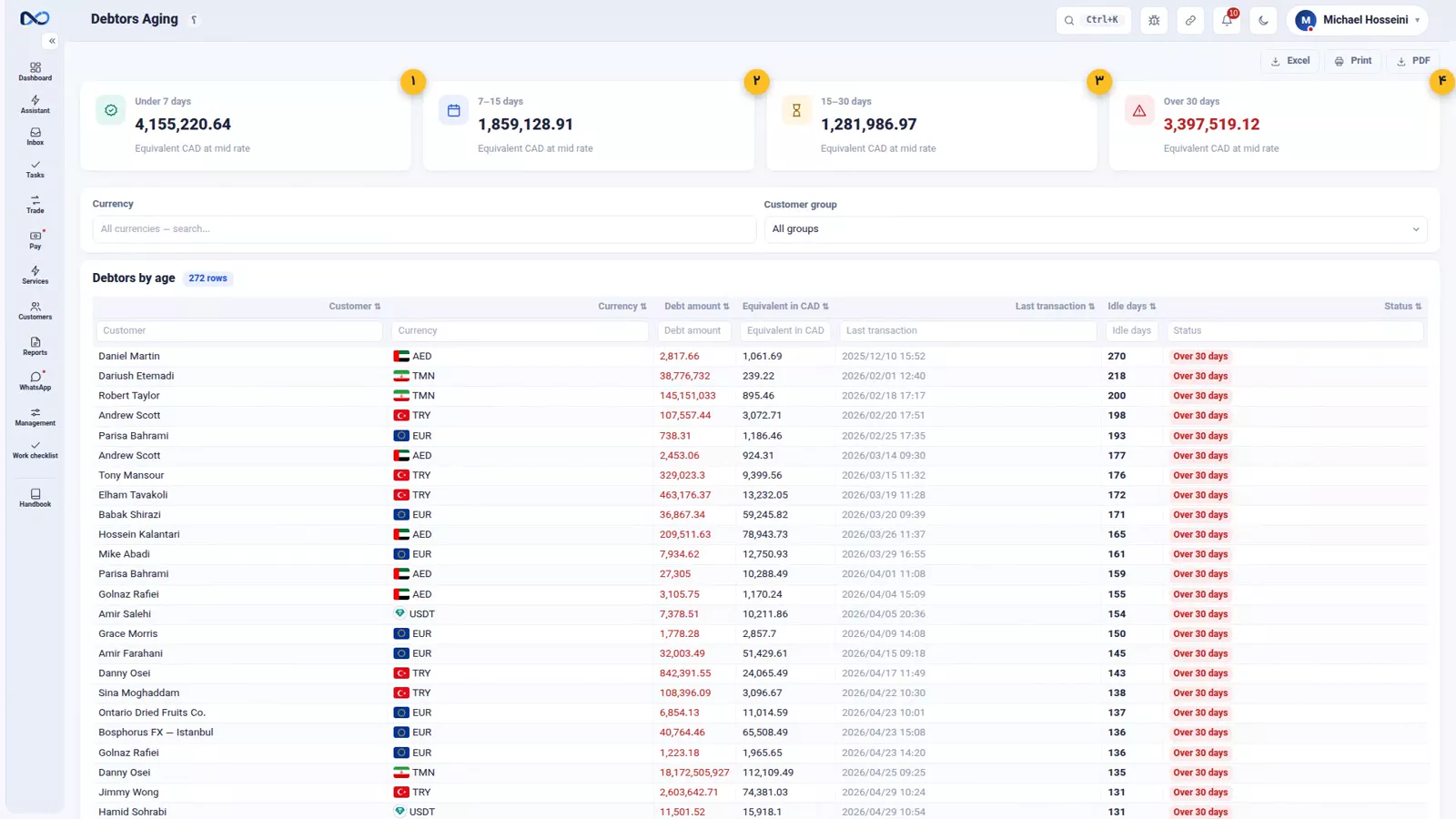
This is the most important report of the episode. Debtors tells you how much you are owed; aging tells you how long it has been outstanding - and it is the second number that shows you the danger.
A 10,000 receivable that is three days old is ordinary business. The same 10,000 sitting for thirty days is a problem. Identical figure, completely different meaning. The aging report splits every balance into four buckets: under 7 days, 7 to 15 days, 15 to 30 days, and over 30 days.
Reading it once a week
Make it a weekly habit rather than a monthly panic. Open the report, go to the oldest bucket first and read down the "idle days" column - that is the number that tells you which balance has stopped moving.
You do not need to leave the page to act. One click opens that customer's statement, another sends them a WhatsApp follow-up. Chase from the report in one pass, rather than writing yourself a list for later.
Work in progress: what is half-finished
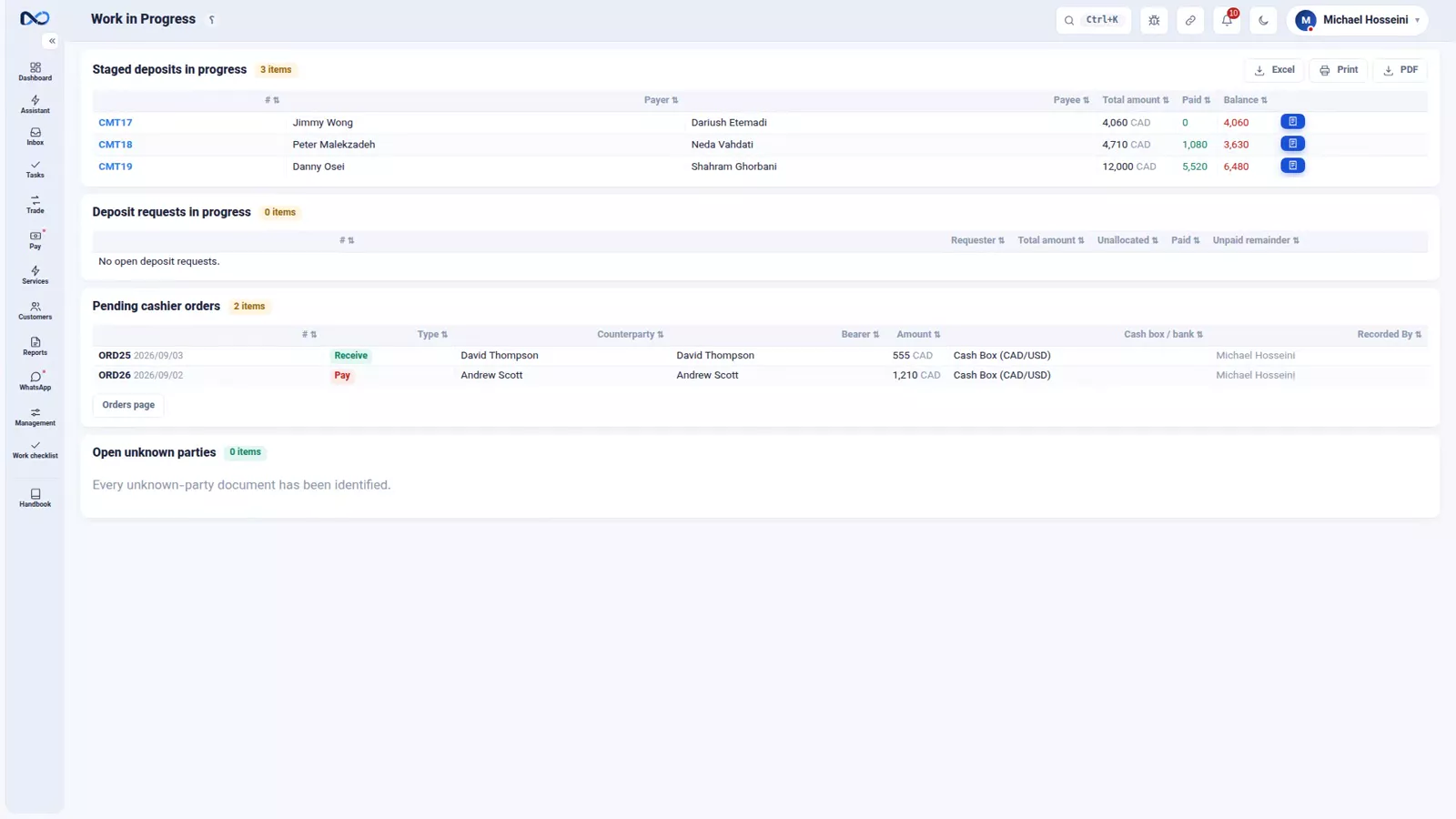
The first two reports are about money you are owed. The third is about work that was started and never closed - the kind of thing that gets forgotten unless something puts it in front of you. It gathers four kinds of unfinished business in one place:
- Staged deposits that still have an instalment outstanding
- Deposit requests that have not been allocated or paid
- Cashier orders that nobody has come to collect
- Unknown parties that nobody has identified
Each line shows the balance and links straight to the document, so you can open it and finish the job. One look at this page every morning is enough to be sure nothing from yesterday is left on the floor.
Tips and warnings
- Never net a customer's currencies in your head. Being owed US Dollars while owing Iranian Toman is two positions, not one.
- The "net of all currencies" figure is a management view in your reference currency. Do not read it to a customer as their balance.
- Start a collection round from the oldest bucket. Working from the top of an unsorted list means the oldest debts stay oldest.
- An unidentified party in work in progress is money that arrived without a name. Leave it there and it becomes hard to trace later.
Where to go next
The previous episode, where is the money, covers the cash you are holding right now. Next comes where is the profit, the last of the four questions. The documents behind most of these rows are created in payment commitments and deposit requests, and every row leads back to the customer statement and the portal.
FAQ
How do I see who owes my exchange office money?
Open the debtors and creditors report. One column lists the customers who owe you and the other lists the ones you owe, split by currency, and any row links straight through to that customer's statement.
Why does Nexto keep the currencies separate in the debtors report?
Because a customer can genuinely be a debtor in one currency and a creditor in another at the same time. Combining them would hide a real position. If you want one figure, tick "net of all currencies" and everything is converted to your reference currency.
What is the aging report for?
It shows how long each amount you are owed has been outstanding, split into four buckets: under 7 days, 7 to 15 days, 15 to 30 days and over 30 days. It is what turns a balance into a warning - a 10,000 receivable at three days is normal, the same amount at thirty days is not.
What shows up in work in progress?
Staged deposits with an instalment still outstanding, deposit requests that have not been allocated or paid, cashier orders nobody has collected, and unknown parties nobody has identified. Each line carries its balance and a link to the document.
Can I chase a customer without leaving the report?
Yes. From a row in the aging report you can open that customer's statement or send a WhatsApp follow-up directly, so a collection round is one pass over one page. Once a week, starting from the oldest bucket, is a reasonable rhythm.
Full video transcript
In an exchange, the money you are owed is your money too — until it is collected. This episode is about knowing how much you are owed, by whom, and how long it has been sitting there. Three reports: debtors tells you how much, the aging report tells you how long, and work in progress tells you what is half-finished and needs chasing. This report has two columns: the people who owe you, and the people you owe — split by currency, because one customer can be a debtor in one currency and a creditor in another at the same time; Nexto never mixes those.
You switch the currency, or with the “net of all currencies” tick you see everything converted to the reference currency. And from any row, one click to that customer's statement. And you can look at the very same thing from the currency's side: the spread of one currency — the Toman, say — across all your accounts: customers, cash boxes, banks, clearing accounts. Who owes you how much and who is owed. This is the report that was quietly doing the work behind the rial-routing episode.
Now the most important report of this episode. Debtors tells you how much you are owed; the aging report tells you how long that money has been outstanding — and it is the second one that shows you the danger. A ten-thousand receivable that is three days old is normal business; the same ten thousand sitting for thirty days is a problem. Same number, different meaning. Four buckets: under seven days, seven to fifteen, fifteen to thirty, and over thirty days.
So make it a habit to open this report once a week and start from the oldest ones: look at the “idle days” column. For each of them, right there and then, one click opens their statement or sends a WhatsApp follow-up. And the third report: work in progress. The two before it were about money you are owed; this one is about work that isn't finished yet and gets forgotten if nobody reminds you: staged deposits that still have an instalment outstanding, deposit requests that have not been allocated or paid, cashier orders nobody has come to collect, and unknown parties nobody has identified.
All of it in one place, with the balance and a link to the document itself. A good habit: one look at this page every morning, so nothing from yesterday is left on the floor. To sum up: debtors tells you how much, the currency spread tells you in which currency, the aging report tells you how long, and work in progress tells you what is half-finished. Together, these are the difference between a tidy exchange and a chaotic one.
Try it yourself right now
A complete private demo with sample data — no installation, no credit card.
Create free demo