
Nexto services and plans
What Nexto cloud services do - bank, IBAN and identity inquiries, receipt reading, Tron energy and the crypto address AML check - how they are billed, and how the three plans differ.
Watch this video on: YouTube
An accounting program can only answer questions about money that has already passed through it. It cannot tell you whose bank account a number belongs to, or whether the phone number on a customer file really belongs to that person. Those answers live outside the software, at an official source.
That is what a service is in Nexto: one inquiry, sent from the page you are already on, answered right there. No separate website, no copying an account number into a browser tab.
The important part first, though: the software is complete without any of this. Services make the work faster and safer; none is compulsory, and one switch turns the lot off.
What you will learn
- What a service is, and why nothing here is compulsory
- The five families: banking, identity, reading a receipt, Tron energy, the crypto address AML check
- How to run an IBAN inquiry, and where it already helps you inside a form
- How prepaid billing works, and why a failed inquiry costs nothing
- The switches that turn services, the inbox, receipt reading and the assistant off
- What separates the three plans, and what to do if a feature is missing
The five families
Banking: who is behind this account number
The first family is banking. Give Nexto an account number or an IBAN and it tells you who owns it, so you can check that the account a customer gave you is really in that customer's own name — the job that until now was done by telephone and guesswork. On the inquiry page you enter the IBAN and press "Inquire"; the answer comes back on the same page.
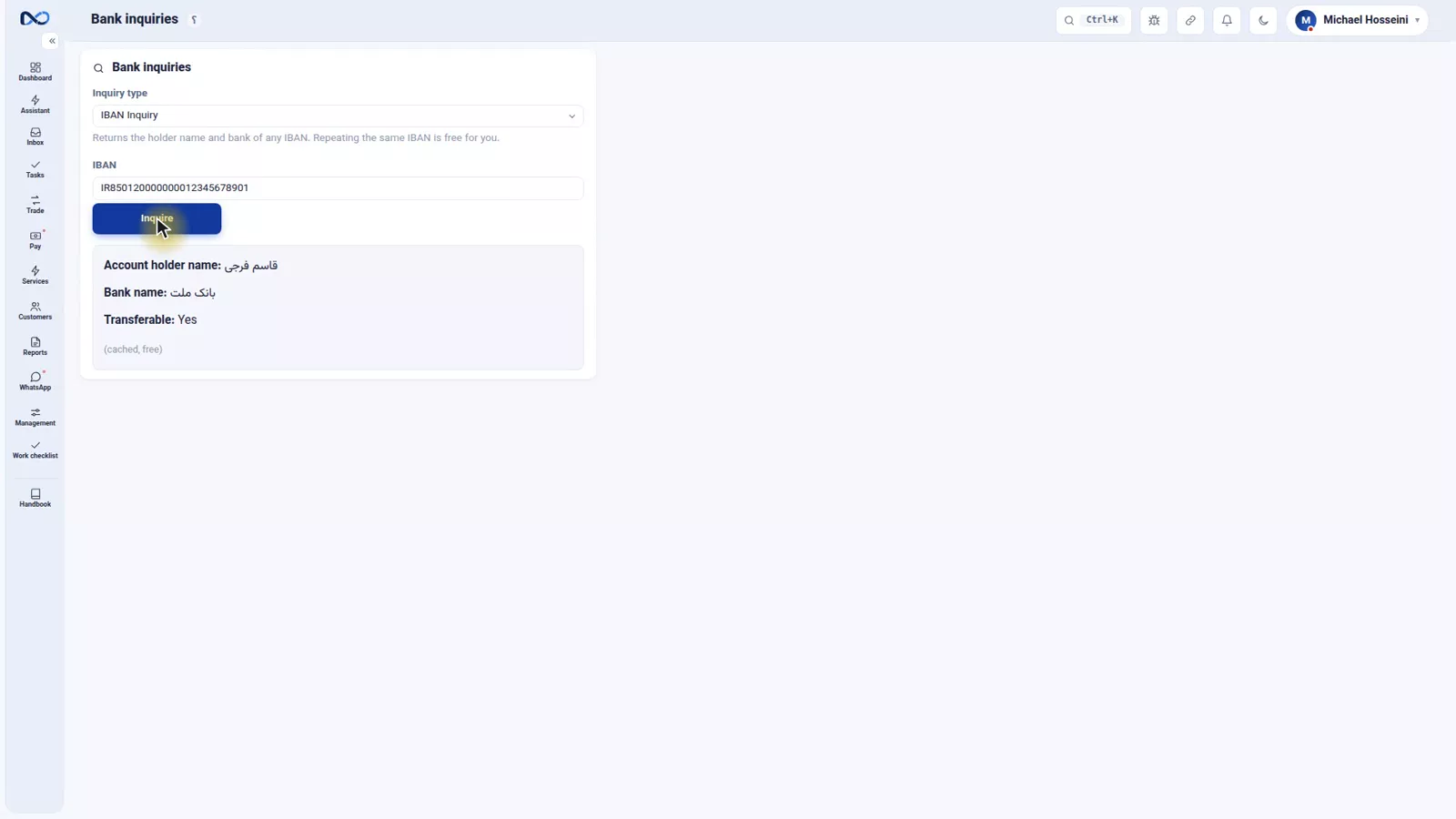
You have already seen it work without opening this page: it is the inquiry that fills in the bank from the IBAN on the commitment and deposit-request forms.
Identity: is this person who they say they are
The second family matches a person's details against a phone number or a national ID. For an exchange office that has to know its counterparty, this turns a customer file from a name somebody typed into a verified record.
Reading a receipt
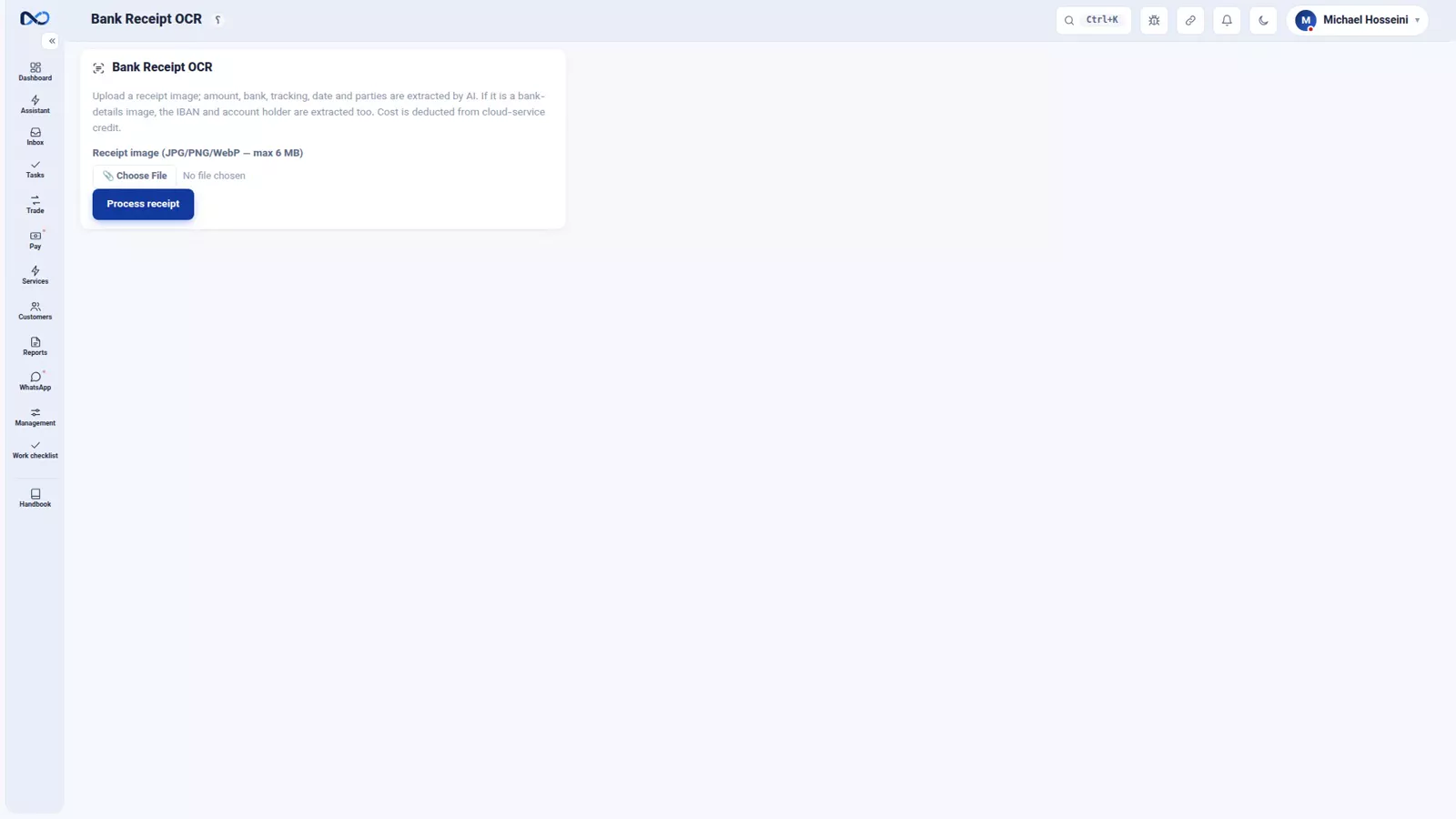
The third you have met already: reading a receipt. It is the same thing the Nexto inbox does by itself when a payment slip lands in a group, and here it can be run by hand for a receipt you are holding.
Tron energy rental
The fourth is for anyone who sends Tether: Tron energy rental, which cuts the network fee on each transfer several times over. If Tether is part of your daily work, this is the one that pays for itself. Crypto and Tether covers the transfers themselves.
The crypto address AML check
The fifth is newer than the rest and matters to anyone who takes Tether in: the crypto address AML check. You paste the wallet address, pick the currency and the network and press "Check", and what comes back is a file: a risk score out of a hundred, the risk level, the address label and the flags on record. So you know before you accept the money whether the counterparty has a history with a mixer or a sanctioned platform. Read the whole file, never the number alone: a score can be low while the risk details say the address has had indirect contact with several high-risk entities, with the share of each one written out.
Every check you run stays in the check history, and for each address you can leave a wallet note and tie it to a customer, so next time you know whose wallet it is. If a case is serious, four additional reports are waiting: the address overview, the address behaviour, the counterparties and the platform trace.
What it costs
Billing is prepaid. Every successful inquiry takes a small amount off your credit, and a failed inquiry takes nothing: you pay for an answer, not for an attempt.
A small gift credit arrives with your plan every month, so you can try the services at no cost, and beyond that you top the account up. The services key lives in Settings and is already filled in, so there is no setup before your first inquiry.
Turning it all off
Since none of it is compulsory, the switches are worth knowing by name. They are in Settings.
The main one is "Enable Nexto cloud services". Turn it off and the services menu disappears, and so does the IBAN inquiry on every form that offers it: commitment, deposit request, cheque.
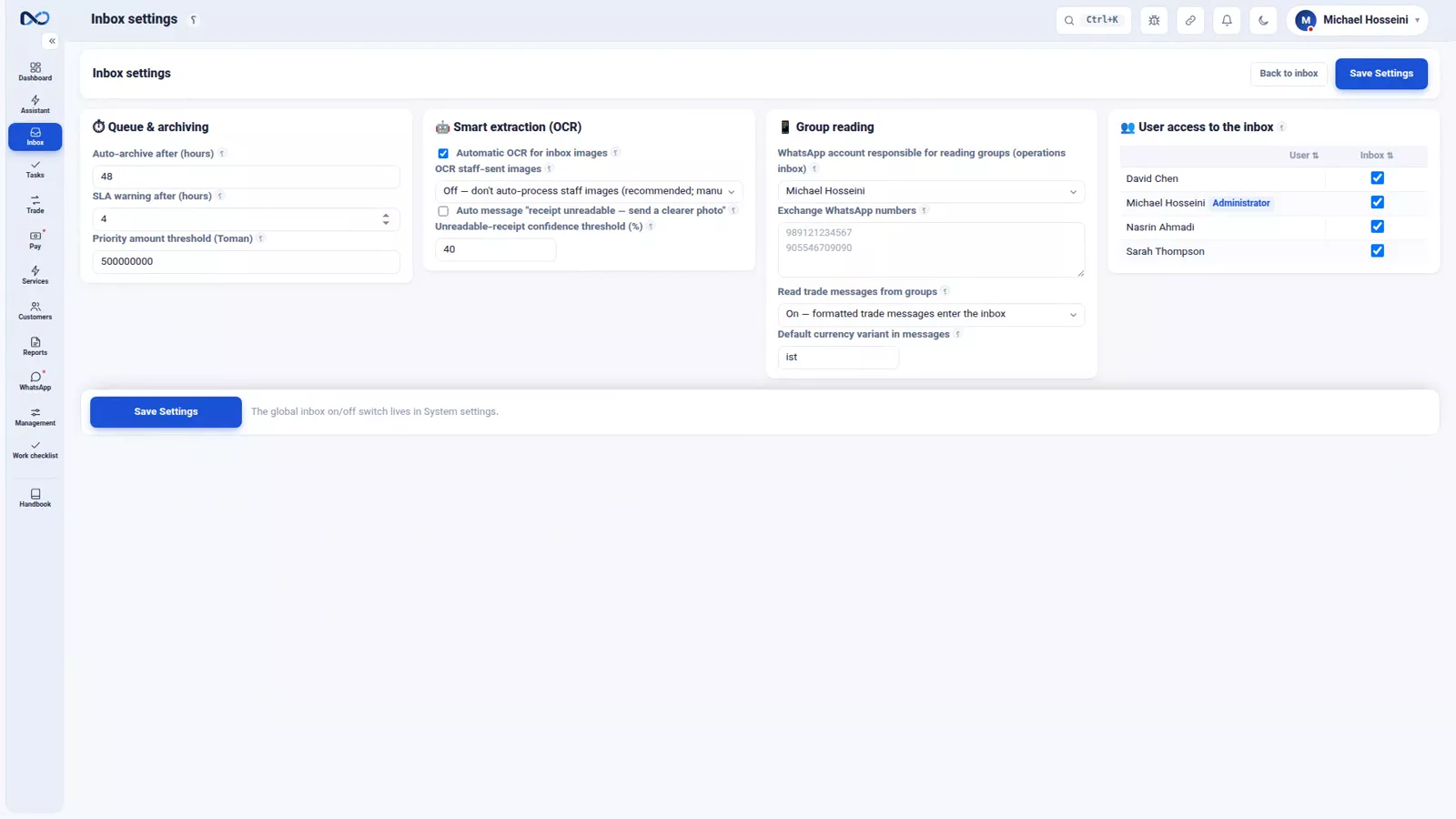
A little further down is the switch for the inbox itself; turn that off and messages from your groups stop coming in. Finer still, inside the inbox settings, the automatic reading of receipts — the OCR step — has a switch of its own, so messages can keep arriving while automatic reading stops.
The assistant is separate again, with its own settings page: there you turn its WhatsApp channel off and decide user by user who may use it. The AI assistant explains what it does. Whatever you do not need, switch off.
The three plans
Nexto comes in three plans, separated by the number of users and customers, the number of WhatsApp lines, and features such as the inbox, local-currency running, the nightly report and the assistant.
Everything shown across this course belongs to the full plan. So if something you saw in an episode is missing from your installation, that is the reason: it is not in your plan. One request turns it on, with no reinstall. Prices are on the Nexto website.
Tips and warnings
- Nothing here is required. The software is complete without a single inquiry, and one switch removes them all.
- Switching off cloud services also removes the IBAN inquiry from the commitment, deposit request and cheque forms, so those forms will change.
- The inbox switch and the receipt-reading switch are separate: you can stop automatic reading and still receive group messages.
- Do not run the AML check after you have taken the money in. The whole value of it is in coming before the transfer, not explaining it afterwards — and in reading the flags, not just the score.
- If a feature from this course is missing on your installation, check the plan before reporting it as a fault.
Where to go next
The previous episode, backup, restore and support, covers the safety net under all of this. Next comes the last episode, the exchange health checklist. For context, payment commitments and deposit requests shows the IBAN inquiry inside a form, and crypto and Tether is where Tron energy matters. You can try any of it in the demo.
FAQ
What is a service in Nexto?
It is a single inquiry sent to an official source from inside the software, with the answer returned on the same page rather than on a separate website. Services are optional and the software is complete without them.
Which services does Nexto offer?
Five families: banking, meaning the owner behind an account number or IBAN; identity, matching a person's details against a phone number or national ID; reading a receipt; Tron energy rental for Tether transfers; and the crypto address AML check.
What does the crypto address AML check give me?
You enter the wallet address and pick the currency and the network, and it comes back with a risk score, a risk level, the address label and the flags on record, so you know before you accept the money whether the address has a history with a mixer or a sanctioned platform. Never judge by the score alone: a low score can sit above risk details showing indirect contact with high-risk entities. Every check stays in the check history, and an address can be tied to a customer with a wallet note.
How are inquiries paid for?
Prepaid. Each successful inquiry takes a small amount off your credit and a failed inquiry takes nothing. A small gift credit comes with your plan every month, and you top the account up beyond that.
Can I turn the services off completely?
Yes. The switch "Enable Nexto cloud services" in Settings removes the services menu and takes the IBAN inquiry off every form that uses it, including commitment, deposit request and cheque.
Why is a feature I saw in the course missing from my Nexto?
Everything shown in this course belongs to the full plan. If something is missing, it is not included in your plan, and one request turns it on with no reinstall.
Full video transcript
Some things no accounting program can do on its own — telling you whose bank account a number belongs to, for instance. Those have to be asked from outside. A service is one inquiry: you ask something, Nexto asks its official source, and the answer comes back right there inside the software. No separate website, no copy-paste. And from the start: the software works perfectly well without any of this; services make the work faster and safer, none of them is compulsory.
The first family is banking: find the owner behind an account number or an IBAN, or make sure the account a customer gave you is really in their own name — the job that until today was done by phone and guesswork. We give it an IBAN and press Inquire. This is the very inquiry that filled the bank in from the IBAN on the commitment and deposit-request forms. The second family is identity: matching a person's details against a phone number or a national ID.
For an exchange office that must know who its counterparty is, it turns a customer file from a name into a verified record. The third one you have seen already: reading a receipt — the same thing the inbox does by itself, and here it can be done manually. And the fourth is for anyone who sends Tether: Tron energy rental, which cuts the fee on each transfer several times over. The billing is simple: prepaid. Every successful inquiry takes a small amount off your credit, and a failed inquiry takes nothing — you pay for an answer, not for an attempt.
And every month a small gift credit comes with your plan, so you can try them at no cost; beyond that you top the account up. The services key lives in Settings and is already filled in. And since we said none of it is compulsory: right here in Settings you have the switch Enable Nexto cloud services. Turn it off and the services menu goes away, and the IBAN inquiry disappears from every form as well — commitment, deposit request, cheque. A little further down is the switch for the inbox itself; turn that off and group messages stop coming in.
Finer still, in the inbox settings: automatic reading of receipts, that is OCR, has a switch of its own. And the assistant has its own settings page: you turn its WhatsApp channel off there, and for each user separately you decide whether they may use the assistant. It is all in your hands; whatever you do not need, switch off. And the plans: Nexto has three plans, separated by the number of users and customers, the number of WhatsApp lines, and features like the inbox, local-currency running, the nightly report and the assistant.
Everything you saw in this course belonged to the full plan; if something is missing in your installation, it means it is not in your plan — one request turns it on, with no reinstall. Prices and details are on the Nexto website at any moment. To sum up: services are not compulsory and one switch turns them off, they are prepaid, a failed one costs nothing, and they do what you used to do by phone and from memory. Next episode, the last one: the exchange health checklist.
Try it yourself right now
A complete private demo with sample data — no installation, no credit card.
Create free demo